Core String Functions in SQL
Lesson 3.2 · Reading time: ~8 min · Practice tasks ↓
In this lesson, you will learn SQL string functions that help clean and transform text directly in queries. We will cover when to use UPPER, LOWER, TRIM, SUBSTRING, CONCAT, and other functions, and walk through practical examples. By the end of the lesson, you will be able to process text fields confidently in real tasks.
In the previous lesson, you were introduced to SQL built-in functions as a whole. Now we will focus on string functions because text fields often need extra processing: case normalization, removing unwanted characters, combining values, and extracting fragments.
These operations are common in analytics, reporting, and data preparation. The better you know string functions, the less manual post-processing you need outside SQL.
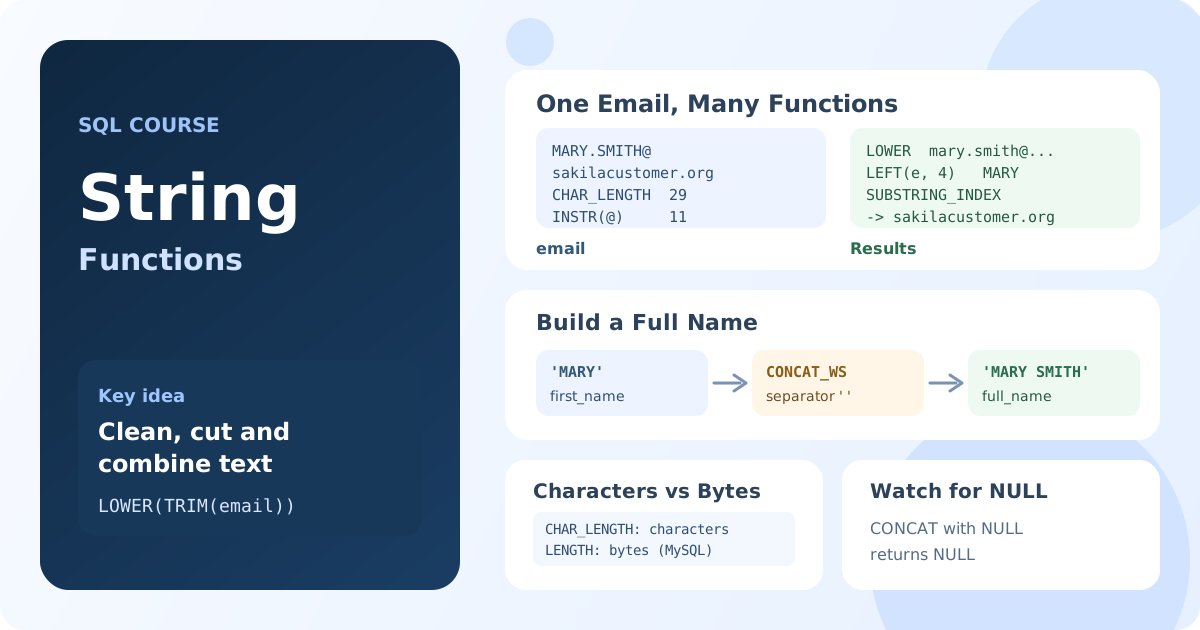
What String Functions Are
String functions work with text and return a string, a number, or a substring position. They are useful when you need to:
- bring text to a consistent format;
- clean noisy values;
- extract part of a string (for example, an email domain);
- build readable output for reports.
Basic Syntax
FUNCTION_NAME(string_expression, ...)
In most cases, the argument is a table column, a string literal, or the result of another function.
Core String Functions
UPPER() and LOWER()
Used to normalize text casing.
SELECT
   customer_id,
   UPPER(last_name) AS last_name_upper,
   LOWER(first_name) AS first_name_lower
FROM customer
LIMIT 5;
Result: the last name is shown in uppercase, and the first name in lowercase.
CHAR_LENGTH() and LENGTH()
Both functions measure string length, but not always in the same way:
CHAR_LENGTH()usually returns character count;LENGTH()in MySQL returns byte count.
SELECT
   title,
   CHAR_LENGTH(title) AS title_chars,
   LENGTH(title) AS title_bytes
FROM film
LIMIT 5;
Note: for multibyte characters, byte count may be greater than character count.
SUBSTRING(), LEFT(), RIGHT()
These functions extract part of a string.
SELECT
   email,
   SUBSTRING(email, 1, 5) AS email_start,
   LEFT(email, 3) AS first_3,
   RIGHT(email, 10) AS last_10
FROM customer
LIMIT 5;
Result: different email fragments are extracted for analysis and format checks.
CONCAT() and CONCAT_WS()
These functions combine multiple values into one string:
CONCAT()joins arguments directly;CONCAT_WS(separator, ...)inserts a separator and is often more practical in reports.
SELECT
   customer_id,
   CONCAT(first_name, ' ', last_name) AS full_name,
   CONCAT_WS(' | ', first_name, last_name, email) AS customer_label
FROM customer
LIMIT 5;
Note: behavior with NULL depends on the DBMS, so always check your system documentation.
TRIM() and REPLACE()
Useful for cleaning text values.
SELECT
   address,
   TRIM(address) AS address_trimmed,
   REPLACE(address, 'Street', 'St.') AS address_short
FROM address
LIMIT 5;
Result: extra spaces are removed and repeated text patterns are replaced.
Substring Search: POSITION() / INSTR() / CHARINDEX()
The function name depends on the DBMS, but the idea is the same: find a substring position inside a string.
SELECT
   email,
   INSTR(email, '@') AS at_pos
FROM customer
LIMIT 5;
Result: returns the position of @, which is useful for email validation.
What to Watch Out For
- Check DBMS differences: function names and behavior may vary.
- Be careful with
NULL: it often changes string-expression results. - For Cyrillic and emoji text, choose length functions intentionally (characters vs bytes).
- Avoid deeply nesting too many functions in one query; split logic into steps when possible.
Practical Example: Preparing Customer Data for Email Campaigns
The query below prepares a clean customer list: normalizes name, normalizes email, and extracts domain.
SELECT
   c.customer_id,
   TRIM(CONCAT_WS(' ', c.first_name, c.last_name)) AS full_name,
   LOWER(TRIM(c.email)) AS email_normalized,
   SUBSTRING_INDEX(LOWER(TRIM(c.email)), '@', -1) AS email_domain
FROM customer AS c
WHERE c.email IS NOT NULL
ORDER BY c.customer_id
LIMIT 20;
Result: you get a clean, consistent set of text fields ready for analytics or export.
Key takeaways from this lesson:
- SQL string functions help clean, normalize, and format text directly in queries.
UPPER,LOWER,TRIM,REPLACE,SUBSTRING,LEFT,RIGHT, andCONCATcover most common tasks.- For string length, it is important to distinguish characters from bytes.
- When combining strings, consider
NULLbehavior in your DBMS. - The practical value of string functions is most visible in real data-preparation workflows.
Frequently Asked Questions
How do I remove spaces from a string in SQL?
TRIM(column) removes leading and trailing spaces, LTRIM and RTRIM remove them from one side only. To remove every space, including the ones inside the string, use REPLACE(column, ' ', ''). In MySQL and PostgreSQL, TRIM can also remove other characters: TRIM(BOTH '.' FROM column).
How do I concatenate strings in SQL?
CONCAT(first_name, ' ', last_name) works in MySQL, PostgreSQL and SQL Server. The standard operator || works in PostgreSQL, SQLite and Oracle, but in MySQL it means logical OR by default. CONCAT_WS(' ', first_name, last_name) adds the separator between values for you.
How do I check if a string contains a substring in SQL?
To filter rows, use LIKE: WHERE email LIKE '%@sakilacustomer.org'. To get the position, use INSTR(email, '@') in MySQL, POSITION('@' IN email) in standard SQL and PostgreSQL, or CHARINDEX('@', email) in SQL Server. A position of 0 means the substring was not found.
Interview Questions
What is the difference between CHAR_LENGTH() and LENGTH(), and why does it matter?
CHAR_LENGTH() usually returns the number of characters, while LENGTH() in MySQL returns the number of bytes. For Cyrillic and other multibyte characters, results may differ. This matters when validating field length and enforcing business rules.
How would you safely build a full name if one field can be NULL?
CONCAT_WS() is often preferred because it is practical when combining strings with a separator. It is also common to handle empty values explicitly with COALESCE() to get predictable output in different scenarios.
Which string functions would you use to clean email values before analytics?
A common approach is TRIM() + LOWER() to remove extra spaces and normalize case. To validate structure, you can also check for @ using INSTR() or its equivalent in your DBMS.