Lesson 1.1 · Reading time: ~8 min
A database is an organized collection of structured data stored electronically and managed by software called a DBMS (Database Management System). In this lesson you'll learn what a database is, how a DBMS works, which types of databases exist, and why SQL remains the universal language for working with them.
SQL is the standard language used to work with relational databases. We will cover it in more detail in a separate lesson later.
Introduction to Databases: What Is a Database and DBMS?
Modern applications — from e-commerce platforms to analytics dashboards — all rely on databases to store and process data. Understanding how databases and DBMS work is the essential starting point for learning SQL and working with data in real-world projects.
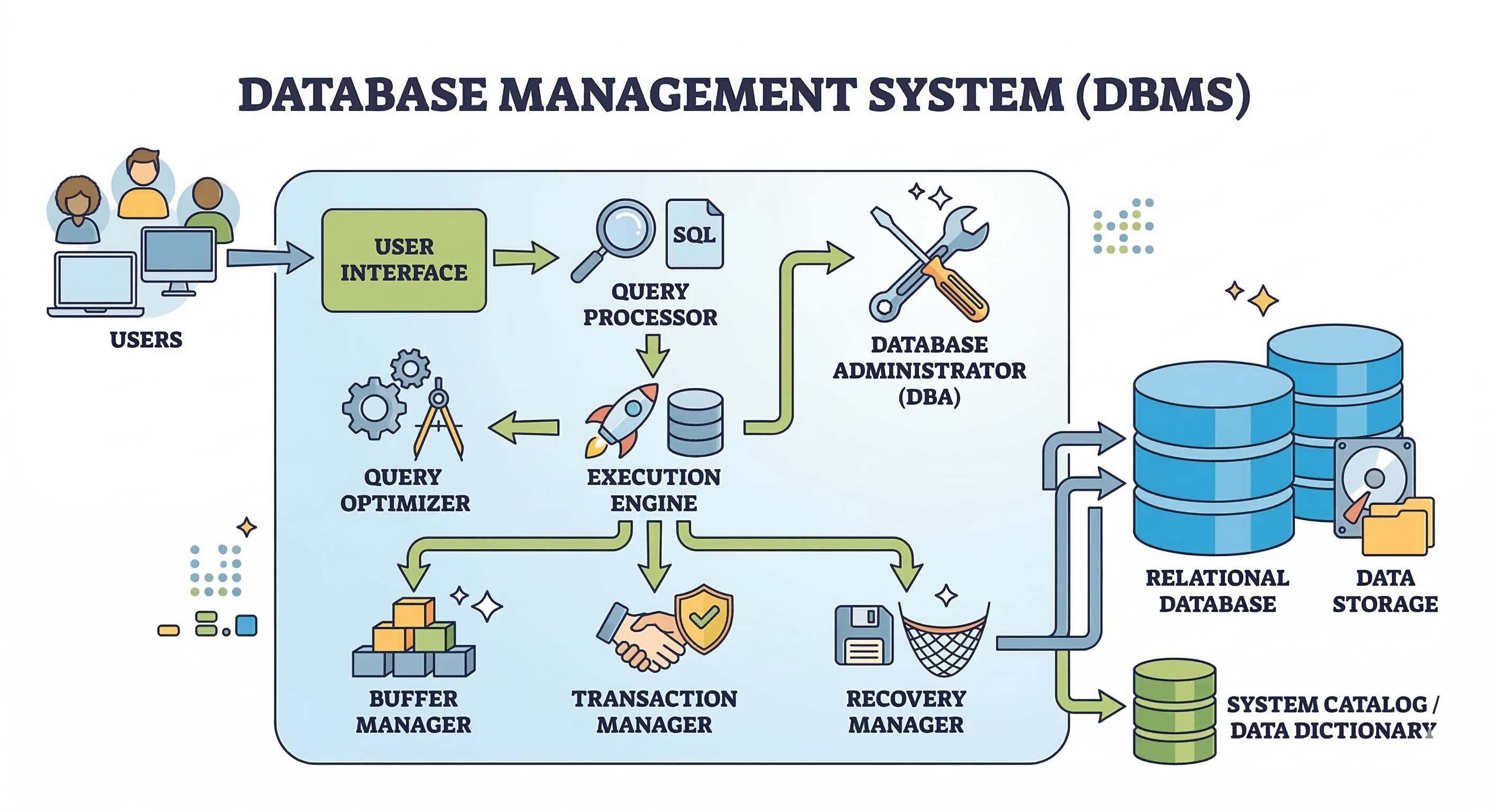
What Is a Database?
At its core, a database is an organized collection of structured information stored electronically in a computer system. Think of it as a sophisticated digital filing cabinet — instead of paper documents scattered everywhere, a database provides a structured way to store, manage, and retrieve information efficiently.
Key characteristics of a database:
- Organized: Data is structured in a specific way, making it easier to find and manage. This structure is often based on tables with rows and columns.
- Persistent: Data remains stored even when the application using it is closed or the computer is turned off.
- Shared: Multiple users and applications can access and interact with the same database simultaneously.
- Managed: A DBMS is the software that allows you to define, create, maintain, and access databases. Examples: MariaDB, PostgreSQL, MySQL, SQLite, Oracle, Microsoft SQL Server.
Why Are Databases Important in Modern Development?
Databases are the backbone of countless applications and systems we use every day. Key reasons:
- Data storage: Reliable and efficient storage of large volumes of data.
- Data retrieval: Quick lookup of specific records based on defined criteria.
- Data management: Tools for organizing, updating, and maintaining data integrity.
- Data sharing: Controlled access for multiple users and applications.
- Data analysis: Structured data is the foundation for reports, analytics, and business intelligence.
- Application development: From social media to e-commerce — every modern application stores its data in a database.
Types of Databases: A Quick Overview
This course focuses on relational databases, but it helps to know how they differ from other types:
- Relational databases (RDB): Store data in tables with rows and columns, linked by keys. Examples: MariaDB, PostgreSQL, MySQL, SQLite. This is the type we focus on throughout the course.
- NoSQL databases: A broad category that doesn't follow the relational model. Used for unstructured or semi-structured data and distributed scalability. Examples: MongoDB, Cassandra, Redis.
- In-memory databases: Store data primarily in RAM for minimum latency. Used for caching and high-throughput scenarios. Examples: Redis, Memcached.
What Is a DBMS (Database Management System)?
A DBMS is software that acts as an intermediary between users (or applications) and the database itself. It provides a systematic, controlled way to create, read, update, and delete data while ensuring security, consistency, and performance.
Core functions of a DBMS:
- Data definition: Create tables, specify data types, set constraints, and define relationships.
- Data manipulation: Insert, update, delete, and query data — typically through SQL.
- Storage management: Handle physical data storage on disk, including indexing, buffering, and optimization.
- Transaction management: Guarantee that a series of operations either all succeed or all fail together, keeping the database consistent. Governed by ACID properties: Atomicity, Consistency, Isolation, Durability.
- Concurrency control: Manage simultaneous access by multiple users, preventing conflicts and data corruption.
- Access control & security: Authentication and authorization — controlling who can connect and what they can do.
- Backup & recovery: Tools to back up data and restore the database to a consistent state after failure.
- Data integrity: Constraints that keep data accurate and valid — uniqueness, referential integrity, and more.
Well-known DBMS examples: MariaDB, PostgreSQL, MySQL, SQLite, Oracle Database, Microsoft SQL Server.
DBMS GUI Tools — And How They Differ from the DBMS
A DBMS GUI (Graphical User Interface) tool is a separate desktop or web application that provides a visual interface for working with a DBMS. The DBMS is the engine that stores and processes data; the GUI tool is just a client that connects to the DBMS and sends commands on your behalf.
Popular DBMS GUI tools:
| Tool | Works with |
|---|---|
| DBeaver | MariaDB, PostgreSQL, MySQL, SQLite, and many more |
| TablePlus | MariaDB, PostgreSQL, MySQL, SQLite, and more |
| pgAdmin | PostgreSQL |
| MySQL Workbench | MySQL / MariaDB |
| DataGrip | Most major DBMS |
| HeidiSQL | MariaDB, MySQL, PostgreSQL |
| DB Browser for SQLite | SQLite |
Key differences between a DBMS and a GUI tool:
| Aspect | DBMS | DBMS GUI Tool |
|---|---|---|
| Role | The database engine — stores, manages, and processes data | A client app — connects to the DBMS to display and edit data |
| Required? | Yes — cannot store or query data without it | No — optional convenience tool |
| Runs where? | Typically on a server (or locally for SQLite) | On the developer's or administrator's machine |
| Interface | Command-line / programmatic API | Visual windows, query editors, table browsers |
| Capabilities | Full control over storage, transactions, security | Subset of DBMS features, presented visually |
In short, the DBMS is the engine and the GUI tool is the dashboard. Throughout this course we'll interact with databases using SQL directly — the language understood by every DBMS — regardless of which GUI tool you choose alongside it.
Relational Databases: Our Focus
In this course we'll dive deep into relational databases and the SQL (Structured Query Language) used to interact with them. The relational model, with its well-defined structure and powerful querying capabilities, remains a cornerstone of data management and analysis.
Key Takeaways:
- A database is an organized and persistent collection of structured data.
- Databases are essential for storing, managing, retrieving, and sharing information.
- A DBMS is the software engine that stores, manages, and controls access to a database — providing data definition, manipulation, transaction management, security, and more.
- A DBMS GUI tool is an optional client application with a visual interface — it is separate from the DBMS itself.
- This course focuses on relational databases (RDB) and SQL.
Frequently Asked Questions
What is the difference between a database and a DBMS?
A database is the data itself — organized tables and records. A DBMS is the software (e.g. PostgreSQL, MariaDB) that stores, manages, and provides access to that data. Without a DBMS, a database is inaccessible.
What is SQL and why should I learn it?
SQL (Structured Query Language) is the standard language for creating, querying, updating, and deleting data in relational databases. SQL is used in over 90% of commercial and analytical systems, making it one of the most in-demand skills in software development and data analysis.
Which database should a beginner learn first?
For beginners, SQLite (zero setup, file-based) or PostgreSQL (free, powerful, production-ready) are excellent starting points. Both are well-documented and widely used in real projects.
Interview Questions
How would you define a database in a technical interview?
A database is an organized, persistent collection of structured data stored electronically and managed by a DBMS. It allows multiple users and applications to store, retrieve, and manipulate data reliably, with guarantees around consistency and integrity.
What are the core functions of a DBMS?
A DBMS handles: data definition (schema, tables, constraints), data manipulation (CRUD via SQL), transaction management (ACID properties), concurrency control, access security and authorization, backup and recovery, and data integrity enforcement.
What does ACID stand for and why does it matter?
ACID stands for Atomicity (a transaction fully succeeds or fully fails), Consistency (data stays valid after each transaction), Isolation (concurrent transactions don't interfere), and Durability (committed data survives failures). These properties are critical for banking, billing, and any system where data correctness is non-negotiable.
What is the difference between a relational and a NoSQL database?
A relational database stores data in structured tables with rows and columns, uses SQL, and enforces ACID transactions. NoSQL databases (key-value, document, graph, wide-column) trade some consistency guarantees for schema flexibility or horizontal scalability. The right choice depends on data structure and workload.
What is the difference between a DBMS and a tool like DBeaver or pgAdmin?
A DBMS (e.g. PostgreSQL, MariaDB) is the engine — it stores, manages, and processes data. A GUI tool (e.g. DBeaver, pgAdmin) is an optional client application that connects to the DBMS and provides a visual interface for writing queries and browsing data. The DBMS is required; the GUI tool is not.