Lesson 6.2 · Reading time: ~8 min
A subquery in WHERE lets you filter rows based on the intermediate result of another query. In this lesson, you will learn when to use comparison operators, IN, NOT IN, EXISTS, NOT EXISTS, ANY, and ALL, and how to choose the safest option for practical tasks.
Subqueries in the WHERE Clause
In the previous lesson, we covered the general idea of subqueries. Now we focus on the most common scenario: filtering in WHERE, when the outer query depends on dynamically calculated values.
In real work, this is used constantly: from finding customers with no payments to comparing a row against a result set.
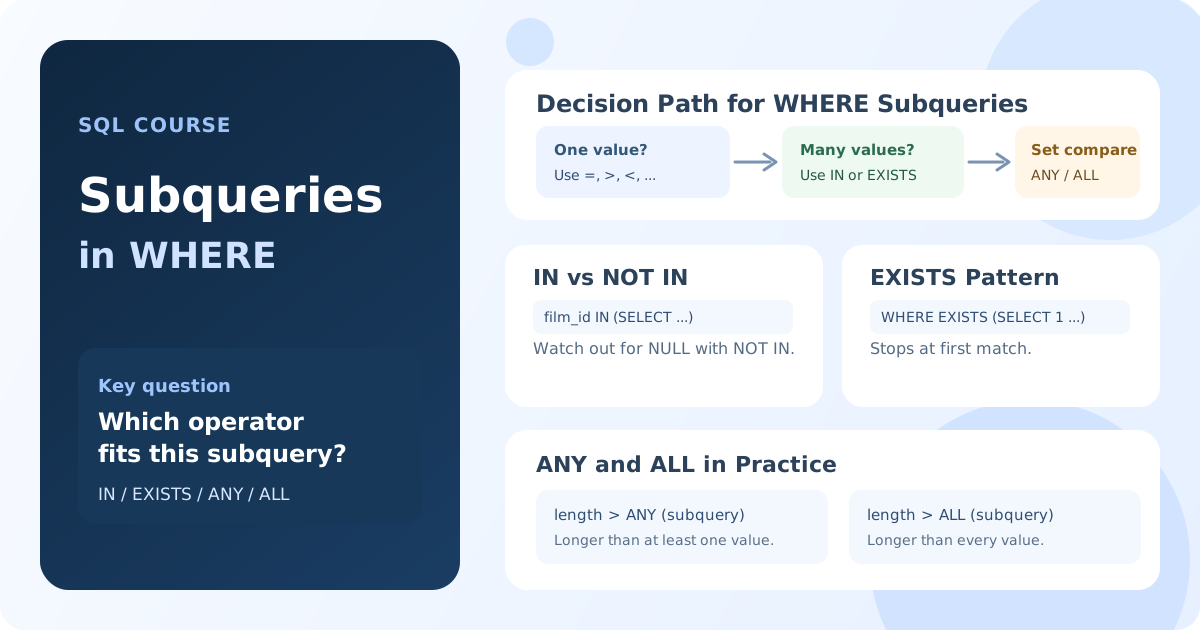
Scalar Subqueries and Comparison Operators
If a subquery returns exactly one value, it is called a scalar subquery. In that case, you can use standard operators =, <>, >, >=, <, <=.
Scenario: find actors with the same first name as the actor with actor_id = 10.
SELECT
    first_name,
    last_name
FROM
    actor
WHERE
    first_name = (
        SELECT first_name
        FROM actor
        WHERE actor_id = 10
    )
    AND actor_id <> 10;
Note: if the inner query returns multiple rows, this query fails with an error.
Multi-Row Subqueries: IN and NOT IN
When a subquery returns a list of values (one column, many rows), use IN.
Scenario: find films in the Action category.
SELECT
    f.title
FROM
    film AS f
WHERE
    f.film_id IN (
        SELECT
            fc.film_id
        FROM
            film_category AS fc
        WHERE
            fc.category_id = (
                SELECT
                    c.category_id
                FROM
                    category AS c
                WHERE
                    c.name = 'Action'
            )
    );
Result: you get all films linked to the Action category through the film_category table.
NOT IN does the opposite filtering, but remember an important caveat: if the subquery result contains NULL, the condition may produce an unexpectedly empty result. In these cases, NOT EXISTS is often safer.
Existence Checks: EXISTS and NOT EXISTS
EXISTS checks whether at least one row exists in the subquery. The database can stop at the first match, so this approach is often efficient on large tables.
EXISTS
Scenario: find customers who have at least one payment.
SELECT
    c.first_name,
    c.last_name
FROM
    customer AS c
WHERE
    EXISTS (
        SELECT
            1
        FROM
            payment AS p
        WHERE
            p.customer_id = c.customer_id
    );
Note: with EXISTS, SELECT 1 is commonly used because only row existence matters, not returned column values.
NOT EXISTS
Scenario: find customers who have made no payments.
SELECT
    c.first_name,
    c.last_name
FROM
    customer AS c
WHERE
    NOT EXISTS (
        SELECT
            1
        FROM
            payment AS p
        WHERE
            p.customer_id = c.customer_id
    );
Result: only customers with no matching rows in payment are returned.
Comparing Against a Set: ANY and ALL
ANY: the condition is true if it is true for at least one value from the subquery.ALL: the condition is true only if it is true for every value from the subquery.
Scenario: compare film length to lengths of films in the Comedy category.
SELECT
    f.title,
    f.length
FROM
    film AS f
WHERE
    f.length > ANY (
        SELECT
            f2.length
        FROM
            film AS f2
        INNER JOIN film_category AS fc ON f2.film_id = fc.film_id
        INNER JOIN category AS c ON fc.category_id = c.category_id
        WHERE
            c.name = 'Comedy'
    );
Result: a film is included if it is longer than at least one film in Comedy.
SELECT
    f.title,
    f.length
FROM
    film AS f
WHERE
    f.length > ALL (
        SELECT
            f2.length
        FROM
            film AS f2
        INNER JOIN film_category AS fc ON f2.film_id = fc.film_id
        INNER JOIN category AS c ON fc.category_id = c.category_id
        WHERE
            c.name = 'Comedy'
    );
Result: a film is included only if it is longer than every film in Comedy.
What to Watch in Real Queries
- For a single value, use a scalar subquery with a comparison operator.
- For a list of values, use
INorEXISTSdepending on the task. - To find missing relationships, prefer
NOT EXISTS, especially whenNULLvalues are possible. - Always check whether a subquery can return more rows than expected.
Key takeaways from this lesson:
WHEREwith subqueries enables dynamic filtering without manual value substitution.INis convenient for checking membership in a list of values.EXISTSandNOT EXISTSare effective for testing presence and absence of related rows.ANYandALLlet you compare a row against a full set of values.- Choosing the right operator makes queries more precise, readable, and reliable.
Frequently Asked Questions
Which is better for finding missing relationships: NOT IN or NOT EXISTS?
In most practical tasks, NOT EXISTS is safer. If a NOT IN subquery returns NULL, the result can become unexpected and filter out too many rows.
Why do people usually write SELECT 1 in EXISTS instead of SELECT *?
Because EXISTS checks only whether rows exist. The selected column values are not used, so SELECT 1 is a standard, clear form.
When should I use ANY and when should I use ALL?
Use ANY when the condition must be true for at least one value from the subquery. Use ALL when the condition must be true for every value in the set.
Interview Questions
What is the difference between IN and EXISTS in SQL?
IN compares a value to a list returned by a subquery, while EXISTS checks for at least one matching row. On large datasets, EXISTS is often more efficient in correlated patterns because it can stop at the first match.
How would you explain the difference between scalar and multi-row subqueries?
A scalar subquery returns one value and is used with operators like = or >. A multi-row subquery returns a set of values and is usually used with IN, ANY, or ALL.
Why can a query with the = operator and a subquery fail?
The = operator expects a single value on the right side. If the subquery returns more than one row, the SQL engine cannot perform an unambiguous comparison and raises an error.
In the next lesson, we will look at correlated subqueries and how they are executed row by row in the outer query.