Lesson 2.5 · Reading time: ~6 min
The SQL ORDER BY clause sorts the rows of a query result by one or more columns or expressions. In this lesson you'll learn ascending and descending sorting, sorting by several columns, sorting by expressions and aliases, and how NULL values are ordered.
SQL ORDER BY: Sorting Query Results
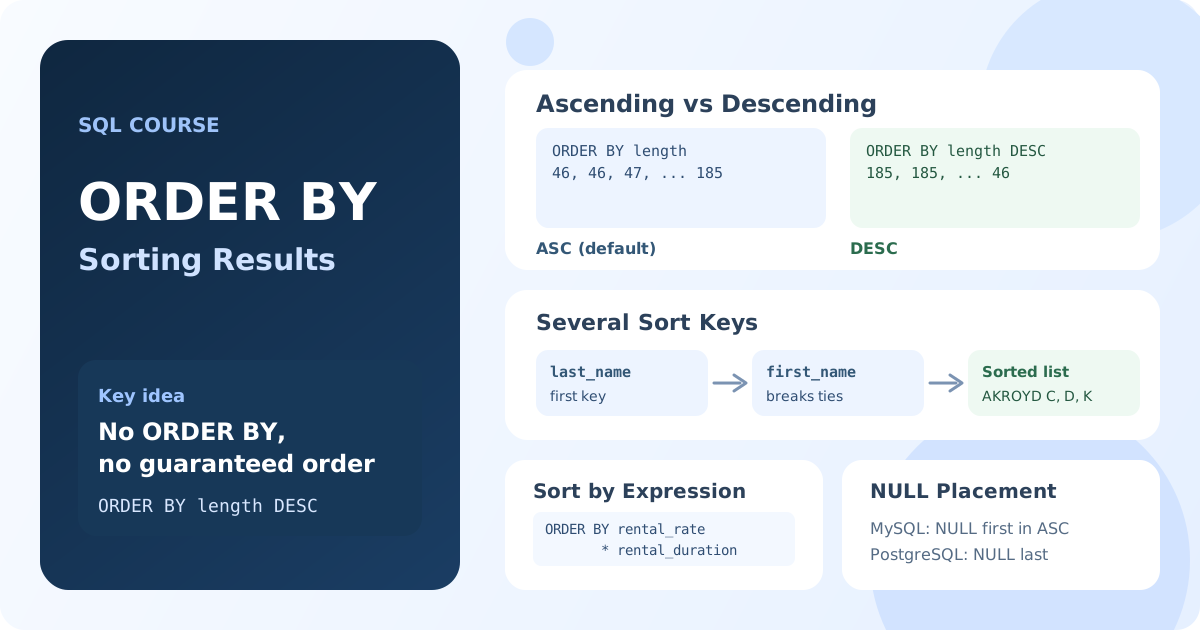
A table has no built-in order of rows. Without ORDER BY, the database returns rows in whatever order is fastest for it, and that order can change from one run to the next. Whenever the order matters, for a report, a top list or a chronological log, you have to request it explicitly.
The ORDER BY Clause
ORDER BY is written at the end of a SELECT statement and lists the sort keys.
Basic Syntax
SELECT column1, column2, ...
FROM table_name
ORDER BY column1 [ASC | DESC], column2 [ASC | DESC], ...;
ASCsorts in ascending order: from smallest to largest, from A to Z, from earliest to latest. It is the default.DESCsorts in descending order.
Sorting by One Column
SELECT first_name, last_name
FROM actor
ORDER BY last_name;
Result: all actors in alphabetical order of their last names.
To reverse the order, add DESC:
SELECT title, length
FROM film
ORDER BY length DESC;
Result: films from the longest to the shortest.
Sorting by Several Columns
When the first sort key has equal values, the database uses the second key to order those rows, then the third, and so on:
SELECT first_name, last_name
FROM actor
ORDER BY last_name, first_name;
Result: actors sorted by last name; actors with the same last name are sorted by first name.
Each column has its own direction. ASC or DESC applies only to the column it follows:
SELECT title, rating, length
FROM film
ORDER BY rating, length DESC;
Result: films grouped by rating; within each rating, the longest films come first.
Sorting by Expressions
You can sort by a calculated value, not only by a stored column. The expression is evaluated for each row and the rows are sorted by the result:
SELECT title, rental_rate, rental_duration
FROM film
ORDER BY rental_rate * rental_duration DESC;
Result: films sorted by the cost of a full rental period, the most expensive first.
A comparison can also be a sort key. It is useful for putting certain rows first:
SELECT title, rating
FROM film
ORDER BY rating = 'G' DESC, title;
Result: films with the G rating at the top, then all other films; each group is sorted by title.
In MySQL and MariaDB, a comparison returns 1 or 0, so DESC puts the matching rows first. Not every database can sort by a comparison; the portable way uses CASE, which you'll learn in Lesson 3.5.
Sorting by Aliases and Column Positions
ORDER BY is processed after SELECT, so it can use the column aliases defined there:
SELECT title, rental_rate * rental_duration AS full_rental_cost
FROM film
ORDER BY full_rental_cost DESC;
You can also sort by the position of a column in the SELECT list:
SELECT first_name, last_name
FROM actor
ORDER BY 2, 1;
Result: actors sorted by the second column (last_name), then by the first (first_name).
Sorting by position is handy for quick queries, but it breaks silently when someone changes the column list. In saved queries, prefer names or aliases.
Sorting and NULL Values
NULL means "no value", so the database has to decide where to put such rows. In MySQL, MariaDB and SQL Server, NULL values come first in ascending order and last in descending order. In PostgreSQL and Oracle, it is the other way around.
SELECT rental_id, rental_date, return_date
FROM rental
ORDER BY return_date
LIMIT 10;
Result: in MySQL, rentals that have not been returned yet (return_date is NULL) appear first.
Key Takeaways:
- Without
ORDER BY, the order of rows in a result is not guaranteed. ASC(the default) sorts in ascending order,DESCin descending order.- With several sort keys, each next key orders the rows that are equal by the previous one.
ASCandDESCapply to each column separately.- You can sort by expressions, aliases and column positions; names and aliases are more reliable than positions.
- Where
NULLvalues appear depends on the database.
Frequently Asked Questions
What is the default sort order in SQL?
Ascending (ASC). ORDER BY last_name and ORDER BY last_name ASC return the same result.
How do I sort by several columns in different directions?
Write the direction after each column: ORDER BY rating ASC, length DESC. A direction applies only to the column it follows.
Can I use a column alias in ORDER BY?
Yes. ORDER BY is processed after SELECT, so aliases defined in the SELECT list are available there. This is different from WHERE, where aliases can't be used.