Lesson 5.5 · Reading time: ~6 min
The SQL FULL OUTER JOIN returns all rows of both tables: matched rows are combined, and rows without a match on either side are kept with NULL in the other table's columns. In this lesson you'll learn the syntax, which databases support it, and how to get the same result in MySQL and MariaDB.
SQL FULL OUTER JOIN: Keeping All Rows from Both Tables
LEFT JOIN keeps the unmatched rows of one table, RIGHT JOIN of the other. FULL OUTER JOIN keeps both. It is the tool for comparing two lists: what is in both, what is only in the first, and what is only in the second.
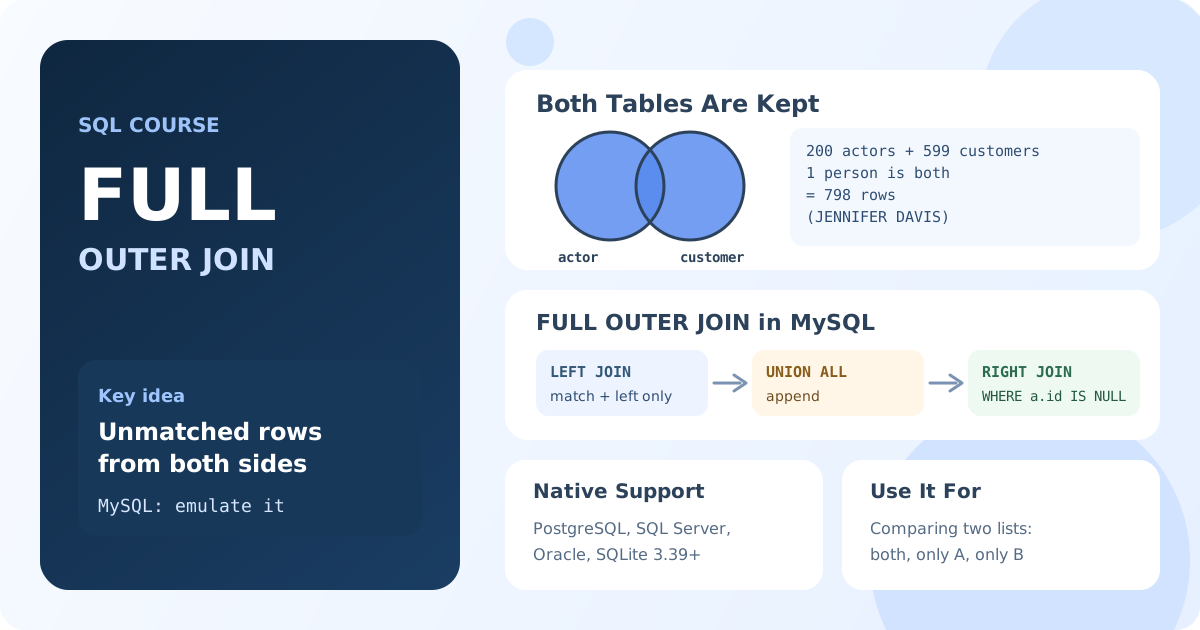
What FULL OUTER JOIN Returns
The result consists of three parts:
- Pairs of rows that match, as in
INNER JOIN. - Rows of the left table without a match, with
NULLin the right table's columns. - Rows of the right table without a match, with
NULLin the left table's columns.
Basic Syntax
SELECT left_table.column1, right_table.column2
FROM left_table
FULL OUTER JOIN right_table ON left_table.key_column = right_table.key_column;
FULL JOIN and FULL OUTER JOIN are the same.
| Database | FULL OUTER JOIN |
|---|---|
| PostgreSQL, SQL Server, Oracle, SQLite 3.39+ | Supported |
| MySQL, MariaDB | Not supported: use the workaround below |
Example: Actors and Customers
Who in the Sakila database is an actor, who is a customer, and who is both? In PostgreSQL or SQL Server, a full join on the name answers this directly:
-- PostgreSQL, SQL Server
SELECT a.first_name AS actor_first, a.last_name AS actor_last,
       c.first_name AS customer_first, c.last_name AS customer_last
FROM actor AS a
FULL OUTER JOIN customer AS c
     ON c.first_name = a.first_name AND c.last_name = a.last_name;
Each actor appears once, each customer appears once, and a person who is both appears in one row with both sides filled.
FULL OUTER JOIN in MySQL and MariaDB
MySQL and MariaDB have no FULL OUTER JOIN, but the same result can be built from two queries joined with UNION ALL:
- A
LEFT JOINreturns the matches and the rows that are only in the left table. - A
RIGHT JOINwithWHERE left_key IS NULLadds only the rows that are only in the right table.
SELECT a.first_name AS actor_first, a.last_name AS actor_last,
       c.first_name AS customer_first, c.last_name AS customer_last
FROM actor AS a
LEFT JOIN customer AS c
       ON c.first_name = a.first_name AND c.last_name = a.last_name
UNION ALL
SELECT a.first_name, a.last_name, c.first_name, c.last_name
FROM actor AS a
RIGHT JOIN customer AS c
       ON c.first_name = a.first_name AND c.last_name = a.last_name
WHERE a.actor_id IS NULL;
Result: 798 rows: 200 actors plus 599 customers, minus one person who is both and appears in one combined row (JENNIFER DAVIS).
You may also see this workaround written with UNION instead of UNION ALL and without the WHERE condition. It works only when the result has no legitimately repeated rows, because UNION removes all duplicates, and it is slower. The UNION ALL version is exact. You'll learn UNION and UNION ALL in Lesson 5.10.
Using a Full Join to Compare Lists
A full join is useful whenever two sources should contain the same items:
- reconciling payments in the database with a bank statement;
- comparing a product catalog with the stock list;
- finding records that exist in only one of two systems after a migration.
To keep only the differences, filter for rows where one of the sides is NULL:
-- PostgreSQL, SQL Server: people who are only actors or only customers
SELECT a.actor_id, c.customer_id
FROM actor AS a
FULL OUTER JOIN customer AS c
     ON c.first_name = a.first_name AND c.last_name = a.last_name
WHERE a.actor_id IS NULL OR c.customer_id IS NULL;
Key Takeaways:
FULL OUTER JOINreturns matched rows plus the unmatched rows of both tables.- Columns of the missing side are
NULL. - PostgreSQL, SQL Server, Oracle and SQLite 3.39+ support it; MySQL and MariaDB don't.
- In MySQL and MariaDB:
LEFT JOINUNION ALLRIGHT JOIN ... WHERE left_key IS NULL. - A full join is the natural tool for comparing two lists.
Frequently Asked Questions
Does MySQL support FULL OUTER JOIN?
No. MySQL and MariaDB don't support it. Combine a LEFT JOIN and a RIGHT JOIN with UNION ALL, keeping only unmatched rows in the second query (WHERE left_key IS NULL).
What is the difference between FULL OUTER JOIN and CROSS JOIN?
FULL OUTER JOIN pairs rows by a condition and keeps unmatched rows of both tables. CROSS JOIN has no condition and returns every combination of rows, so its result is usually much larger.
Why use UNION ALL instead of UNION to emulate FULL OUTER JOIN?
UNION removes duplicate rows, including rows that are legitimately repeated in the data, and needs extra work to find duplicates. UNION ALL with the IS NULL filter in the second query returns exactly the rows of a full join.