SQL CTE: Common Table Expressions and the WITH Clause
Lesson 6.4 · Reading time: ~8 min · Practice tasks ↓
A SQL CTE (common table expression) is a named temporary result set that you define with the WITH clause and then use in the main query like a table. In this lesson you'll learn CTE syntax, how a CTE compares to a subquery, how to chain several CTEs, and how to build multi-step analysis that stays easy to read.
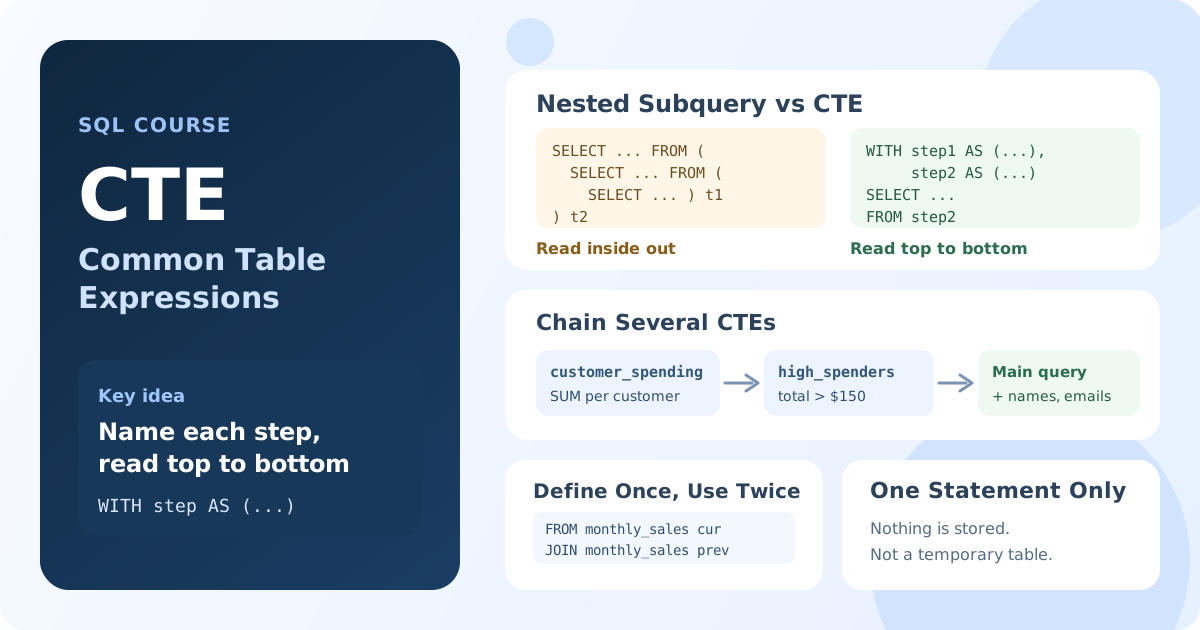
In the previous lessons you wrote subqueries inside FROM and WHERE. They work, but as logic grows, nested subqueries become hard to read: you have to start from the innermost query and work outwards. A CTE lets you give each step a name and write the steps top to bottom, in the order you think about them.
What Is a CTE in SQL?
A common table expression is a query result with a name, defined at the beginning of a statement. It exists only while that statement runs: nothing is stored in the database, and other queries cannot see it.
You can think of a CTE as a named subquery. The main benefits are:
- Readability: each step has a meaningful name.
- Reuse: the main query can reference the same CTE several times.
- Modularity: a complex query splits into small logical steps.
- Debugging: each CTE can be run and checked on its own.
Basic Syntax
WITH cte_name AS (
    SELECT ...
)
SELECT ...
FROM cte_name;
WITHintroduces the CTE.cte_nameis the name the main query will use.- The query in parentheses defines the rows of the CTE.
- The main query that follows works with
cte_nameas with an ordinary table.
Your First CTE
Let's find customers who have spent more than $100 in total:
WITH customer_spending AS (
    SELECT customer_id,
           SUM(amount) AS total_spent,
           COUNT(*) AS payment_count,
           AVG(amount) AS avg_payment
    FROM payment
    GROUP BY customer_id
)
SELECT customer_id, total_spent, payment_count, avg_payment
FROM customer_spending
WHERE total_spent > 100
ORDER BY total_spent DESC;
Result: customers with more than $100 in payments, with their payment count and average payment, highest spenders first.
The CTE calculates spending per customer, and the main query only filters and sorts. The name customer_spending tells the reader what the intermediate data is before they read how it is calculated.
CTE vs Subquery
Here is the same query written with a subquery in FROM:
SELECT customer_id, total_spent, payment_count, avg_payment
FROM (
    SELECT customer_id,
           SUM(amount) AS total_spent,
           COUNT(*) AS payment_count,
           AVG(amount) AS avg_payment
    FROM payment
    GROUP BY customer_id
) AS spending_data
WHERE total_spent > 100
ORDER BY total_spent DESC;
Both queries return the same rows. The difference is in how they read:
| Aspect | CTE | Subquery in FROM |
|---|---|---|
| Order of reading | Top to bottom, step by step | From the inside out |
| Naming | Each step has a meaningful name | Alias is often an afterthought |
| Reuse | One definition, many references | Repeat the subquery for every use |
| Debugging | Run each CTE on its own | Hard to isolate a nested level |
For a single short step, a subquery is fine. When the logic has two or more steps, or one result is needed twice, a CTE is usually clearer.
Multiple CTEs in One Query
You can define several CTEs separated by commas. Each one can use the CTEs defined before it:
WITH customer_spending AS (
    SELECT customer_id, SUM(amount) AS total_spent
    FROM payment
    GROUP BY customer_id
),
high_spenders AS (
    SELECT customer_id, total_spent
    FROM customer_spending
    WHERE total_spent > 150
)
SELECT c.customer_id,
       CONCAT(c.first_name, ' ', c.last_name) AS customer_name,
       c.email,
       hs.total_spent
FROM high_spenders AS hs
JOIN customer AS c ON c.customer_id = hs.customer_id
ORDER BY hs.total_spent DESC;
Result: names and emails of customers who spent more than $150, highest spenders first.
The query reads as a short plan:
customer_spendingtotals the payments per customer.high_spenderskeeps only customers above $150.- The main query adds names and emails from
customer.
Note that WITH is written only once, before the first CTE.
Referencing a CTE More Than Once
A CTE can appear several times in the main query, for example to join a result to itself. Let's compare each month's revenue with the previous month:
WITH monthly_sales AS (
    SELECT CAST(DATE_FORMAT(payment_date, '%Y-%m-01') AS DATE) AS month_start,
           SUM(amount) AS monthly_total
    FROM payment
    GROUP BY month_start
)
SELECT cur.month_start,
       cur.monthly_total AS current_sales,
       prev.monthly_total AS previous_sales,
       ROUND((cur.monthly_total - prev.monthly_total) / prev.monthly_total * 100, 2) AS percent_change
FROM monthly_sales AS cur
LEFT JOIN monthly_sales AS prev
       ON prev.month_start = cur.month_start - INTERVAL 1 MONTH
ORDER BY cur.month_start;
Result: revenue for each month next to the previous month's revenue and the change in percent. When the previous month has no payments (May 2005, the first month, and February 2006, after a gap in the data), the comparison columns are NULL.
monthly_sales is defined once and used twice, as cur and prev. With subqueries you would have to write the same aggregation twice and keep both copies in sync.
Practical Example: Each Customer's Latest Rental
A common task is to find the most recent event for every customer. With a CTE it splits into two clear steps: find the latest date, then attach the details.
WITH last_rental AS (
    SELECT customer_id, MAX(rental_date) AS last_rental_date
    FROM rental
    GROUP BY customer_id
)
SELECT c.customer_id,
       CONCAT(c.first_name, ' ', c.last_name) AS customer_name,
       lr.last_rental_date
FROM customer AS c
LEFT JOIN last_rental AS lr ON lr.customer_id = c.customer_id
ORDER BY lr.last_rental_date
LIMIT 20;
Result: 20 customers who have not rented anything for the longest time, with the date of their last rental.
In Module 7 you will see how window functions solve "latest row per group" tasks when you need the whole row, not only the date.
Practical Example: Cohort Analysis
CTEs are especially useful for multi-step analysis. In a cohort analysis, customers are grouped by the month of their first rental, and then their activity is tracked month by month:
WITH customer_cohort AS (
    SELECT customer_id,
           CAST(DATE_FORMAT(MIN(rental_date), '%Y-%m-01') AS DATE) AS cohort_month
    FROM rental
    GROUP BY customer_id
),
monthly_activity AS (
    SELECT cc.cohort_month,
           CAST(DATE_FORMAT(r.rental_date, '%Y-%m-01') AS DATE) AS rental_month,
           r.customer_id
    FROM customer_cohort AS cc
    JOIN rental AS r ON r.customer_id = cc.customer_id
)
SELECT cohort_month,
       rental_month,
       COUNT(DISTINCT customer_id) AS active_customers,
       COUNT(*) AS rentals
FROM monthly_activity
GROUP BY cohort_month, rental_month
ORDER BY cohort_month, rental_month;
Result: for each cohort (month of the first rental), how many of its customers rented films in each following month, and how many rentals they made.
customer_cohortassigns every customer to the month of their first rental.monthly_activityattaches the cohort to every rental.- The main query counts active customers and rentals per cohort and month.
CTEs and Performance
A CTE is first of all a way to organize a query. In most modern databases, a simple CTE performs the same as the equivalent subquery, because the optimizer inlines it into the main query.
There are differences between databases:
- PostgreSQL before version 12 always materialized a CTE (calculated it once into a temporary result). Since version 12 a CTE referenced once is inlined;
AS MATERIALIZEDandAS NOT MATERIALIZEDlet you choose. - MySQL (8.0+) and MariaDB (10.2+) can either merge a CTE into the main query or materialize it. A CTE referenced several times is usually calculated once.
If a query with CTEs is slow, check its execution plan with EXPLAIN, as you would for any other query.
Key Takeaways:
- A CTE is a named temporary result set defined with
WITHand available only within one statement. - CTEs let you write multi-step logic top to bottom, with a meaningful name for each step.
- Several CTEs are separated by commas, and each one can use the CTEs defined before it.
- One CTE can be referenced several times in the main query, so you don't repeat the same subquery.
- For a single short step, a subquery is fine; for multi-step logic, a CTE is usually more readable.
- Performance is usually the same as with subqueries, but materialization rules differ between databases.
Frequently Asked Questions
What is the difference between a CTE and a subquery?
Both define an intermediate result inside one query. A CTE is written before the main query with a name, can be referenced several times, and reads top to bottom. A subquery is written inline where it is used and has to be repeated for every use.
Is a CTE faster than a subquery?
Usually neither is faster: most optimizers process a simple CTE and the equivalent subquery the same way. The difference appears when a database materializes a CTE, which can help when the result is reused and hurt when the main query filters it heavily. Check the plan with EXPLAIN.
Is a CTE the same as a temporary table?
No. A CTE exists only during one statement and is not stored. A temporary table is created explicitly, lives until the end of the session, and can be used by many queries and indexed.
Which databases support the WITH clause?
PostgreSQL, SQL Server, Oracle, SQLite (3.8.3+), MySQL (8.0+) and MariaDB (10.2+) all support CTEs.