Lesson 8.1: The INSERT INTO Statement
So far, we have focused on retrieving data from existing tables using the SELECT statement. Now, we will begin exploring Data Manipulation Language (DML), starting with how to add new data to your tables using the INSERT INTO statement.
The Basic Syntax
There are two primary ways to use the INSERT INTO statement.
1. Specifying Columns (Recommended)
This is the safest and most common method. You explicitly list the columns you want to fill, followed by the values for those columns.
INSERT INTO table_name (column1, column2, column3)
VALUES (value1, value2, value3);
2. Without Specifying Columns
If you are providing values for all columns in the table in the exact order they were defined, you can omit the column names. However, this is less flexible and can lead to errors if the table structure changes.
INSERT INTO table_name
VALUES (value1, value2, value3, ...);
Important Rules for Inserting Data
- Data Types: The values you provide must match the data type of the corresponding column (e.g., you cannot insert text into a numeric column).
- Strings and Dates: Just like in the
WHEREclause, string (text) and date values must be enclosed in single quotes ('). - Numbers: Numeric values do not require quotes.
- NULL Values: If a column allows
NULLand you don't provide a value for it, it will be filled withNULL(or a default value if one is defined).
Examples
Example 1: Inserting a New Actor
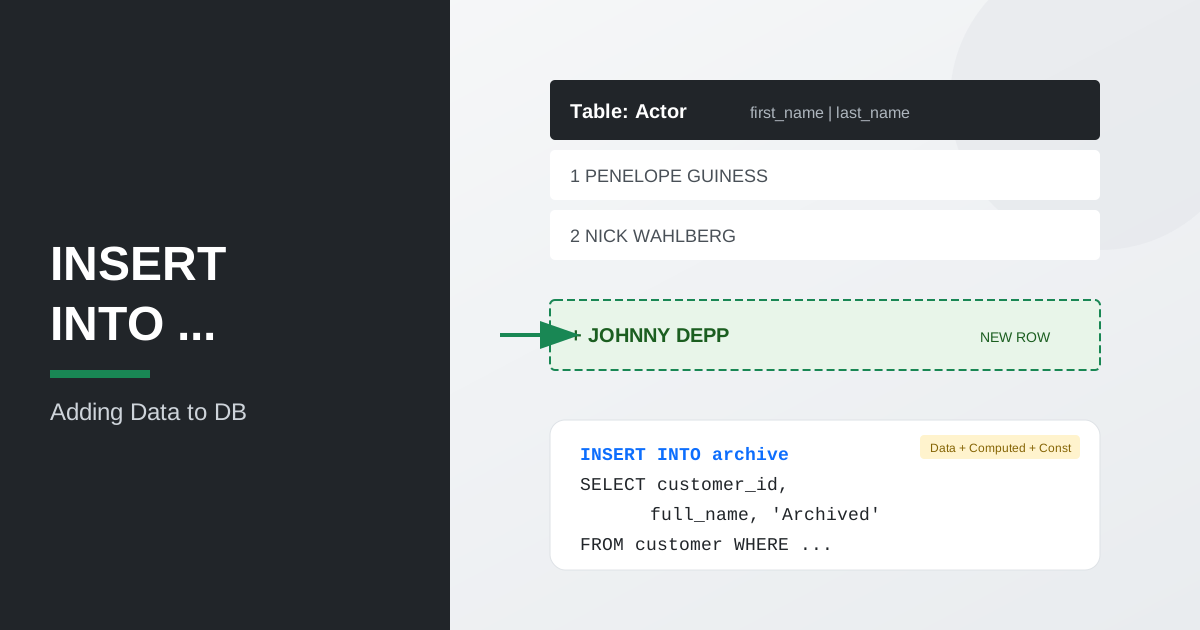
Let's add a new actor to the actor table in the Sakila database.
INSERT INTO actor (first_name, last_name)
VALUES ('JOHNNY', 'DEPP');
Note: We didn't specify the actor_id because it is usually auto-generated by the database.
Example 2: Inserting into Specific Columns
If we have a table with many columns but only want to fill a few:
INSERT INTO customer (first_name, last_name, email, store_id, address_id)
VALUES ('ALICE', 'JOHNSON', 'alice.j@example.com', 1, 5);
Example 3: Multi-row Insert
Most modern databases allow you to insert multiple rows in a single statement by separating the sets of values with commas.
INSERT INTO actor (first_name, last_name)
VALUES
    ('TOM', 'HANKS'),
    ('MERYL', 'STREEP'),
    ('LEONARDO', 'DICAPRIO');
Inserting Data from Another Query (INSERT INTO ... SELECT)
Sometimes you don't need to enter data manually, but rather transfer it from one table to another (e.g., during archiving or report generation). For this, a combination of INSERT INTO and SELECT is used.
Syntax
INSERT INTO target_table (column1, column2, column3)
SELECT source_column1, source_column2, source_column3
FROM source_table
WHERE condition;
Flexibility in Data Formation
An important feature of this command is that in the SELECT block you can combine different types of values:
- Selected values: directly from the source table (
source_column1). - Calculated values: the result of formulas or functions (e.g.,
amount * 0.1). - Constant values: fixed data that is not in the source table (e.g., insertion date or a status as a string).
Example: Creating an Archive of Inactive Customers
Suppose we have a customer_archive table, and we want to transfer data there from the main customer table, adding the archiving date and a status note:
INSERT INTO customer_archive (customer_id, full_name, archived_at, status_note)
SELECT
    customer_id,
    CONCAT(first_name, ' ', last_name), -- Calculated value (Full Name)
    CURRENT_DATE,                       -- Constant (current date)
    'Auto-archived'                     -- Constant (text label)
FROM customer
WHERE active = 0;
Note: The number and order of columns in INSERT INTO must strictly match the number and order of columns returned in the SELECT.
Working with NULL and Default Values
When inserting a row, you don't always need to supply a value for every column. The database handles missing values in two ways: through NULL and through column defaults.
Inserting NULL Explicitly
If a column allows NULL, you can pass the keyword NULL directly as the value:
INSERT INTO customer (first_name, last_name, email, store_id, address_id)
VALUES ('BOB', 'SMITH', NULL, 1, 5);
Here the email column will be stored as NULL, meaning "no value known".
Relying on Column Defaults
If a column has a DEFAULT value defined in the table schema, you can omit it entirely from the column list. The database will fill it automatically:
INSERT INTO actor (first_name, last_name)
VALUES ('CATE', 'BLANCHETT');
Columns like actor_id (auto-increment) and last_update (default timestamp) are populated by the database without any explicit input.
Inserting DEFAULT Explicitly
You can also use the DEFAULT keyword to trigger a column's default value while still listing the column:
INSERT INTO actor (actor_id, first_name, last_name, last_update)
VALUES (DEFAULT, 'CATE', 'BLANCHETT', DEFAULT);
This is useful when your insert statement lists all columns but you still want the database to handle specific ones.
Key Takeaways from this Lesson:
- The
INSERT INTOstatement is used to add new rows to a table. - The
INSERT INTO ... SELECTcommand allows copying data from one table to another. - In the
SELECTblock, you can combine real data from the table, calculated fields, and constants. - Explicitly listing column names is recommended for better code reliability and readability.
- String and date values must be enclosed in single quotes.
- You can insert multiple rows at once to improve performance.
- Columns with
NULLorDEFAULTvalues can be omitted or passed explicitly using theNULLandDEFAULTkeywords.
In the next lesson, we will look at how to modify existing records using the UPDATE statement.