Lesson 5.6 · Reading time: ~5 min
The SQL CROSS JOIN combines every row of one table with every row of another; the result is called the Cartesian product. In this lesson you'll learn the CROSS JOIN syntax, how large its result gets, and how to use it to build report grids that show zero values instead of missing rows.
SQL CROSS JOIN: All Combinations of Rows
All the joins so far paired rows by a condition. CROSS JOIN has no condition: each row of the first table meets each row of the second. This is rarely what you want for related data, but it is exactly what you need to generate all combinations: every store with every category, every product with every size, every day with every employee.
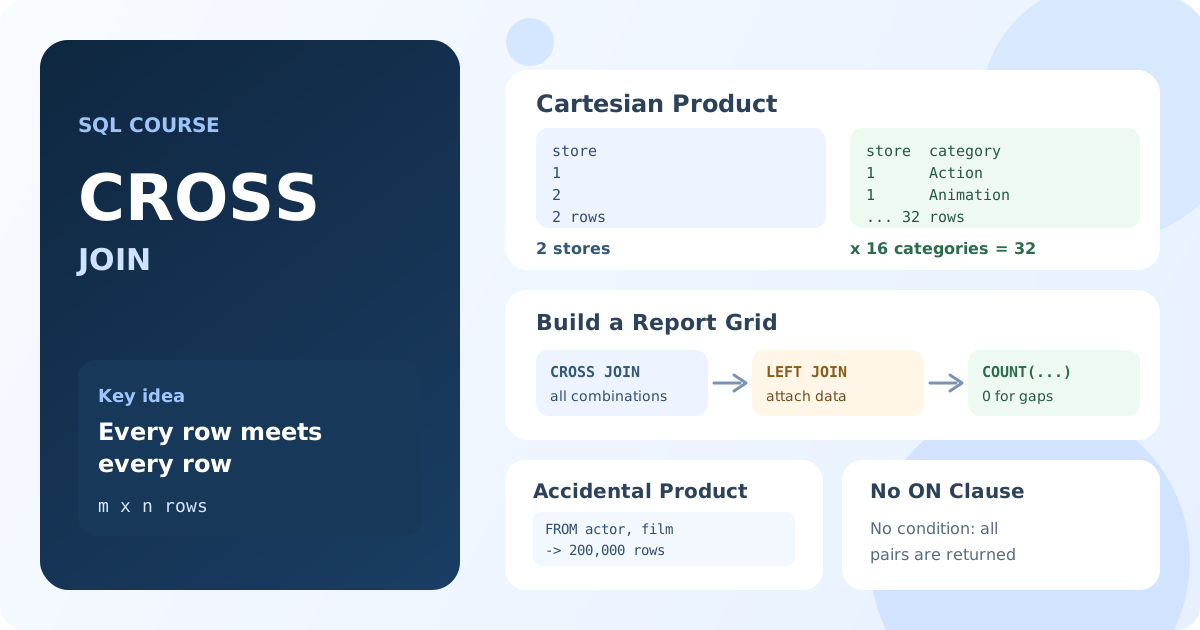
What CROSS JOIN Returns
If the first table has m rows and the second has n rows, the result has m × n rows. There is no ON clause.
Basic Syntax
SELECT table1.column1, table2.column2
FROM table1
CROSS JOIN table2;
The old comma syntax, FROM table1, table2 without a condition, means the same thing. CROSS JOIN states the intent explicitly and is preferred.
Example: Every Store with Every Category
SELECT s.store_id, c.name AS category
FROM store AS s
CROSS JOIN category AS c
ORDER BY s.store_id, c.name;
Result: 32 rows: 2 stores × 16 categories, each store with each category.
Building a Report Grid
The most practical use of CROSS JOIN is the "skeleton" of a report. Suppose you need the number of films per store and category, including combinations with zero films. A normal join and GROUP BY returns only combinations that exist in the data. A CROSS JOIN first creates all combinations, and a LEFT JOIN then attaches the data:
SELECT s.store_id,
       c.name AS category,
       COUNT(i.inventory_id) AS copies
FROM store AS s
CROSS JOIN category AS c
LEFT JOIN film_category AS fc ON fc.category_id = c.category_id
LEFT JOIN inventory AS i ON i.film_id = fc.film_id
                        AND i.store_id = s.store_id
GROUP BY s.store_id, c.name
ORDER BY s.store_id, c.name;
Result: 32 rows with the number of film copies of each category in each store. A combination without copies would show 0 instead of disappearing.
COUNT(i.inventory_id) counts only matched copies, so a combination without copies gets 0. The same technique fills gaps in time series: cross join a list of dates with a list of products to get a row for each product on each day.
The Accidental Cartesian Product
A Cartesian product often appears by mistake, when a join condition is missing:
-- No join condition: every actor is combined with every film
SELECT COUNT(*) AS row_count
FROM actor, film;
Result: 200,000 rows: 200 actors × 1000 films.
If a query suddenly returns far too many rows, or rows repeat in strange combinations, check that every joined table has a join condition. Two tables of 100,000 rows each produce 10 billion combinations, which can stop the database.
Key Takeaways:
CROSS JOINcombines every row of one table with every row of another.- The result has
m × nrows and noONcondition. FROM a, bwithout a condition is also a Cartesian product, often an accidental one.CROSS JOINplusLEFT JOINbuilds a full report grid, with zeros for missing combinations.- Check result sizes before cross joining large tables.
Frequently Asked Questions
What is a Cartesian product in SQL?
The set of all combinations of rows from two tables. If one table has 2 rows and the other has 16, the Cartesian product has 32 rows. CROSS JOIN returns it explicitly.
What is the difference between CROSS JOIN and INNER JOIN?
INNER JOIN keeps only the combinations that satisfy the ON condition. CROSS JOIN keeps all combinations. An INNER JOIN with a condition that is always true behaves like a CROSS JOIN.
When should I use CROSS JOIN?
When you need all combinations: report grids, product variants (colors × sizes), calendars (dates × employees), or filling gaps in time series together with LEFT JOIN.