SQL JOIN: How to Combine Tables in Relational Databases
Lesson 5.1 · Reading time: ~8 min · Practice tasks ↓
A SQL JOIN combines rows from two or more tables based on a related column. In this lesson you will learn the core concept behind JOIN, how to write an ON condition, why table aliases matter, and how to query related data from the Sakila database step by step.
In relational databases, information is stored as a set of related tables. To extract meaningful data from them, you need to know how to join them. The JOIN operation in SQL is used for this purpose. It allows you to combine rows from two or more tables based on a related column.
This lesson lays the foundation for understanding JOIN as a key concept for working with relational data.
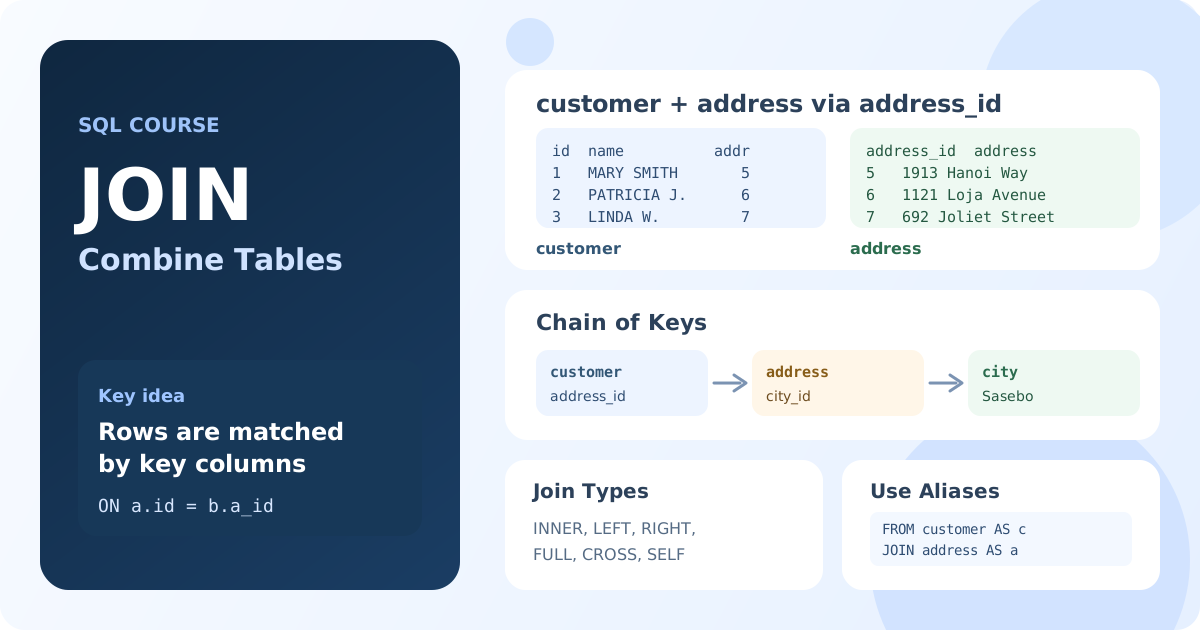
What Is a SQL JOIN and How Does It Work?
A JOIN is a mechanism that allows you to combine rows from different tables into a single result set. The join is performed based on a condition that most often compares values in key columns.
Imagine two tables: customer and payment. The payment table has a customer_id column that indicates which customer made the payment. A JOIN lets you "glue" the rows from these two tables together so that for each payment, you can see the customer's name, not just their ID.
How it works:
- You specify the two tables you want to join.
- You define the join condition in the
ONclause, for example,customer.customer_id = payment.customer_id. - The database goes through the rows, finds matching pairs, and forms new, combined rows from them.
Visualization:
  Table A (customer)      Table B (payment)
  +----+-------+            +----+----------+
  | id | name  |            | id | amount   |
  +----+-------+            +----+----------+
  | 1  | Ivan  | <-----\    | 1  | 100.00   |
  | 2  | Maria |       \--->| 1  | 50.00    |
  | 3  | Petr  |            | 3  | 200.00   |
  +----+-------+            +----+----------+
The arrows show how rows from the payment table find their corresponding customer in the customer table based on the matching id.
How to Use JOIN in Practice: Sakila Examples
Let's see what this looks like in a real SQL query using the Sakila database.
Getting a list of customers and their payments: This query joins the
customerandpaymenttables to show the customer's first and last name next to each payment.SELECT c.first_name, c.last_name, p.amount, p.payment_date FROM customer AS c JOIN payment AS p ON c.customer_id = p.customer_id;JOIN payment AS pspecifies that we are joining thepaymenttable.ON c.customer_id = p.customer_idis the condition that defines how the rows are related.candpare aliases, which make the query shorter and more readable.
Getting a list of films and their language: Let's join the
filmandlanguagetables to show the title of each film and the language it is in.SELECT f.title, l.name AS language FROM film AS f JOIN language AS l ON f.language_id = l.language_id;Here, the relationship is established through the
language_idkey.
Key takeaways from this lesson:
- A SQL JOIN combines rows from two or more tables into a single result set.
- The ON condition defines how rows from different tables are related - usually by matching key columns.
- Table aliases (
customer AS c) shorten queries and make them easier to read. JOINdoes not modify the original data; it creates a temporary result set.- In following lessons we will explore
INNER JOIN,LEFT JOIN,RIGHT JOIN, andFULL JOINin detail.
Frequently Asked Questions
What is the difference between JOIN and INNER JOIN?
In SQL, a bare JOIN is a shorthand for INNER JOIN. They produce identical results. The explicit INNER JOIN keyword is often preferred for clarity, especially when mixing different join types in the same query.
What happens if the ON condition matches no rows?
If no rows satisfy the ON condition, an INNER JOIN returns an empty result set. No error is raised - the query simply returns zero rows. Other join types (LEFT JOIN, etc.) handle unmatched rows differently.
Can you join more than two tables in one query?
Yes. You can chain multiple JOIN clauses in a single query, each with its own ON condition. The database processes them left to right, building up the result set progressively.
Interview Questions
How would you explain JOIN to a non-technical colleague?
A JOIN is like using a shared ID to look up related information across two spreadsheets. For example, if one sheet lists customers with IDs and another lists payments with customer IDs, a JOIN lets you see each payment with the customer’s name - without duplicating data in either sheet.
What is the ON clause and why is it required?
The ON clause specifies the condition that connects rows from the two tables. Without it (or without a valid condition), the database would produce a Cartesian product - every row from the first table paired with every row from the second - which is rarely useful and potentially huge.
Why use table aliases in JOIN queries?
Table aliases make queries shorter and unambiguous. When two tables share a column name (e.g. both have id), aliases let you write c.id vs p.id so the database and the reader know exactly which column is meant.