Lesson 7.3 · Reading time: ~8 min
A window frame decides which rows around the current one an aggregate window function actually uses: all rows from the start, the last three rows, or the last seven days. In this lesson you'll learn the ROWS and RANGE frame syntax, build running totals and moving averages, see why "the last 3 rows" and "the last 3 days" give different answers on real data, and avoid the trap of the default frame.
SQL Window Frames: ROWS vs RANGE
PARTITION BY splits rows into groups, and ORDER BY orders them. The frame is the third part of OVER: inside the current partition, it selects a sliding range of rows relative to the current one. Aggregate functions (SUM, AVG, COUNT, MIN, MAX) and value functions (FIRST_VALUE, LAST_VALUE) respect the frame; ranking functions and LAG/LEAD ignore it.
The examples run on the Sakila sample database (MySQL 8.0).
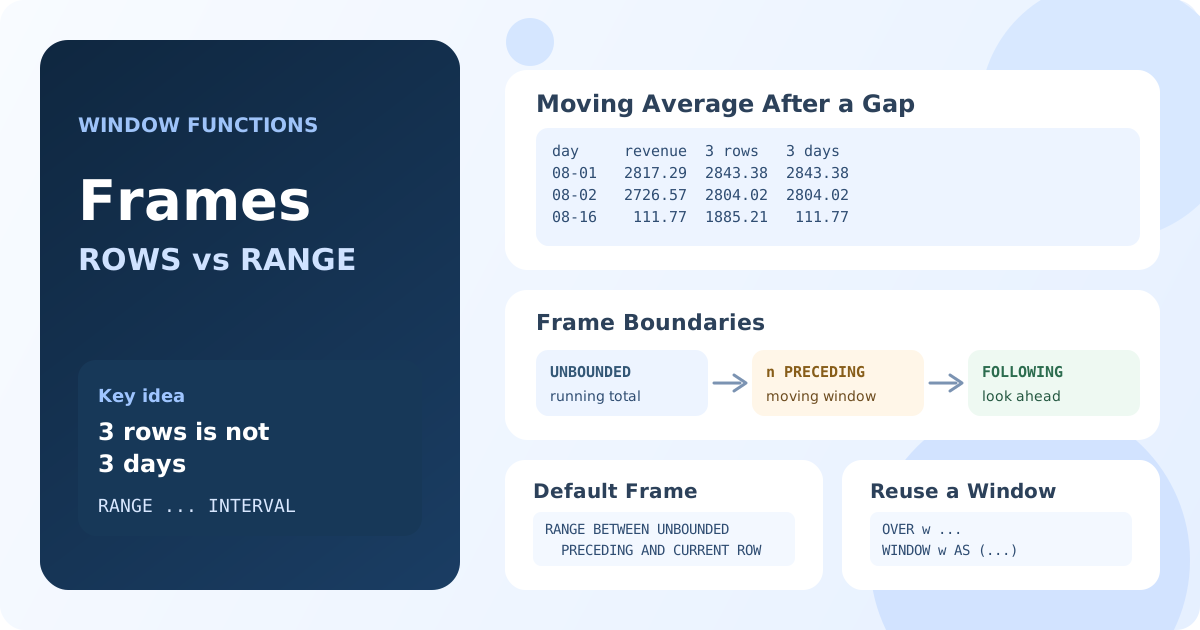
Frame Syntax
function_name(expression) OVER (
    PARTITION BY partition_columns
    ORDER BY sort_column
    { ROWS | RANGE } BETWEEN frame_start AND frame_end
)
| Boundary | Meaning |
|---|---|
UNBOUNDED PRECEDING | The first row of the partition |
n PRECEDING | n rows (or n units of value) before the current row |
CURRENT ROW | The current row |
n FOLLOWING | n rows (or n units of value) after the current row |
UNBOUNDED FOLLOWING | The last row of the partition |
ROWScounts physical rows:2 PRECEDINGis the two rows above the current one, whatever their values.RANGEworks with the values of theORDER BYcolumn:INTERVAL 2 DAY PRECEDINGis every row whose date is at most two days earlier. ARANGEframe with an offset needs exactly one numeric or date column inORDER BY.
The Data: Daily Revenue
All examples use daily revenue from July 26 to August 23, 2005. Note the gap: after August 2 the next day with payments is August 16.
WITH daily AS (
    SELECT DATE(payment_date) AS pay_day, SUM(amount) AS revenue
    FROM payment
    WHERE payment_date >= '2005-07-26'
      AND payment_date < '2005-08-24'
    GROUP BY DATE(payment_date)
)
SELECT pay_day, revenue
FROM daily
ORDER BY pay_day;
Result: 16 days: July 26 – August 2 and August 16 – 23.
Running Total and Remaining Total
UNBOUNDED PRECEDING AND CURRENT ROW accumulates from the first row; CURRENT ROW AND UNBOUNDED FOLLOWING sums what is still ahead:
WITH daily AS (
    SELECT DATE(payment_date) AS pay_day, SUM(amount) AS revenue
    FROM payment
    WHERE payment_date >= '2005-07-26'
      AND payment_date < '2005-08-24'
    GROUP BY DATE(payment_date)
)
SELECT
    pay_day,
    revenue,
    SUM(revenue) OVER (ORDER BY pay_day
        ROWS BETWEEN UNBOUNDED PRECEDING AND CURRENT ROW) AS running_total,
    SUM(revenue) OVER (ORDER BY pay_day
        ROWS BETWEEN CURRENT ROW AND UNBOUNDED FOLLOWING) AS remaining_total
FROM daily
ORDER BY pay_day
LIMIT 3;
Result: on July 26 the running total is 160.67 and the remaining total is the whole period, 37971.56; on July 28 they are 5464.98 and 35084.38.
Running totals in more depth, including totals per group and the solution without window functions, are covered in Lesson 12.7.
Moving Average: 3 Rows Is Not 3 Days
A moving average smooths daily noise. The usual first attempt is "the current row and the two before it", a ROWS frame. A RANGE frame with INTERVAL instead takes "the current day and the two calendar days before it":
WITH daily AS (
    SELECT DATE(payment_date) AS pay_day, SUM(amount) AS revenue
    FROM payment
    WHERE payment_date >= '2005-07-26'
      AND payment_date < '2005-08-24'
    GROUP BY DATE(payment_date)
)
SELECT
    pay_day,
    revenue,
    ROUND(AVG(revenue) OVER (ORDER BY pay_day
        ROWS BETWEEN 2 PRECEDING AND CURRENT ROW), 2) AS avg_3_rows,
    ROUND(AVG(revenue) OVER (ORDER BY pay_day
        RANGE BETWEEN INTERVAL 2 DAY PRECEDING AND CURRENT ROW), 2) AS avg_3_days
FROM daily
ORDER BY pay_day;
Result: 16 rows; the two averages are equal everywhere except right after the gap: on August 16 the 3-row average is 1885.21 and the 3-day average is 111.77.
| pay_day | revenue | avg_3_rows | avg_3_days |
|---|---|---|---|
| 2005-08-01 | 2817.29 | 2843.38 | 2843.38 |
| 2005-08-02 | 2726.57 | 2804.02 | 2804.02 |
| 2005-08-16 | 111.77 | 1885.21 | 111.77 |
| 2005-08-17 | 2457.07 | 1765.14 | 1284.42 |
| 2005-08-18 | 2710.79 | 1759.88 | 1759.88 |
On August 16, "the last 3 rows" are August 1, August 2 and August 16: two of them are two weeks old. "The last 3 days" contains only August 16 itself, because there were no payments on August 14 and 15. When dates have gaps, use RANGE with INTERVAL for calendar windows, or join the data to a full calendar first (Lesson 6.6) so that every day has a row.
MariaDB doesn't accept INTERVAL in a frame. There, order by the day number and use a numeric offset, which gives the same result: AVG(revenue) OVER (ORDER BY TO_DAYS(pay_day) RANGE BETWEEN 2 PRECEDING AND CURRENT ROW).
At the start of the data, both frames simply contain fewer rows: the first day is averaged over one value, the second over two.
The Default Frame
If OVER has ORDER BY but no frame, the database uses RANGE BETWEEN UNBOUNDED PRECEDING AND CURRENT ROW. That is a running calculation, and because it is RANGE, rows with the same sort value are added together, as a group. Without ORDER BY, the default frame is the whole partition.
Two practical consequences:
SUM(x) OVER (ORDER BY day)is a running total, not a grand total. RemoveORDER BYfor the total.- When the sort column has duplicates, the running total jumps by the whole group of equal rows. Lesson 12.7 shows this on two payments made in the same second. Write
ROWS BETWEEN ...explicitly whenever the frame matters.
Naming a Window with WINDOW
When several functions use the same window, define it once with the WINDOW clause and refer to it by name:
WITH daily AS (
    SELECT DATE(payment_date) AS pay_day, SUM(amount) AS revenue
    FROM payment
    WHERE payment_date >= '2005-07-26'
      AND payment_date < '2005-08-24'
    GROUP BY DATE(payment_date)
)
SELECT
    pay_day,
    revenue,
    MIN(revenue) OVER last_3_days AS min_3_days,
    MAX(revenue) OVER last_3_days AS max_3_days,
    COUNT(*) OVER last_3_days AS days_in_window
FROM daily
WINDOW last_3_days AS (
    ORDER BY pay_day
    RANGE BETWEEN INTERVAL 2 DAY PRECEDING AND CURRENT ROW
)
ORDER BY pay_day;
Result: 16 rows; on August 16 days_in_window is 1, on August 17 it is 2, and from August 18 it is 3 again.
The WINDOW clause goes after HAVING and before ORDER BY. MySQL 8.0, MariaDB 10.2+, PostgreSQL and SQLite support it; SQL Server supports it from version 2022.
What MySQL Doesn't Support
The SQL standard also has GROUPS frames, which count groups of equal values, and an EXCLUDE option. PostgreSQL and SQLite support them; MySQL and MariaDB don't.
Key Takeaways:
- A frame selects the rows around the current one that an aggregate window function uses:
ROWSorRANGE BETWEEN start AND end. UNBOUNDED PRECEDING AND CURRENT ROWgives a running total;n PRECEDING AND CURRENT ROWgives a moving window.ROWScounts rows,RANGEcompares values: with date gaps, "3 rows" and "3 days" give different averages.- With
ORDER BYand no frame, the default isRANGE BETWEEN UNBOUNDED PRECEDING AND CURRENT ROW; write the frame explicitly when it matters. - The
WINDOWclause names a window and lets several functions reuse it.
Frequently Asked Questions
What is the difference between ROWS and RANGE in SQL?
ROWS counts physical rows: 2 PRECEDING means the two rows above the current one. RANGE compares values of the ORDER BY column: INTERVAL 2 DAY PRECEDING means all rows whose date is within two days before the current one, however many rows that is.
How do I calculate a moving average in SQL?
Use AVG with a frame: AVG(revenue) OVER (ORDER BY day ROWS BETWEEN 6 PRECEDING AND CURRENT ROW) averages the current row and the six before it. If some days have no rows, use RANGE BETWEEN INTERVAL 6 DAY PRECEDING AND CURRENT ROW or fill the gaps with a calendar first.
What is the default window frame?
With ORDER BY in OVER and no frame clause, it is RANGE BETWEEN UNBOUNDED PRECEDING AND CURRENT ROW, a running calculation in which rows with equal sort values are included together. Without ORDER BY, the frame is the whole partition.
Do window frames work with ROW_NUMBER and RANK?
No. Ranking functions (ROW_NUMBER, RANK, DENSE_RANK, NTILE) and LAG/LEAD always work on the whole partition and ignore the frame. Frames affect aggregate functions and FIRST_VALUE, LAST_VALUE and NTH_VALUE.