SQL Conditional Aggregation with CASE
Lesson 4.4 · Reading time: ~8 min · Practice tasks ↓
Conditional aggregation calculates several metrics in one SQL query by putting a CASE expression inside an aggregate function: SUM(CASE WHEN ... THEN ... END). In this lesson you'll learn conditional sums, counts and averages, the ELSE mistakes that give wrong numbers, and how to turn rows into columns (pivot).
With GROUP BY you get one value per group: the number of payments, the total amount. Reports usually need more: for each staff member, how many payments were small, medium and large, and how much each range brought in. Without conditional aggregation you would run three queries with different WHERE filters and combine the results by hand.
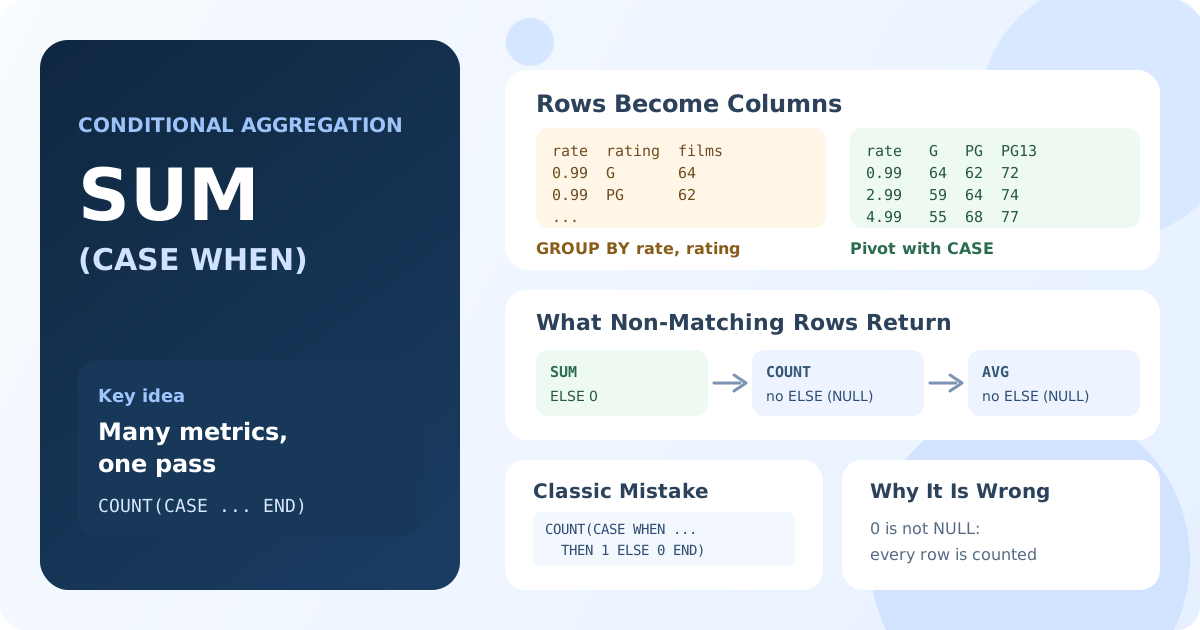
The Core Idea
An aggregate function processes every row of the group. A CASE inside it decides what value each row contributes:
SUM(CASE WHEN condition THEN value ELSE 0 END)
COUNT(CASE WHEN condition THEN 1 END)
AVG(CASE WHEN condition THEN value END)
Rows that don't match the condition contribute 0 to a sum or NULL, which aggregate functions ignore. So each metric is calculated only over "its" rows, while all metrics are calculated in one pass over the table.
Conditional Sum
SELECT staff_id,
       SUM(CASE WHEN amount < 2 THEN amount ELSE 0 END) AS low_total,
       SUM(CASE WHEN amount >= 2 AND amount < 6 THEN amount ELSE 0 END) AS medium_total,
       SUM(CASE WHEN amount >= 6 THEN amount ELSE 0 END) AS high_total,
       SUM(amount) AS total
FROM payment
GROUP BY staff_id;
Result: for each staff member, the revenue from small, medium and large payments, and the total. The three ranges add up to the total.
For SUM, ELSE 0 is correct: rows outside the range add nothing. Without ELSE, a range with no matching rows returns NULL instead of 0.
Conditional Count
SELECT staff_id,
       COUNT(CASE WHEN amount < 2 THEN 1 END) AS low_payments,
       COUNT(CASE WHEN amount >= 2 AND amount < 6 THEN 1 END) AS medium_payments,
       COUNT(CASE WHEN amount >= 6 THEN 1 END) AS high_payments
FROM payment
GROUP BY staff_id;
Result: the number of payments in each range for each staff member.
COUNT(expression) counts non-NULL values. When the condition is false and there is no ELSE, CASE returns NULL, and the row isn't counted.
A common mistake: COUNT(CASE WHEN ... THEN 1 ELSE 0 END). Zero is not NULL, so COUNT counts every row and all three columns show the same number. If you prefer ELSE 0, use SUM instead: SUM(CASE WHEN ... THEN 1 ELSE 0 END).
A column can also be counted directly. COUNT(return_date) counts only returned rentals:
SELECT staff_id,
       COUNT(*) AS all_rentals,
       COUNT(return_date) AS returned,
       COUNT(CASE WHEN return_date IS NULL THEN 1 END) AS not_returned
FROM rental
GROUP BY staff_id;
Result: for each staff member, all rentals, returned rentals and rentals that are still out.
Conditional Average
SELECT staff_id,
       AVG(amount) AS avg_payment,
       AVG(CASE WHEN amount >= 5 THEN amount END) AS avg_big_payment
FROM payment
GROUP BY staff_id;
Result: for each staff member, the average of all payments and the average of payments of $5 and more.
For AVG, don't write ELSE 0. The average is the sum divided by the number of values; zeros would be counted as values and would pull the average down. Without ELSE, non-matching rows give NULL and are skipped.
| Function | What to return for non-matching rows |
|---|---|
SUM(CASE ...) | ELSE 0 |
COUNT(CASE ...) | no ELSE (NULL) |
AVG(CASE ...), MIN, MAX | no ELSE (NULL) |
Pivot: Turning Rows into Columns
A pivot shows the values of a category as separate columns. With a normal GROUP BY rental_rate, rating you get one row per combination. With conditional aggregation, each rating becomes a column:
SELECT rental_rate,
       COUNT(CASE WHEN rating = 'G' THEN 1 END) AS g,
       COUNT(CASE WHEN rating = 'PG' THEN 1 END) AS pg,
       COUNT(CASE WHEN rating = 'PG-13' THEN 1 END) AS pg13,
       COUNT(CASE WHEN rating = 'R' THEN 1 END) AS r,
       COUNT(CASE WHEN rating = 'NC-17' THEN 1 END) AS nc17,
       COUNT(*) AS all_films
FROM film
GROUP BY rental_rate
ORDER BY rental_rate;
Result: three rows, one per rental rate ($0.99, $2.99, $4.99), with the number of films of each rating in separate columns.
The same works for other aggregates. Average film length per rating, again without ELSE:
SELECT rental_rate,
       ROUND(AVG(CASE WHEN rating = 'G' THEN length END), 1) AS g_avg_length,
       ROUND(AVG(CASE WHEN rating = 'R' THEN length END), 1) AS r_avg_length
FROM film
GROUP BY rental_rate
ORDER BY rental_rate;
A pivot by day of the week, built from a date:
SELECT MONTH(rental_date) AS rental_month,
       SUM(CASE WHEN DAYOFWEEK(rental_date) IN (1, 7) THEN 1 ELSE 0 END) AS weekend_rentals,
       SUM(CASE WHEN DAYOFWEEK(rental_date) BETWEEN 2 AND 6 THEN 1 ELSE 0 END) AS weekday_rentals
FROM rental
GROUP BY MONTH(rental_date)
ORDER BY rental_month;
Result: for each month, the number of rentals on weekends and on weekdays. In MySQL, DAYOFWEEK() returns 1 for Sunday and 7 for Saturday.
Some databases have a PIVOT operator (SQL Server, Oracle), but conditional aggregation works everywhere and is the portable choice.
Shares and Ratios
Two conditional aggregates can be combined in one expression:
SELECT customer_id,
       COUNT(*) AS payments,
       ROUND(100 * SUM(CASE WHEN amount >= 5 THEN 1 ELSE 0 END) / COUNT(*), 1) AS big_payment_pct
FROM payment
GROUP BY customer_id
ORDER BY big_payment_pct DESC
LIMIT 10;
Result: the 10 customers with the highest share of payments of $5 and more.
The FILTER Clause
PostgreSQL and SQLite (3.30+) support a shorter standard syntax, FILTER:
-- PostgreSQL, SQLite
SELECT customer_id,
       COUNT(*) AS all_payments,
       COUNT(*) FILTER (WHERE amount >= 5) AS big_payments,
       SUM(amount) FILTER (WHERE amount >= 5) AS big_total
FROM payment
GROUP BY customer_id;
It means the same as COUNT(CASE WHEN amount >= 5 THEN 1 END). MySQL, MariaDB and SQL Server don't support FILTER, so CASE remains the portable form.
Key Takeaways:
- Conditional aggregation is an aggregate function with
CASEinside: several metrics in one query and one pass. SUM(CASE ... ELSE 0 END)for sums;COUNT(CASE ... END)withoutELSEfor counts.COUNT(CASE ... ELSE 0 END)counts all rows: a common mistake.AVG(CASE ...)withoutELSE, otherwise zeros lower the average.- A pivot with
CASEturns category values into columns and works in every database.
Frequently Asked Questions
What is conditional aggregation in SQL?
It is an aggregate function whose argument is a CASE expression, for example SUM(CASE WHEN amount >= 5 THEN amount ELSE 0 END). Each metric is calculated only over the rows that match its condition, so one query can return many differently filtered metrics.
Why does COUNT(CASE WHEN ... ELSE 0 END) count all rows?
COUNT counts values that are not NULL, and 0 is not NULL. Remove ELSE so non-matching rows return NULL, or use SUM(CASE WHEN ... THEN 1 ELSE 0 END).
How do I pivot rows into columns in MySQL?
MySQL has no PIVOT operator. Use one conditional aggregate per output column: COUNT(CASE WHEN rating = 'G' THEN 1 END) AS g, and group by the row dimension.