SQL Recursive CTE: Querying Hierarchies
Lesson 6.5 · Reading time: ~9 min · Practice tasks ↓
A SQL recursive CTE is a common table expression that refers to itself, so one query can walk a hierarchy of any depth: an org chart, a category tree, a thread of comments. In this lesson you'll learn the WITH RECURSIVE syntax, how the anchor and recursive members work together, how to find all subordinates or all managers of an employee, how to build a path through the tree, and how to stop runaway recursion.
In the previous lesson, a CTE was a named step of a query that ran once. Hierarchical data needs something more. If each employee row stores the id of their manager, a JOIN finds direct reports, a second JOIN finds the next level, and so on, but you don't know in advance how many levels there are. A recursive CTE repeats the join for you until there is nothing left to find.
The examples use MySQL 8.0 syntax and also run on MariaDB 10.2+. The sample databases on SQLtest are read-only, so run the examples in the playground on a database without sample data: each one creates its own table.
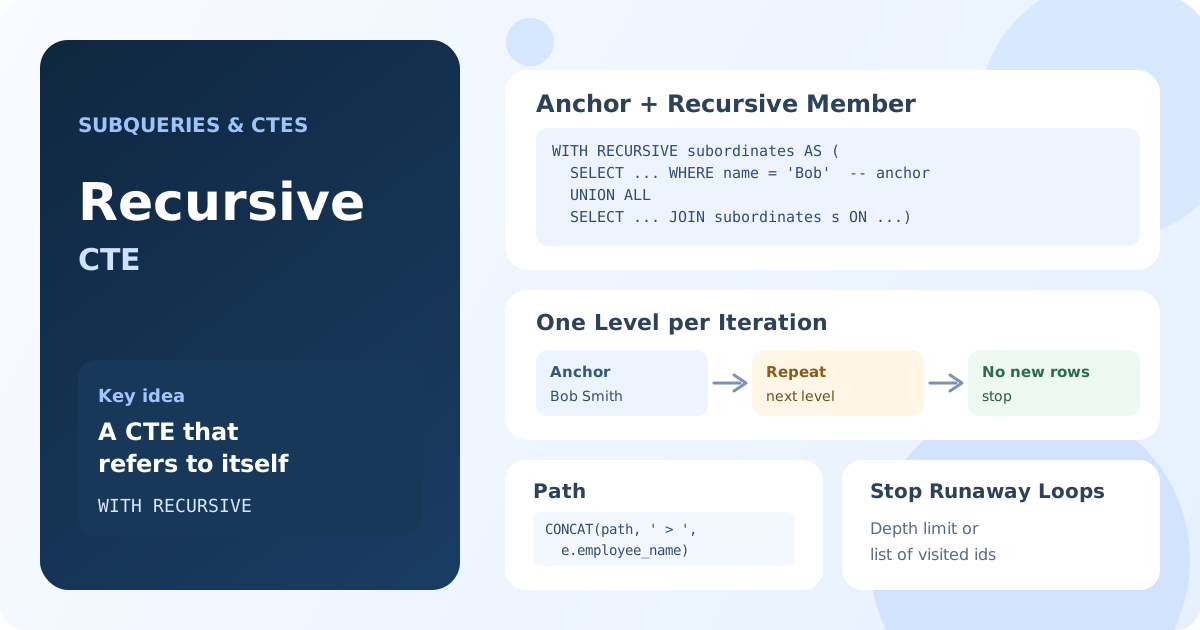
How a Recursive CTE Works
A recursive CTE has two parts joined by UNION ALL:
WITH RECURSIVE cte_name AS (
    -- Anchor member: the starting rows
    SELECT ...
    FROM table_name
    WHERE start_condition

    UNION ALL

    -- Recursive member: the next level, found from the previous one
    SELECT ...
    FROM table_name
    INNER JOIN cte_name ON join_condition
)
SELECT * FROM cte_name;
WITH RECURSIVEtells the database that the CTE refers to itself.- The anchor member runs once and returns the starting rows, such as the top manager.
- The recursive member refers to the CTE by name. Each time it runs, it sees only the rows produced by the previous iteration.
- The recursion stops when an iteration returns no rows. All rows from all iterations form the result.
The Simplest Example: a Number Series
WITH RECURSIVE numbers AS (
    SELECT 1 AS n
    UNION ALL
    SELECT n + 1
    FROM numbers
    WHERE n < 5
)
SELECT n FROM numbers;
Result: 5 rows with the numbers 1, 2, 3, 4, 5.
The anchor returns 1. The first iteration reads 1 and returns 2, the next one returns 3, and so on. When the previous iteration produced 5, the condition n < 5 is false, the recursive member returns nothing, and the query ends. The WHERE condition is the termination condition: without it, the recursion would never stop.
Sample Data: an Org Chart
A hierarchy in a table is usually stored as an adjacency list: every row has a reference to its parent in the same table. Here manager_id points to another employee, and the CEO has no manager:
CREATE TABLE employee (
    employee_id INT PRIMARY KEY,
    employee_name VARCHAR(100) NOT NULL,
    manager_id INT,
    title VARCHAR(100)
);

INSERT INTO employee VALUES
    (1, 'Alice Johnson', NULL, 'CEO'),
    (2, 'Bob Smith', 1, 'VP of Engineering'),
    (3, 'Carol White', 1, 'VP of Sales'),
    (4, 'David Brown', 2, 'Engineering Manager'),
    (5, 'Eve Davis', 2, 'Engineering Manager'),
    (6, 'Frank Miller', 3, 'Sales Manager'),
    (7, 'Grace Wilson', 4, 'Senior Developer'),
    (8, 'Henry Moore', 4, 'Developer'),
    (9, 'Ivy Taylor', 5, 'Developer'),
    (10, 'Jack Anderson', 6, 'Sales Representative');
Finding All Subordinates
Who reports to Bob Smith, directly or indirectly? The anchor selects Bob; the recursive member finds employees whose manager is in the previous level:
WITH RECURSIVE subordinates AS (
    SELECT employee_id, employee_name, title, 0 AS level
    FROM employee
    WHERE employee_name = 'Bob Smith'

    UNION ALL

    SELECT e.employee_id, e.employee_name, e.title, s.level + 1
    FROM employee AS e
    INNER JOIN subordinates AS s ON e.manager_id = s.employee_id
)
SELECT employee_id, employee_name, title, level
FROM subordinates
ORDER BY level, employee_name;
Result: 6 rows: Bob Smith at level 0, David Brown and Eve Davis at level 1, Grace Wilson, Henry Moore and Ivy Taylor at level 2.
| employee_id | employee_name | title | level |
|---|---|---|---|
| 2 | Bob Smith | VP of Engineering | 0 |
| 4 | David Brown | Engineering Manager | 1 |
| 5 | Eve Davis | Engineering Manager | 1 |
| 7 | Grace Wilson | Senior Developer | 2 |
| 8 | Henry Moore | Developer | 2 |
| 9 | Ivy Taylor | Developer | 2 |
The level column counts iterations: it starts at 0 in the anchor and grows by one at each step down. To exclude Bob himself, add WHERE level > 0 to the final query.
Building the Whole Tree with a Path
To show the full org chart, start from the employee without a manager and collect the path from the top to each person:
WITH RECURSIVE org_chart AS (
    SELECT
        employee_id,
        employee_name,
        title,
        0 AS level,
        CAST(employee_name AS CHAR(500)) AS path
    FROM employee
    WHERE manager_id IS NULL

    UNION ALL

    SELECT
        e.employee_id,
        e.employee_name,
        e.title,
        oc.level + 1,
        CONCAT(oc.path, ' > ', e.employee_name)
    FROM employee AS e
    INNER JOIN org_chart AS oc ON e.manager_id = oc.employee_id
)
SELECT
    CONCAT(REPEAT('- ', level), employee_name) AS hierarchy,
    title,
    path
FROM org_chart
ORDER BY path;
Result: all 10 employees in tree order, each with the chain of managers above them.
| hierarchy | title | path |
|---|---|---|
| Alice Johnson | CEO | Alice Johnson |
| - Bob Smith | VP of Engineering | Alice Johnson > Bob Smith |
| - - David Brown | Engineering Manager | Alice Johnson > Bob Smith > David Brown |
| - - - Grace Wilson | Senior Developer | Alice Johnson > Bob Smith > David Brown > Grace Wilson |
| - - - Henry Moore | Developer | Alice Johnson > Bob Smith > David Brown > Henry Moore |
| - - Eve Davis | Engineering Manager | Alice Johnson > Bob Smith > Eve Davis |
| - - - Ivy Taylor | Developer | Alice Johnson > Bob Smith > Eve Davis > Ivy Taylor |
| - Carol White | VP of Sales | Alice Johnson > Carol White |
| - - Frank Miller | Sales Manager | Alice Johnson > Carol White > Frank Miller |
| - - - Jack Anderson | Sales Representative | Alice Johnson > Carol White > Frank Miller > Jack Anderson |
Two details make this work:
- Sorting by path puts every employee right after their manager, so the result reads like a tree.
CAST(... AS CHAR(500))in the anchor. The column types of a recursive CTE are taken from the anchor member. Without the cast,pathwould get the type ofemployee_name,VARCHAR(100), and as soon as a path grew longer than 100 characters, MySQL would stop with the error "Data too long for column 'path'". Make text columns that grow in the recursion wide enough in the anchor.
Walking Up: All Managers of an Employee
The same technique works in the other direction. To find the chain of managers above Ivy Taylor, start from her and join each row to its parent: the join condition is reversed.
WITH RECURSIVE managers AS (
    SELECT employee_id, employee_name, manager_id, 0 AS steps_up
    FROM employee
    WHERE employee_name = 'Ivy Taylor'

    UNION ALL

    SELECT e.employee_id, e.employee_name, e.manager_id, m.steps_up + 1
    FROM employee AS e
    INNER JOIN managers AS m ON e.employee_id = m.manager_id
)
SELECT employee_name, steps_up
FROM managers
ORDER BY steps_up;
Result: 4 rows: Ivy Taylor (0), Eve Davis (1), Bob Smith (2), Alice Johnson (3).
The recursion stops at Alice Johnson: her manager_id is NULL, so the join finds nothing.
Stopping Runaway Recursion
A recursive CTE ends when an iteration returns no rows. Two situations break that rule: a missing termination condition, as in a number series without WHERE, and cycles in the data, for example when A is B's manager and B is A's manager by mistake. Then the same rows are found again and again.
Limit the Depth
Add a condition on the level to the recursive member:
WITH RECURSIVE subordinates AS (
    SELECT employee_id, employee_name, 0 AS level
    FROM employee
    WHERE manager_id IS NULL

    UNION ALL

    SELECT e.employee_id, e.employee_name, s.level + 1
    FROM employee AS e
    INNER JOIN subordinates AS s ON e.manager_id = s.employee_id
    WHERE s.level < 2
)
SELECT employee_name, level
FROM subordinates;
Result: 6 rows: the CEO, two vice presidents and three managers; levels below 2 are not expanded.
MySQL also has a safety limit: the cte_max_recursion_depth variable (1000 by default). A query that needs more iterations fails with "Recursive query aborted after 1001 iterations". For a legitimately deep recursion, raise it with SET SESSION cte_max_recursion_depth = 10000;. MariaDB behaves differently: when it reaches max_recursive_iterations, it stops without an error and returns the rows found so far, so an incomplete result can go unnoticed.
Skip Rows Already Visited
A depth limit stops a cycle but still returns repeated rows. To prevent the cycle itself, keep the list of visited ids and don't step into a row that is already on the path:
WITH RECURSIVE org_chart AS (
    SELECT employee_id, employee_name, CAST(employee_id AS CHAR(500)) AS visited
    FROM employee
    WHERE manager_id IS NULL

    UNION ALL

    SELECT e.employee_id, e.employee_name, CONCAT(oc.visited, ',', e.employee_id)
    FROM employee AS e
    INNER JOIN org_chart AS oc ON e.manager_id = oc.employee_id
    WHERE FIND_IN_SET(e.employee_id, oc.visited) = 0
)
SELECT employee_name, visited
FROM org_chart;
Result: 10 rows; for example, Ivy Taylor has visited = 1,2,5,9.
FIND_IN_SET() returns the position of a value in a comma-separated list, or 0 if it isn't there. PostgreSQL 14+ has a built-in CYCLE clause for the same purpose.
Rules and Differences Between Databases
- The recursive member must refer to the CTE exactly once, in
FROMorJOIN, not in a subquery. - In MySQL, the recursive member can't use aggregate functions, window functions,
GROUP BY,ORDER BYorDISTINCT. Aggregate in the final query instead. UNION ALLkeeps every row and is the usual choice.UNIONremoves duplicate rows and, as a side effect, stops a cycle when the repeated rows are identical.
| Database | Syntax |
|---|---|
| MySQL 8.0+, MariaDB 10.2+, PostgreSQL, SQLite | WITH RECURSIVE |
| SQL Server | WITH without RECURSIVE; limit with OPTION (MAXRECURSION n), 100 by default |
| Oracle | WITH without RECURSIVE, or the older CONNECT BY |
For better performance, index the column used in the recursive join, such as manager_id.
Key Takeaways:
- A recursive CTE refers to itself and walks a hierarchy of any depth with
WITH RECURSIVE. - The anchor member returns the starting rows; the recursive member finds the next level from the previous one; the recursion stops when an iteration returns no rows.
- Joining
e.manager_id = cte.employee_idwalks down the tree; joininge.employee_id = cte.manager_idwalks up. - A
levelcounter and apathcolumn show the position of each row; cast growing text columns in the anchor. - Protect queries with a depth limit or a list of visited ids; MySQL stops after
cte_max_recursion_depthiterations.
Frequently Asked Questions
What is a recursive CTE in SQL?
A recursive CTE is a common table expression that refers to itself. It consists of an anchor member that returns the starting rows and a recursive member that is executed repeatedly, each time on the rows from the previous iteration, until no new rows appear. It is used for hierarchies and graphs: org charts, category trees, routes.
How do I stop infinite recursion in a recursive CTE?
Add a termination condition to the recursive member, such as WHERE level < 10, and protect against cycles in the data by tracking visited ids. MySQL also aborts a query after cte_max_recursion_depth iterations (1000 by default) and SQL Server after MAXRECURSION (100 by default); MariaDB silently stops after max_recursive_iterations.
Does MySQL support recursive CTEs?
Yes, since MySQL 8.0 and MariaDB 10.2, with the WITH RECURSIVE syntax. Older MySQL versions have no CTEs; hierarchies there were queried with stored procedures or a fixed number of self-joins.
Why does my recursive CTE fail with "Data too long for column"?
The columns of a recursive CTE get their types from the anchor member. If the recursive member builds a longer string, such as a path, it no longer fits. Cast the column in the anchor to a wider type, for example CAST(name AS CHAR(500)).