Types of Databases: Relational, NoSQL and Beyond
Lesson 1.2 · Reading time: ~15 min · Practice tasks ↓
There are many types of databases, each optimized for a specific kind of data, query pattern, or scalability requirement. In this lesson you'll learn the main database models - relational, key-value, document, wide-column, graph, time-series, and columnar - with their key differences, typical use cases, and examples of real systems.
In the previous lesson, we introduced the general idea of a database and a DBMS. In practice, not all databases are built the same way. Different database types are optimized for different kinds of data, query patterns, scalability requirements, and consistency needs.
We will also take a closer look at relational databases, because they will remain our main focus throughout this course.
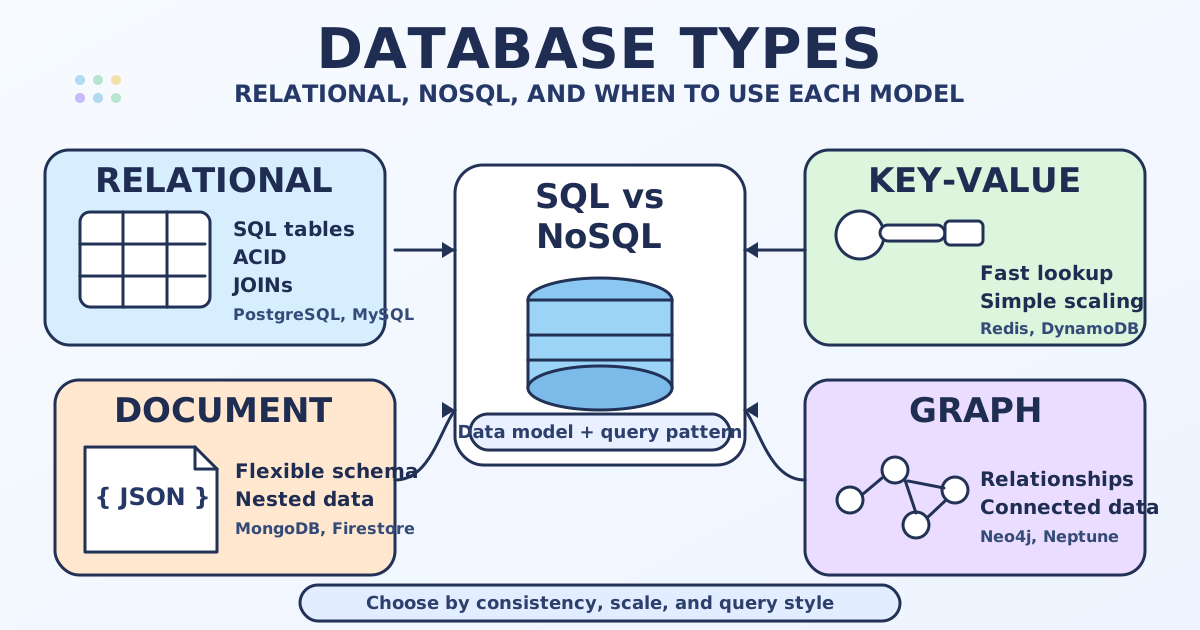
Why Are There Different Types of Databases?
No single database design is perfect for every application.
For example:
- A banking system needs strong consistency and reliable transactions.
- A caching system needs extremely fast key lookups.
- A social network may need flexible document storage and graph-style relationship analysis.
- An analytics platform may need to scan billions of values efficiently for reporting.
Because different systems solve different problems, several database models have emerged over time.
Main Types of Databases: Comparison Table
Here is a quick comparison before we examine each type in more detail:
| Type | Data Model | Strengths | Common Use Cases | Examples |
|---|---|---|---|---|
| Relational | Tables with rows and columns | Strong consistency, SQL, joins, structured data | Banking, ERP, CRM, e-commerce, reporting | PostgreSQL, MySQL, MariaDB, SQLite, Oracle |
| Key-Value | Key paired with value | Very fast lookups, simple scaling | Caching, sessions, feature flags, shopping carts | Redis, Amazon DynamoDB, Riak |
| Document | JSON-like documents | Flexible schema, nested data | Content management, user profiles, catalogs, web apps | MongoDB, Couchbase, Firestore |
| Wide-Column | Rows with flexible columns grouped by families | High write throughput, horizontal scaling | Event logging, IoT, large-scale distributed workloads | Apache Cassandra, HBase, ScyllaDB |
| Graph | Nodes and edges | Relationship-heavy queries | Social networks, fraud detection, recommendation engines | Neo4j, Amazon Neptune, ArangoDB |
| Time-Series | Time-stamped records | Efficient ingestion and aggregation over time | Monitoring, metrics, sensors, financial ticks | InfluxDB, TimescaleDB, OpenTSDB |
| Columnar Analytical | Data stored by column instead of by row | Fast analytical scans and aggregation | BI, dashboards, warehousing, OLAP | ClickHouse, DuckDB, Amazon Redshift, BigQuery |
| In-Memory | Data stored primarily in RAM | Extremely low latency | Caching, leaderboards, real-time counters | Redis, Memcached, SAP HANA |
Relational Databases
Relational databases store data in tables made of rows and columns. Tables can be connected to each other through relationships, usually using primary keys and foreign keys.
This model is especially good when data is well structured and when correctness, consistency, and complex querying are important.
Core Properties of Relational Databases
1. Structured schema
Relational databases usually require a clearly defined schema. Before storing data, you define tables, columns, data types, constraints, and relationships.
This makes the structure predictable and easier to validate.
2. Relationships between tables
A major strength of relational systems is the ability to model relationships explicitly.
For example:
- A
customerstable can be related to anorderstable. - An
orderstable can be related to anorder_itemstable.
This makes relational databases well suited for business systems where entities are interconnected.
3. SQL support
Relational databases are commonly queried using SQL (Structured Query Language). SQL provides a standard way to filter, join, aggregate, sort, and modify structured data.
4. ACID transactions
Relational databases are well known for supporting ACID properties:
- Atomicity: A transaction succeeds completely or fails completely.
- Consistency: Data must remain valid according to defined rules.
- Isolation: Concurrent transactions should not interfere incorrectly with one another.
- Durability: Once committed, data remains stored even after failures.
These properties are critical in systems such as banking, billing, reservations, and inventory control.
5. Data integrity constraints
Relational databases can enforce rules directly in the database layer, for example:
- primary keys
- foreign keys
- unique constraints
NOT NULLconstraints- check constraints
These features help prevent invalid or inconsistent data.
6. Powerful joins and reporting
Relational databases excel when you need to combine information from multiple tables. This is one reason they remain central to reporting, analytics, finance, operations, and many transactional systems.
7. Normalization and reduced redundancy
Relational design often uses normalization, which means organizing data into related tables to reduce duplication and improve consistency.
For example, customer information can be stored once in a customers table instead of being repeated in every order record.
Common Use Cases for Relational Databases
Relational databases are usually the best choice when:
- data is structured and clearly defined
- relationships between entities are important
- transactions must be reliable
- consistency matters more than schema flexibility
- the application needs complex querying and reporting
Examples of Relational Databases
- PostgreSQL: Powerful open-source relational database with strong standards support and advanced features.
- MySQL: Popular relational database, widely used in web applications.
- MariaDB: Community-developed fork of MySQL.
- SQLite: Lightweight embedded relational database stored in a single file.
- Oracle Database: Enterprise-grade relational database.
- Microsoft SQL Server: Relational database widely used in enterprise environments.
Key-Value Databases
Key-value databases store data as a simple pair: a key and its associated value.
The key works like a unique identifier, and the database retrieves the value directly from that key. This model is very simple and very fast.
Key Differences
- Data access is usually based on a single key rather than complex joins.
- The database often does not understand the internal structure of the value.
- It is optimized for extremely fast reads and writes.
Typical Use Cases
- caching query results
- storing user sessions
- shopping carts
- feature flags
- rate limiting
- leaderboards and counters
Examples
- Redis
- Amazon DynamoDB
- Riak
Document Databases
Document databases store data as documents, usually in a JSON-like format. Each document can contain fields, arrays, and nested objects.
Unlike relational databases, not every document must have exactly the same structure.
Key Differences
- Schema is flexible or semi-flexible.
- Related data can often be stored together in one document.
- They are convenient for applications where the structure evolves frequently.
Typical Use Cases
- content management systems
- product catalogs
- user profiles
- mobile and web applications
- prototyping systems with changing requirements
Examples
- MongoDB
- Couchbase
- Google Firestore
Wide-Column Databases
Wide-column databases, sometimes called column-family databases, store data in rows, but each row can have a very large and flexible set of columns. They are designed for distribution across many servers and for high write throughput.
Key Differences
- Schema is more flexible than in relational databases.
- They are optimized for large-scale distributed storage.
- They handle massive datasets and heavy write loads well.
- They typically do not support relational joins in the same way as SQL databases.
Typical Use Cases
- event logging
- IoT telemetry
- messaging systems
- write-heavy applications
- geographically distributed systems
Examples
- Apache Cassandra
- Apache HBase
- ScyllaDB
Columnar Analytical Databases
A columnar database stores values of the same column together on disk instead of storing a full row together. This is different from a wide-column database.
Columnar storage is especially efficient for analytical queries that read a few columns from a very large dataset.
Key Differences
- Optimized for scanning and aggregating large volumes of data.
- Very efficient for reporting and analytics.
- Usually less suitable for heavy transactional workloads with many small row updates.
Typical Use Cases
- business intelligence
- dashboards
- data warehousing
- analytical reporting
- large-scale log analysis
Examples
- ClickHouse
- DuckDB
- Amazon Redshift
- Google BigQuery
Graph Databases
Graph databases are designed for data where relationships are the most important part of the model. They store nodes (entities) and edges (relationships).
Key Differences
- Relationship traversal is fast and natural.
- They are ideal when querying paths, networks, and connected data.
- They are often a better fit than relational databases for many-hop relationship queries.
Typical Use Cases
- social networks
- fraud detection
- recommendation systems
- network topology
- knowledge graphs
Examples
- Neo4j
- Amazon Neptune
- ArangoDB
Time-Series Databases
Time-series databases are specialized for data points associated with time. They are optimized for high ingestion rates, retention policies, compression, and time-based aggregation.
Key Differences
- Every record is associated with a timestamp.
- Queries often focus on ranges such as the last hour, day, or month.
- They provide efficient aggregation over time windows.
Typical Use Cases
- server monitoring
- application metrics
- sensor data
- stock market data
- industrial measurements
Examples
- InfluxDB
- TimescaleDB
- OpenTSDB
In-Memory Databases
In-memory databases store most or all data in RAM rather than on disk. This makes them extremely fast, though memory is more expensive than disk storage.
Some in-memory databases are used only as temporary caches, while others can also persist data to disk.
Typical Use Cases
- caching
- session storage
- real-time counters
- gaming leaderboards
- ultra-low-latency systems
Examples
- Redis
- Memcached
- SAP HANA
How to Choose the Right Database Type
When selecting a database, ask questions like these:
- Is the data highly structured or flexible?
- Do I need strong ACID transactions?
- Will I run complex joins?
- Is low-latency key lookup the top priority?
- Is the workload transactional or analytical?
- Will the system scale across many servers?
- Are relationships between entities central to the application?
In many real systems, organizations use more than one database type. For example:
- a relational database for core business data
- Redis for caching
- a document database for flexible content
- a columnar warehouse for analytics
This is often called polyglot persistence.
Summary: Key Differences Between Database Types
The main differences between database types usually involve:
- data model - tables, documents, key-value pairs, graphs, or time-stamped records
- schema flexibility - fixed versus flexible structure
- query style - SQL, key lookup, document queries, graph traversal, time-window analysis
- consistency model - strong transactional guarantees versus scalability-focused trade-offs
- performance profile - optimized for transactions, analytics, relationships, or ultra-fast access
Key Takeaways:
- Different database types exist because different applications have different technical and business requirements.
- Relational databases are best known for structured schemas, SQL, relationships, integrity constraints, and ACID transactions.
- Key-value databases are excellent for fast lookups and caching.
- Document databases are useful when data structure is flexible or evolves frequently.
- Wide-column databases are built for distributed, large-scale, write-heavy workloads.
- Columnar analytical databases are optimized for reporting and large-scale analytics.
- Graph databases are ideal for relationship-heavy data.
- Time-series databases specialize in time-based metrics and events.
- Many modern systems use multiple database types together (polyglot persistence).
Frequently Asked Questions
What is the difference between relational and NoSQL databases?
Relational databases use a fixed table-based schema, enforce ACID transactions, and are queried with SQL. NoSQL databases is an umbrella term covering key-value, document, wide-column, and graph models - they trade some consistency guarantees for schema flexibility or horizontal scalability. Neither is universally better; the right choice depends on your data and workload.
When should I use a document database instead of a relational database?
Use a document database when your data has a naturally nested, variable structure (e.g. product catalogs with different attributes per product) and you rarely need to join across collections. Use a relational database when data is structured, entities are interrelated, and you need reliable transactions and complex multi-table queries.
Can a single application use multiple database types?
Yes - this is called polyglot persistence. It is common in production systems: for example, PostgreSQL for transactional data, Redis for caching, and ClickHouse for analytics. Each database type is used where it performs best.
Interview Questions
What database type would you choose for a given use case, and why?
Start from the workload and constraints: data structure, consistency needs, query patterns, latency targets, and scale. For example, choose a relational database for ACID-heavy transactional systems, a document database for flexible JSON-like records, and a time-series database for timestamped metrics with retention policies.
What are the pros and cons of one database type compared to another?
Every model is a trade-off. Relational databases provide strong consistency, joins, and mature SQL tooling, but schema changes can be stricter at scale. NoSQL models often provide better flexibility or horizontal scaling, but they may limit joins or require careful consistency design.
Can you use different database types in one application?
Yes. This is polyglot persistence: using multiple databases, each for the workload it handles best. A common pattern is PostgreSQL for core transactions, Redis for caching, and ClickHouse (or another columnar system) for analytics.