SQL ROLLUP, CUBE and GROUPING SETS
Lesson 4.5 · Reading time: ~9 min · Practice tasks ↓
SQL ROLLUP, CUBE and GROUPING SETS extend GROUP BY: besides the normal groups, they return subtotal rows and a grand total in the same result. In this lesson you'll learn how the three constructs differ, how to use WITH ROLLUP in MySQL, and how the GROUPING() function separates total rows from real NULL values.
A typical report shows detail rows, subtotals and a grand total: revenue by month, a total for each year, and the total for the whole period. With a plain GROUP BY, you would run a query for each level and glue the results together. ROLLUP, CUBE and GROUPING SETS return all the levels in one query.
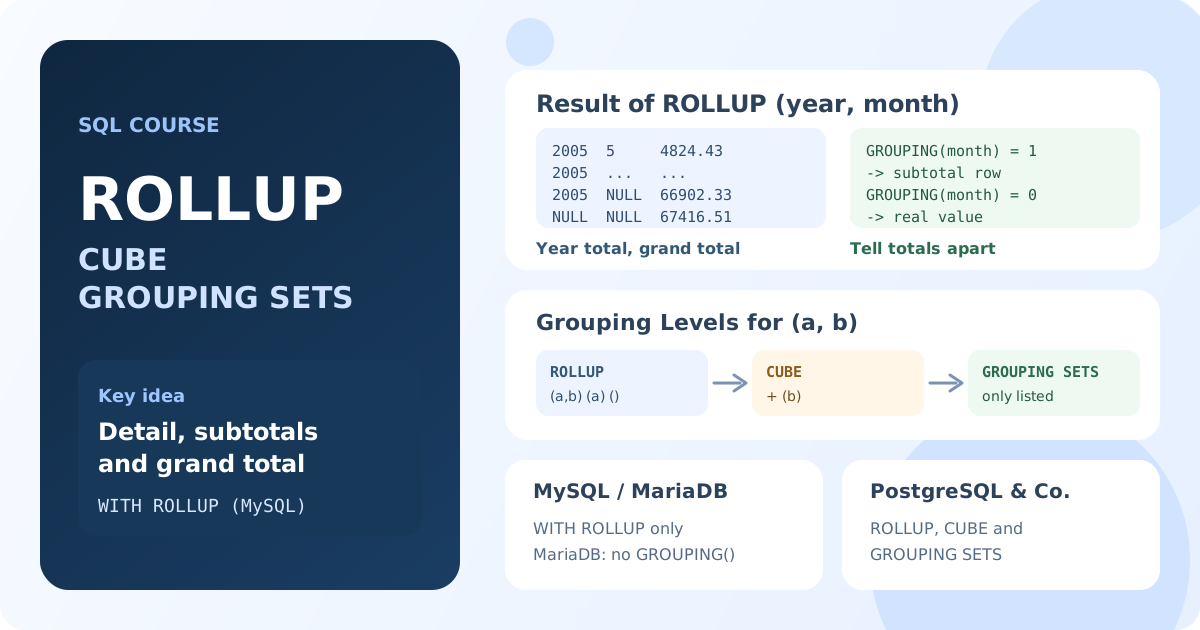
How Grouping Levels Work
A grouping level is the set of columns the rows are grouped by. For two columns, there are four possible levels:
| Level | Meaning | Example |
|---|---|---|
(year, month) | Detail | Revenue for each month |
(year) | Subtotal | Revenue for each year |
(month) | Subtotal by the other column | Revenue for each month across all years |
() | Grand total | Revenue for the whole period |
In a subtotal row, the columns that were "rolled up" contain NULL.
| Construct | Levels for (a, b) |
|---|---|
ROLLUP (a, b) | (a, b), (a), (): a hierarchy from right to left |
CUBE (a, b) | (a, b), (a), (b), (): all combinations |
GROUPING SETS (...) | exactly the levels you list |
WITH ROLLUP in MySQL and MariaDB
MySQL and MariaDB support ROLLUP with their own syntax: WITH ROLLUP after the GROUP BY list.
SELECT YEAR(payment_date) AS pay_year,
       MONTH(payment_date) AS pay_month,
       SUM(amount) AS revenue
FROM payment
GROUP BY YEAR(payment_date), MONTH(payment_date) WITH ROLLUP;
Result: revenue for each month (May to August 2005 and February 2006), a subtotal row for each year where pay_month is NULL, and a grand total row where both columns are NULL.
The order of columns in GROUP BY defines the hierarchy: subtotals are added for each value of the first column, and the last column is "rolled up" first.
Telling Total Rows Apart with GROUPING()
In a total row, the rolled-up columns are NULL. But real data can contain NULL too, and then you can't tell a subtotal from a group of rows with an empty value. The GROUPING(column) function solves this: it returns 1 if the column was rolled up in this row, and 0 if the value comes from the data.
GROUPING() is supported by MySQL 8.0+, PostgreSQL, SQL Server and Oracle. MariaDB doesn't support it; there you can only check for NULL.
-- MySQL 8.0+
SELECT CASE
           WHEN GROUPING(YEAR(payment_date)) = 1 THEN 'Grand total'
           WHEN GROUPING(MONTH(payment_date)) = 1 THEN 'Year total'
           ELSE 'Month'
       END AS row_type,
       YEAR(payment_date) AS pay_year,
       MONTH(payment_date) AS pay_month,
       SUM(amount) AS revenue
FROM payment
GROUP BY YEAR(payment_date), MONTH(payment_date) WITH ROLLUP;
Result: the same eight rows, each labeled as Month, Year total or Grand total.
Standard ROLLUP, CUBE and GROUPING SETS
PostgreSQL, SQL Server and Oracle support the standard syntax with all three constructs. The examples below run on the AdventureWorks database in SQL Server. Products are grouped by the year their sales started and by color; some products have no color, so Color contains real NULL values.
ROLLUP
SELECT YEAR(SellStartDate) AS start_year,
       Color,
       COUNT(*) AS products,
       GROUPING(Color) AS is_year_total
FROM Product
GROUP BY ROLLUP (YEAR(SellStartDate), Color)
ORDER BY GROUPING(YEAR(SellStartDate)), start_year, GROUPING(Color), Color;
Result: the number of products for each year and color, a subtotal for each year (is_year_total = 1), and the grand total last. For 2006, there are two rows with Color = NULL: the one with is_year_total = 0 is a group of 18 products without a color, and the one with is_year_total = 1 is the year's subtotal.
CUBE
CUBE adds totals for every combination of the columns, including totals by color across all years:
SELECT YEAR(SellStartDate) AS start_year,
       Color,
       COUNT(*) AS products
FROM Product
GROUP BY CUBE (YEAR(SellStartDate), Color)
ORDER BY GROUPING(YEAR(SellStartDate)), start_year, GROUPING(Color), Color;
Result: everything ROLLUP returns, plus a total for each color across all years.
With n columns, CUBE produces 2ⁿ grouping levels, so the result grows quickly. Use it for a small number of dimensions.
GROUPING SETS
GROUPING SETS returns only the levels you list. For example, totals by year and totals by color, without detail rows:
SELECT YEAR(SellStartDate) AS start_year,
       Color,
       COUNT(*) AS products
FROM Product
GROUP BY GROUPING SETS ((YEAR(SellStartDate)), (Color), ())
ORDER BY GROUPING(YEAR(SellStartDate)), start_year, Color;
Result: one row per year, one row per color, and the grand total.
ROLLUP and CUBE are shortcuts: ROLLUP (a, b) is the same as GROUPING SETS ((a, b), (a), ()).
Support in Databases
| Database | ROLLUP | CUBE | GROUPING SETS | GROUPING() |
|---|---|---|---|---|
| MySQL 8.0+ | WITH ROLLUP | No | No | Yes |
| MariaDB | WITH ROLLUP | No | No | No |
| PostgreSQL, SQL Server, Oracle | Yes | Yes | Yes | Yes |
| SQLite | No | No | No | No |
Where a construct isn't supported, combine several GROUP BY queries with UNION ALL, which you'll learn in Lesson 5.10.
When to Use Which
- ROLLUP for hierarchies: year → month, region → city, category → product.
- CUBE to analyze all slices of a few independent dimensions.
- GROUPING SETS when you need specific levels only, for example two independent breakdowns in one result.
Always add ORDER BY, so total rows appear in a predictable place, and label them with GROUPING() and CASE.
Key Takeaways:
ROLLUP,CUBEandGROUPING SETSadd subtotal and grand total rows to theGROUP BYresult.ROLLUP (a, b)gives(a, b),(a),();CUBE (a, b)also adds(b).GROUPING SETSreturns exactly the listed levels.GROUPING(column) = 1marks a rolled-up column and separates total rows from realNULLvalues.- MySQL and MariaDB support only
WITH ROLLUP; MariaDB has noGROUPING().
Frequently Asked Questions
What is the difference between ROLLUP and CUBE?
ROLLUP creates hierarchical subtotals from right to left: for (year, month) it adds totals per year and a grand total. CUBE creates subtotals for all combinations, so it also adds totals per month across all years.
How do I add a total row to a GROUP BY query?
In MySQL and MariaDB, add WITH ROLLUP after the GROUP BY columns. In PostgreSQL, SQL Server and Oracle, use GROUP BY ROLLUP (columns), or GROUP BY GROUPING SETS ((columns), ()) for detail plus a grand total only.
Why are there NULL values in ROLLUP results?
In subtotal and total rows, the columns that are rolled up have no single value, so they are NULL. Use GROUPING(column), which returns 1 for such rows, to distinguish them from real NULL values in the data.