SQL UPDATE: Changing Existing Rows
Lesson 8.2 · Reading time: ~7 min · Practice tasks ↓
The SQL UPDATE statement changes values in existing rows of a table. In this lesson you'll learn the UPDATE ... SET ... WHERE syntax, how to update several columns and calculate new values from current ones, how to update rows based on another table, and how to make sure an update changes only the rows you intend.
INSERT adds new rows; UPDATE corrects and maintains the ones that exist: a customer changes their email, prices go up, a status changes from "active" to "inactive". An UPDATE can change one row or millions of rows with one statement, so it deserves the same care as DELETE.
The sample databases on SQLtest are read-only, so these statements return a permission error there. The examples use the Sakila schema.
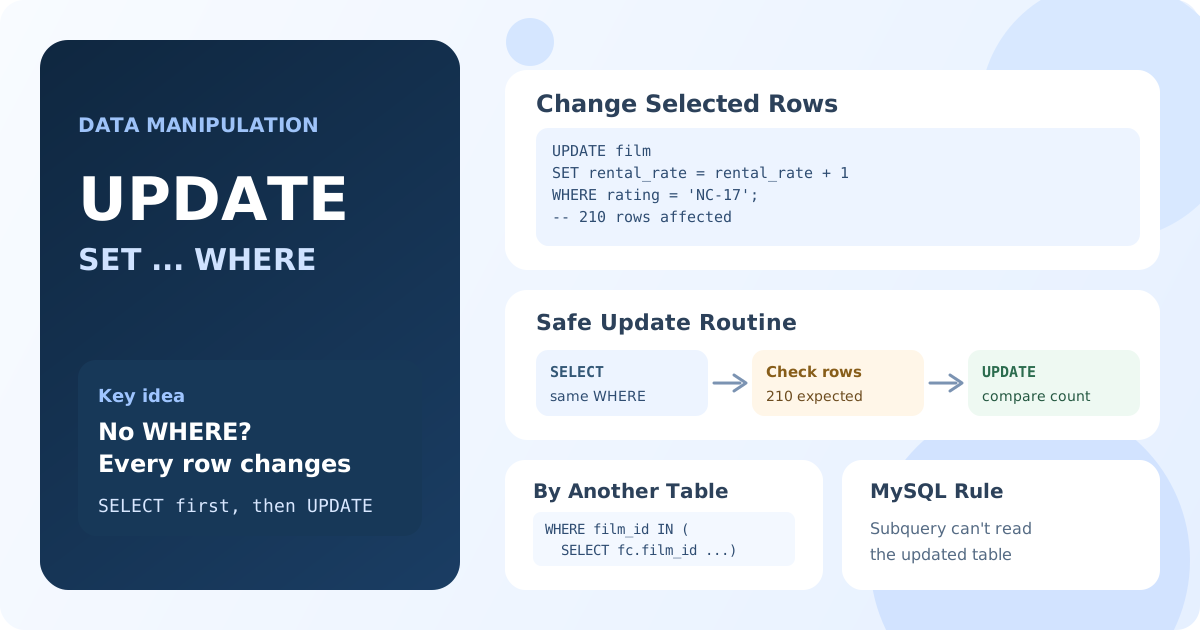
UPDATE Syntax
UPDATE table_name
SET column1 = value1,
    column2 = value2
WHERE condition;
UPDATEnames the table.SETlists the columns and their new values.WHEREselects the rows to change. WithoutWHERE, every row of the table is updated.
Updating One Row
UPDATE customer
SET email = 'mary.smith@example.com'
WHERE customer_id = 1;
Result: one row changed; the condition on the primary key matches exactly one customer.
Filtering by the primary key is the safest way to change a specific row: names can repeat, keys can't.
Updating Several Columns
List the assignments in SET, separated by commas:
UPDATE customer
SET first_name = 'ALICE',
    last_name = 'COOPER',
    email = 'alice.cooper@example.com'
WHERE customer_id = 42;
Result: three columns of customer 42 changed in one statement.
Calculating from the Current Value
The right side of SET can use the column's current value:
UPDATE film
SET rental_rate = rental_rate + 1.00
WHERE rating = 'NC-17';
Result: the rental rate of all 210 NC-17 films increases by $1.
All expressions in SET use the values from before the update, so SET a = b, b = a swaps two columns in standard SQL. MySQL is an exception: it applies assignments from left to right, and later ones see the new values.
Updating Rows Based on Another Table
To change rows by a condition from another table, use a subquery in WHERE. Raise the rental rate of all comedies by 10%:
UPDATE film
SET rental_rate = rental_rate * 1.10
WHERE film_id IN (
    SELECT fc.film_id
    FROM film_category AS fc
    INNER JOIN category AS c ON c.category_id = fc.category_id
    WHERE c.name = 'Comedy'
);
Result: the rate of the 58 comedies increases by 10%.
MySQL and MariaDB don't allow the subquery to read the table being updated: WHERE film_id IN (SELECT f.film_id FROM film f ...) fails with "You can't specify target table 'film' for update in FROM clause". Write the subquery over the other tables, as above.
MySQL and MariaDB also support a multi-table UPDATE with JOIN:
UPDATE film AS f
INNER JOIN film_category AS fc ON fc.film_id = f.film_id
INNER JOIN category AS c ON c.category_id = fc.category_id
SET f.rental_rate = f.rental_rate * 1.10
WHERE c.name = 'Comedy';
PostgreSQL uses UPDATE film SET ... FROM film_category, category WHERE ... instead; SQL Server uses UPDATE f SET ... FROM film f JOIN ....
Setting a Value to NULL
UPDATE film
SET original_language_id = NULL
WHERE film_id = 10;
Note the difference: SET column = NULL assigns "no value", while WHERE column = NULL matches nothing; in conditions, use IS NULL.
Check Before You Update
- Run a
SELECTwith the sameWHEREand check the rows and their number. - Then run the
UPDATEand compare the "rows affected" count with theSELECTresult.
-- 1. Which rows will change?
SELECT film_id, title, rental_rate
FROM film
WHERE rating = 'NC-17';
-- 2. Change exactly those rows
UPDATE film
SET rental_rate = rental_rate + 1.00
WHERE rating = 'NC-17';
In production, run important updates inside a transaction, so a mistake can be rolled back. MySQL Workbench and the MySQL client also have a "safe updates" mode that rejects UPDATE and DELETE without a key condition.
Key Takeaways:
UPDATE table SET column = value WHERE conditionchanges existing rows.- Without
WHERE, every row of the table is changed. SETcan assign several columns and use their current values.- To update by another table, use a subquery in
WHEREor a multi-tableUPDATE; in MySQL, the subquery can't read the updated table. - Check the rows with
SELECTfirst, and compare the affected row count.
Frequently Asked Questions
What happens if I run UPDATE without WHERE?
Every row of the table is updated. The only protection is a transaction that hasn't been committed, a safe-updates mode, or a backup. Always check the WHERE clause before running an UPDATE.
How do I update multiple columns in SQL?
List them in SET, separated by commas: UPDATE customer SET first_name = 'ALICE', last_name = 'COOPER' WHERE customer_id = 42;.
How do I update a table using values from another table?
Use a subquery in WHERE or SET, or a multi-table update. In MySQL: UPDATE t1 JOIN t2 ON ... SET t1.col = t2.col WHERE ...; in PostgreSQL: UPDATE t1 SET col = t2.col FROM t2 WHERE t1.id = t2.id.