LAG, LEAD, FIRST_VALUE, and LAST_VALUE
Lesson 7.4 · Reading time: ~9 minutes · Practice tasks ↓
This lesson introduces the window functions LAG, LEAD, FIRST_VALUE, and LAST_VALUE. You will learn how to retrieve previous and next values without JOIN, how to get the first and last value inside a window, and why LAST_VALUE often requires an explicit frame. By the end of the lesson, you will be able to use these functions confidently for row comparison, trend analysis, and analytical reporting.
In the previous lesson, we covered window frames and saw how frame boundaries affect calculations. Now we move to functions that let us look backward, forward, and at the edge values inside a window.
These functions are especially useful in analytics: they help compare daily sales, identify a customer's previous action, calculate changes versus an earlier value, and find the first or last record in a group without a self join.
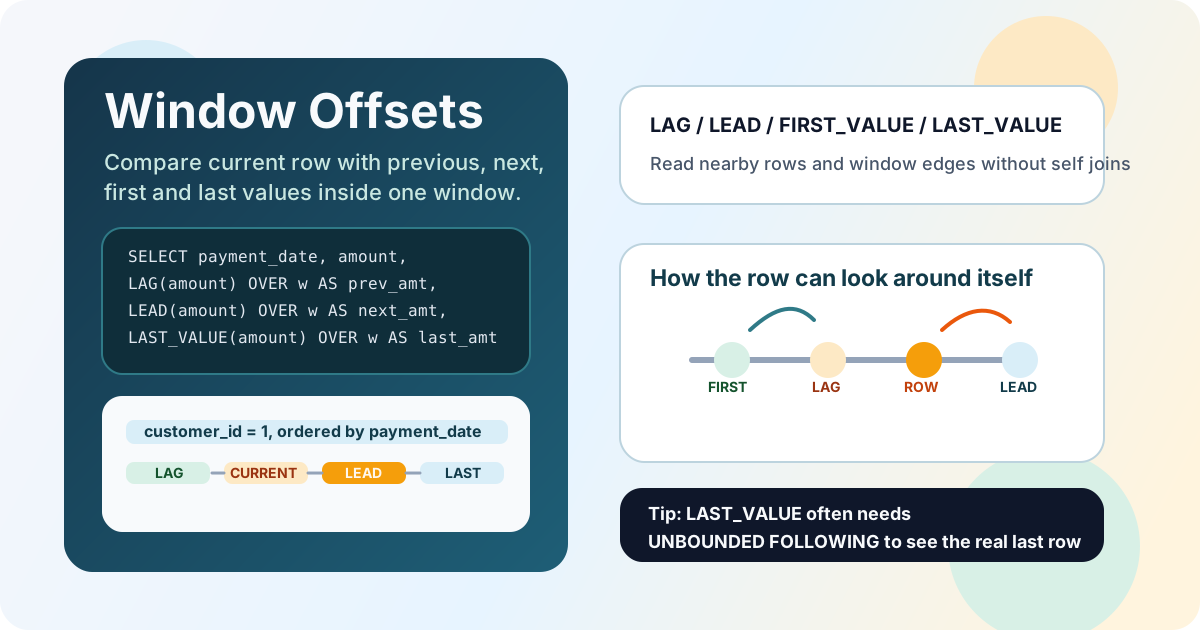
What These Functions Do
All four functions are window functions and are used with OVER (...).
LAGreturns a value from a previous row in the window.LEADreturns a value from a following row in the window.FIRST_VALUEreturns the first value in the current window.LAST_VALUEreturns the last value in the current window.
The key idea is simple: the current row stays in place but gains access to values from other rows in the same partition.
Basic Syntax
LAG and LEAD
LAG(expression [, offset [, default_value]]) OVER (
    [PARTITION BY ...]
    ORDER BY ...
)

LEAD(expression [, offset [, default_value]]) OVER (
    [PARTITION BY ...]
    ORDER BY ...
)
expressionis the value you want to retrieve from another row.offsetis how many rows backward or forward to move.default_valueis what to return if that row does not exist.
FIRST_VALUE and LAST_VALUE
FIRST_VALUE(expression) OVER (
    [PARTITION BY ...]
    ORDER BY ...
    [frame_clause]
)

LAST_VALUE(expression) OVER (
    [PARTITION BY ...]
    ORDER BY ...
    [frame_clause]
)
For FIRST_VALUE and especially LAST_VALUE, the window frame matters. Without an explicit frame, LAST_VALUE often produces a result different from what beginners expect.
Using LAG
LAG is useful when you need to compare the current row with the previous one.
A customer's previous payment
SELECT
    customer_id,
    payment_date,
    amount,
    LAG(amount) OVER (
        PARTITION BY customer_id
        ORDER BY payment_date
    ) AS previous_amount
FROM payment
WHERE customer_id = 1
ORDER BY payment_date;
Result: each row shows the current payment and the previous payment amount for the same customer.
Difference from the previous payment
SELECT
    customer_id,
    payment_date,
    amount,
    amount - LAG(amount, 1, 0) OVER (
        PARTITION BY customer_id
        ORDER BY payment_date
    ) AS amount_diff
FROM payment
WHERE customer_id = 1
ORDER BY payment_date;
Result: you can see how much the current payment differs from the previous one. For the first row, 0 is used as the default.
Using LEAD
LEAD works symmetrically, but looks forward instead of backward.
A customer's next payment
SELECT
    customer_id,
    payment_date,
    amount,
    LEAD(amount) OVER (
        PARTITION BY customer_id
        ORDER BY payment_date
    ) AS next_amount
FROM payment
WHERE customer_id = 1
ORDER BY payment_date;
Result: each row shows the amount of the next payment for that customer.
Next rental date
SELECT
    customer_id,
    rental_date,
    LEAD(rental_date) OVER (
        PARTITION BY customer_id
        ORDER BY rental_date
    ) AS next_rental_date
FROM rental
WHERE customer_id = 1
ORDER BY rental_date;
Result: the query shows when the same customer will make the next rental.
Using FIRST_VALUE
FIRST_VALUE returns the first value in the window. This is useful when you want to compare the current row with a starting point.
A customer's first payment
SELECT
    customer_id,
    payment_date,
    amount,
    FIRST_VALUE(amount) OVER (
        PARTITION BY customer_id
        ORDER BY payment_date
        ROWS BETWEEN UNBOUNDED PRECEDING AND UNBOUNDED FOLLOWING
    ) AS first_payment_amount
FROM payment
WHERE customer_id = 1
ORDER BY payment_date;
Result: the amount of the customer's first payment is repeated on every row in the window.
Comparing the current payment with the first one
SELECT
    customer_id,
    payment_date,
    amount,
    amount - FIRST_VALUE(amount) OVER (
        PARTITION BY customer_id
        ORDER BY payment_date
        ROWS BETWEEN UNBOUNDED PRECEDING AND UNBOUNDED FOLLOWING
    ) AS diff_from_first
FROM payment
WHERE customer_id = 1
ORDER BY payment_date;
Result: this helps measure how far current values move away from the first value in the sequence.
Using LAST_VALUE
LAST_VALUE looks straightforward, but this is where expectations often break.
Important nuance: the default frame
If you write this:
SELECT
    customer_id,
    payment_date,
    amount,
    LAST_VALUE(amount) OVER (
        PARTITION BY customer_id
        ORDER BY payment_date
    ) AS last_amount_default
FROM payment
WHERE customer_id = 1
ORDER BY payment_date;
then in many DBMSs the result is not the last value of the whole partition, but the value at the end of the current frame. Very often, that means the current row itself.
Correct version for the last value in the partition
SELECT
    customer_id,
    payment_date,
    amount,
    LAST_VALUE(amount) OVER (
        PARTITION BY customer_id
        ORDER BY payment_date
        ROWS BETWEEN UNBOUNDED PRECEDING AND UNBOUNDED FOLLOWING
    ) AS last_payment_amount
FROM payment
WHERE customer_id = 1
ORDER BY payment_date;
Result: every row can now see the amount of the customer's last payment in the full partition.
Why this is useful
This pattern is convenient when you need to compare a current value with the last known value in a series, the final order status, or the last payment made by a customer.
Comparing LAG, LEAD, FIRST_VALUE, and LAST_VALUE
| Function | What it returns | Typical use case |
|---|---|---|
LAG | Value from a previous row | Compare with a past value |
LEAD | Value from a following row | Prepare for the next step or date |
FIRST_VALUE | First value in the window | Baseline for comparison |
LAST_VALUE | Last value in the window | Final value in a sequence |
If the task is about comparing neighboring rows, LAG and LEAD are usually the right tools. If you need a reference point at the start or end of the window, use FIRST_VALUE and LAST_VALUE.
Practical Example: Daily Revenue and Comparison with Neighboring Days
First, aggregate payments by day, then apply window functions to the aggregated result:
SELECT
    pay_day,
    daily_total,
    LAG(daily_total) OVER (ORDER BY pay_day) AS previous_day_total,
    LEAD(daily_total) OVER (ORDER BY pay_day) AS next_day_total,
    FIRST_VALUE(daily_total) OVER (
        ORDER BY pay_day
        ROWS BETWEEN UNBOUNDED PRECEDING AND UNBOUNDED FOLLOWING
    ) AS first_day_total,
    LAST_VALUE(daily_total) OVER (
        ORDER BY pay_day
        ROWS BETWEEN UNBOUNDED PRECEDING AND UNBOUNDED FOLLOWING
    ) AS last_day_total
FROM (
    SELECT
        DATE(payment_date) AS pay_day,
        SUM(amount) AS daily_total
    FROM payment
    GROUP BY DATE(payment_date)
) AS daily_stats
ORDER BY pay_day;
Result: each date gets access to the previous day's revenue, the next day's revenue, and the first and last values in the full sequence.
This is a strong template for time-series analysis, dashboard preparation, and identifying trend deviations.
Frequently Asked Questions
What is the difference between LAG and LEAD?
LAG looks backward and returns a value from a previous row, while LEAD looks forward and returns a value from a following row. Both functions operate within the defined window and sort order.
Why does LAST_VALUE often return the current row?
Because the result depends on the window frame. If you keep the default frame, the last row of the frame may be the current row. To get the last value of the full partition, you usually need ROWS BETWEEN UNBOUNDED PRECEDING AND UNBOUNDED FOLLOWING.
Can I use LAG and LEAD without PARTITION BY?
Yes. In that case, the function works over the entire result set as one large partition. This is useful when you need to analyze a single overall sequence without splitting it into groups.
Interview Questions
When should I use LAG, and when should I use LEAD?
Use LAG when you need to compare the current row with the previous one, for example to find the change from the prior payment. Use LEAD when you need to look forward, for example to get the next event date or the next metric value.
How is FIRST_VALUE different from MIN?
MIN returns the minimum value across a set of rows, while FIRST_VALUE returns the value from the first row according to the specified ordering. If the sort order does not match the minimum value, the results will differ.
Why does LAST_VALUE often require an explicit frame?
Because LAST_VALUE does not mean "the last row of the partition no matter what". It means the last row of the current frame. If the default frame ends at the current row, the function returns the current value. An explicit frame expands the window to the whole partition.
Key takeaways from this lesson:
LAGandLEADlet you access neighboring rows without aself join.FIRST_VALUEandLAST_VALUEreturn edge values inside a window, not simply the minimum or maximum.- For all of these functions, the
ORDER BYclause is critical because it defines the row sequence. LAST_VALUEoften requires the explicit frameUNBOUNDED PRECEDING ... UNBOUNDED FOLLOWING.- These functions are especially useful for sequence analysis, time-series work, and change detection between rows.