Lesson 5.10 · Reading time: ~8 min
This lesson introduces SQL dataset operations. You will learn how to combine results from several queries, find common rows, and exclude values you do not need. We will look at UNION, UNION ALL, INTERSECT, and EXCEPT on Sakila examples. By the end of the lesson, you will be able to choose the right operator for different analytical scenarios.
Dataset Operations
In the previous lessons, you learned how to join tables with JOIN and how the engine executes those joins. Now we move to a different idea: sometimes you do not want to connect rows by keys, but instead want to combine and compare whole result sets.
Dataset operations are useful when you want to merge data from several queries, find the overlap between audiences, or remove rows that already appear in another list. In practice, this shows up often in reports, data quality checks, and final list preparation.
What Dataset Operations Are
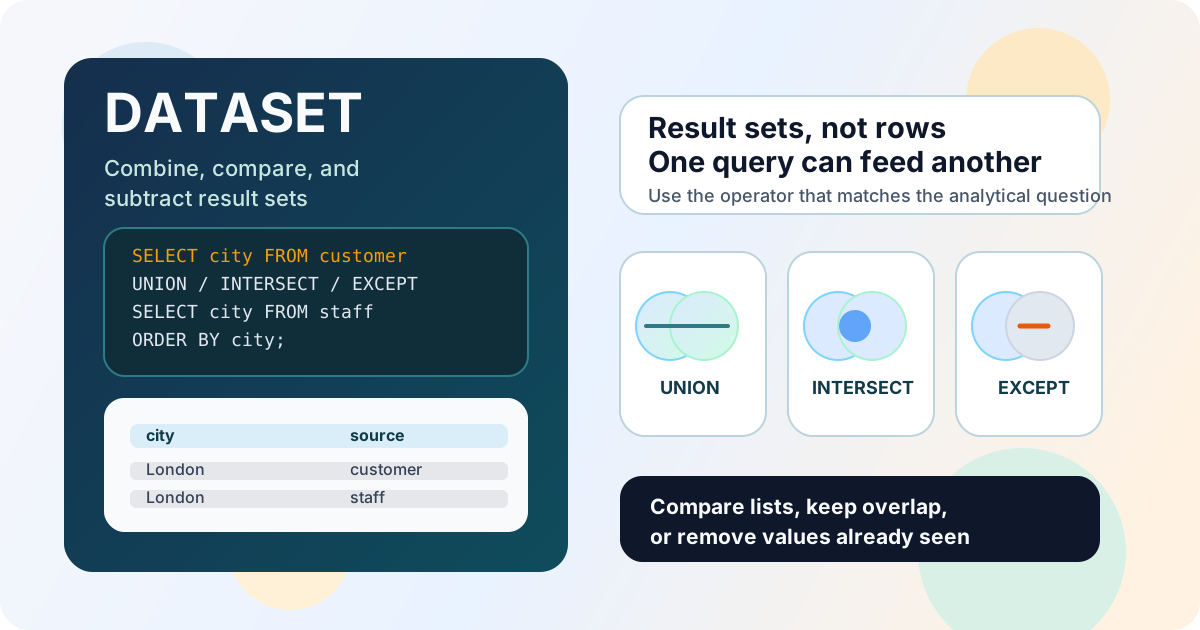
Dataset operations work not with rows from one table, but with the results of two or more queries. In SQL terms, each SELECT returns a row set, and operators like UNION or INTERSECT combine those sets according to specific rules.
The four operators used most often are:
UNION- combines results and removes duplicates;UNION ALL- combines results and keeps duplicates;INTERSECT- keeps only the rows that appear in both sets;EXCEPT- returns rows from the first set that do not exist in the second.
Important: not every database supports these operators in exactly the same way. When you move queries between engines, always check version and compatibility.
General Rules
To use a set operation, both SELECT queries must return compatible results.
Query Requirements
- the same number of columns;
- compatible data types in corresponding positions;
- the same column order;
- the same meaning of values when possible.
If you need to sort the final result, write ORDER BY at the very end of the whole expression.
SELECT column1, column2
FROM table_a
UNION
SELECT column1, column2
FROM table_b
ORDER BY column1;
UNION and UNION ALL
UNION and UNION ALL look similar, but they solve different problems.
UNIONremoves duplicates from the final result.UNION ALLkeeps all rows, even if they repeat.
Example: one city list for customers and staff
Suppose we want a single list of cities where Sakila customers and staff live.
SELECT
    ci.city
FROM customer AS c
JOIN address AS a ON c.address_id = a.address_id
JOIN city AS ci ON a.city_id = ci.city_id
UNION
SELECT
    ci.city
FROM staff AS s
JOIN address AS a ON s.address_id = a.address_id
JOIN city AS ci ON a.city_id = ci.city_id
ORDER BY city;
Result: you get a unique list of cities without duplicates, even if customers and staff live in the same city.
If you want to keep all sources, use UNION ALL:
SELECT
    ci.city
FROM customer AS c
JOIN address AS a ON c.address_id = a.address_id
JOIN city AS ci ON a.city_id = ci.city_id
UNION ALL
SELECT
    ci.city
FROM staff AS s
JOIN address AS a ON s.address_id = a.address_id
JOIN city AS ci ON a.city_id = ci.city_id
ORDER BY city;
Note: UNION ALL is useful when duplicates carry meaning, for example if you plan to count rows in the combined list later.
When to Choose UNION ALL
UNION ALL is usually faster than UNION because the database does not spend time removing duplicates. So if you do not need uniqueness, UNION ALL is usually the better choice.
INTERSECT
INTERSECT returns only the rows that appear in both result sets. It is useful when you need the overlap between two lists.
Example: cities where both customers and staff live
SELECT
    ci.city
FROM customer AS c
JOIN address AS a ON c.address_id = a.address_id
JOIN city AS ci ON a.city_id = ci.city_id
INTERSECT
SELECT
    ci.city
FROM staff AS s
JOIN address AS a ON s.address_id = a.address_id
JOIN city AS ci ON a.city_id = ci.city_id
ORDER BY city;
Result: you see only the cities that appear among both customers and staff.
Where It Helps
INTERSECT is handy for finding the shared segment between two audiences, comparing lists from different systems, or checking whether two extracts overlap.
EXCEPT
EXCEPT returns rows from the first set that do not exist in the second. It is the set difference operator.
Example: cities where customers live but staff do not
SELECT
    ci.city
FROM customer AS c
JOIN address AS a ON c.address_id = a.address_id
JOIN city AS ci ON a.city_id = ci.city_id
EXCEPT
SELECT
    ci.city
FROM staff AS s
JOIN address AS a ON s.address_id = a.address_id
JOIN city AS ci ON a.city_id = ci.city_id
ORDER BY city;
Result: you get the list of cities where there are customers but no staff.
Important Note
In some databases, EXCEPT may be called MINUS or may only be available in certain versions. If you write portable SQL, you should check that separately.
Practical Use
Dataset operations are especially useful in analytics and data validation.
UNIONhelps you build one reference list from several sources.UNION ALLis useful for combining data streams before later aggregation.INTERSECTshows overlap or matching rows.EXCEPThelps you find mismatches, gaps, and extra values.
Sometimes dataset operations can be replaced with JOIN, but that is not always convenient. If you need to compare query results rather than connect tables by keys, dataset operations are often easier to read.
When Multiple OR Conditions Are Better Rewritten with UNION
Sometimes a long WHERE clause with several OR conditions becomes hard to read and maintain. In that case, you can split the logic into separate branches and combine them with UNION.
This approach is especially useful when:
- each branch represents a different business rule;
- the conditions are very different in meaning;
- you want the query to be easier to read and maintain.
Example: find films that either have rating R or are longer than 180 minutes.
SELECT
    title,
    rating,
    length
FROM film
WHERE rating = 'R'

UNION

SELECT
    title,
    rating,
    length
FROM film
WHERE length > 180
ORDER BY title;
Result: instead of one long WHERE ... OR ... clause, you get two clear queries that are easier to read, change, and test. If a row can match both branches, UNION removes duplicates automatically. If duplicates are not a problem and the branches do not overlap, you can use UNION ALL.
Note: if the conditions apply to the same column, IN (...) is often enough. UNION is most useful when the branches are logically different or depend on different columns.
Interview Questions
What is the difference between UNION and UNION ALL?
UNION combines the results of two queries and removes duplicates, while UNION ALL keeps every row. In practice, UNION ALL is usually faster because it does not do the extra work of finding repeats.
Why do set operations require compatible SELECT queries?
Because SQL combines results by column position, not by column name. If two queries return a different number of columns or incompatible data types, the database cannot build a valid final set.
When should you use INTERSECT, and when should you use EXCEPT?
INTERSECT is best when you need the rows that appear in both lists. EXCEPT is useful when you want to subtract the second list from the first and keep only the remaining values.
How are set operations different from JOIN?
JOIN connects rows by keys and usually adds columns from another table. Set operations work with whole query results and compare them as sets, which is useful for combining lists, finding overlaps, and identifying differences.
Key Takeaways from This Lesson
UNIONcombines results and removes duplicates.UNION ALLcombines results without removing duplicates.INTERSECTkeeps only the common rows of two sets.EXCEPTreturns rows that exist in the first set but not in the second.- All set operations require compatible
SELECTqueries with the same number of columns. ORDER BYfor the final result must go at the end of the whole expression.- In practical analytics, these operations are useful for merging lists, finding overlaps, and comparing data between sources.
In the next lesson, we will move on to subqueries and see how to use nested SELECT statements for more flexible conditions and calculations.