Core Mathematical Functions in SQL
Lesson 3.3 · Reading time: ~8 min · Practice tasks ↓
In this lesson, you will learn core SQL mathematical functions that help you calculate and transform numeric data directly in queries. We will cover rounding, modulo, powers, roots, and value comparisons, with practical examples from Sakila. By the end of the lesson, you will be able to apply these functions confidently in analytical and practical tasks.
Mathematical functions in SQL are used to perform calculations on numeric data. They let you round values, find minimum and maximum values, compute remainders, and much more. This lesson covers the most commonly used mathematical functions, with examples based on the Sakila database.
Important: numeric data in SQL can use different types (INTEGER, REAL/FLOAT, DECIMAL/NUMERIC). The same formula can produce different results depending on the data type (for example, because of integer division, rounding, and precision). If data types are ignored, the final result may differ from what you expect.
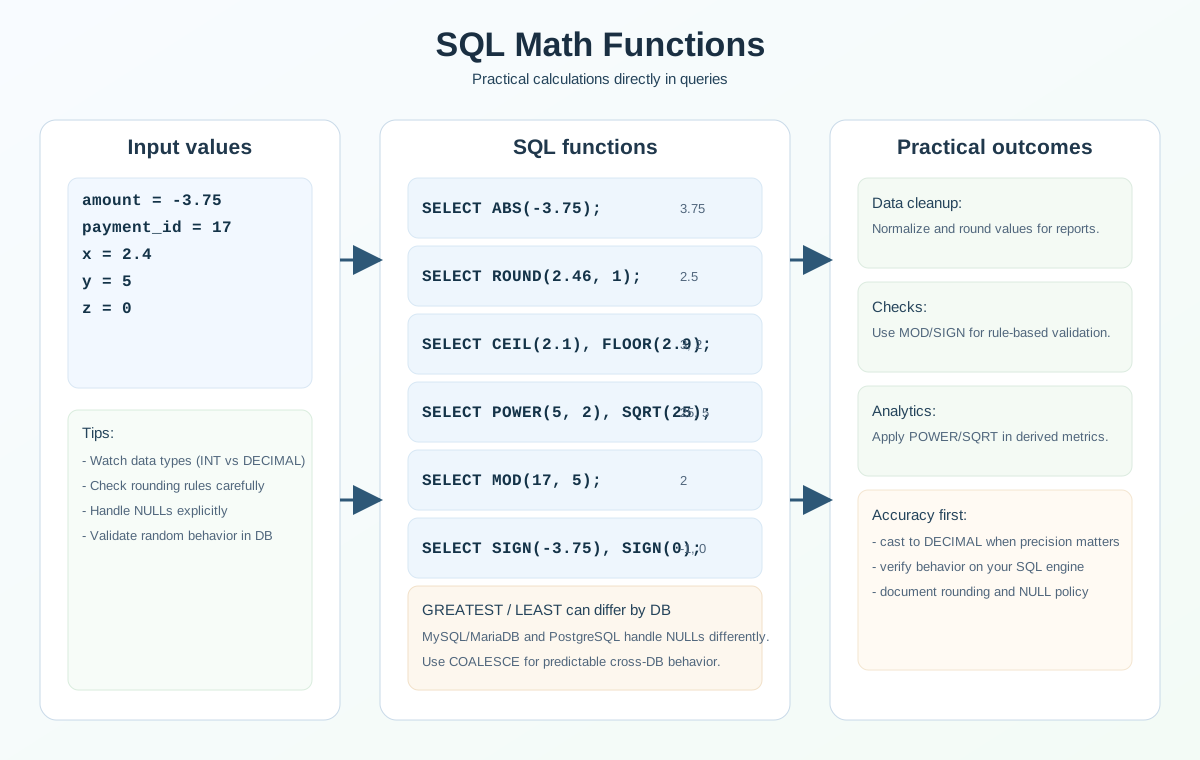
Common Mathematical Functions
ABS() - Returns the absolute value of a number.
Syntax:
ABS(number)
Example:
SELECT ABS(amount - 5) AS abs_difference
FROM payment
LIMIT 3;
Result: Returns the absolute difference between amount and 5.
CEIL() / CEILING() - Rounds a number up (to the nearest integer).
Syntax:
CEIL(number)
CEILING(number)
Example:
SELECT CEIL(amount) AS rounded_up
FROM payment
LIMIT 3;
Result: Rounds amount up to the nearest integer.
FLOOR() - Rounds a number down (to the nearest integer).
Syntax:
FLOOR(number)
Example:
SELECT FLOOR(amount) AS rounded_down
FROM payment
LIMIT 3;
Result: Rounds amount down to the nearest integer.
ROUND() - Rounds a number to a specified number of decimal places.
Syntax:
ROUND(number, decimals)
Example:
SELECT ROUND(amount, 1) AS rounded_amount
FROM payment
LIMIT 3;
Result: Rounds amount to one decimal place.
POWER() / POW() - Raises a number to a power.
Syntax:
POWER(number, exponent)
POW(number, exponent)
Example:
SELECT POWER(amount, 2) AS squared_amount
FROM payment
LIMIT 3;
Result: Squares amount.
SQRT() - Returns the square root of a number.
Syntax:
SQRT(number)
Example:
SELECT SQRT(amount) AS sqrt_amount
FROM payment
LIMIT 3;
Result: Returns the square root of amount.
PI() - Returns the mathematical constant pi.
Syntax:
PI()
Example:
SELECT PI() AS pi_value;
Result: Returns the value of pi (approximately 3.141592653589793).
MOD() - Returns the remainder of a division.
Syntax:
MOD(dividend, divisor)
Example:
SELECT MOD(payment_id, 5) AS mod_result
FROM payment
LIMIT 3;
Result: Returns the remainder of payment_id divided by 5.
Example of using a function in WHERE (find even values):
SELECT payment_id, amount
FROM payment
WHERE MOD(payment_id, 2) = 0
LIMIT 10;
Result: Returns only rows with even payment_id values.
SIGN() - Returns the sign of a number (-1, 0, or 1).
Syntax:
SIGN(number)
Example:
SELECT SIGN(amount - 5) AS sign_value
FROM payment
LIMIT 3;
Result: Returns -1 if negative, 0 if zero, and 1 if positive.
GREATEST() - Returns the largest value among the provided values (MySQL, PostgreSQL).
Syntax:
GREATEST(value1, value2, ...)
Example:
SELECT GREATEST(amount, 5) AS max_value
FROM payment
LIMIT 3;
Result: Returns the larger value between amount and 5.
Important (NULL): GREATEST() behavior depends on the DBMS.
- In MySQL/MariaDB, if at least one argument is
NULL, the result is usuallyNULL. - In PostgreSQL,
NULLarguments are ignored, andNULLis returned only if all arguments areNULL.
LEAST() - Returns the smallest value among the provided values (MySQL, PostgreSQL).
Syntax:
LEAST(value1, value2, ...)
Example:
SELECT LEAST(amount, 5) AS min_value
FROM payment
LIMIT 3;
Result: Returns the smaller value between amount and 5.
Important (NULL): LEAST() follows the same DBMS-specific NULL behavior as GREATEST().
To make behavior predictable across DBMSs, COALESCE() is often used, for example:
SELECT GREATEST(COALESCE(value1, 0), COALESCE(value2, 0));
RAND() - Returns a random number between 0 and 1.
Syntax:
RAND()
Example:
SELECT RAND() AS random_value
FROM payment
LIMIT 3;
Result: Returns a random number between 0 and 1.
Important: do not assume that RAND() is always re-evaluated for every row in every context. Depending on the DBMS, execution plan, use of CTEs/subqueries, and other factors, the same random value can be reused for multiple rows.
If distinct row-level random values are critical, verify behavior on your DBMS and query shape.
Practical Use Cases
Rounding payment amounts: Use
ROUND(amount, 0)to round values to whole numbers.Finding records by remainder: Use
MOD(payment_id, 2)inWHERE(for example,MOD(payment_id, 2) = 0) to find even payment IDs.Computing square roots: Use
SQRT(amount)to analyze payment distributions.Comparing values: Use
GREATEST()andLEAST()to pick the maximum or minimum from multiple values.Controlling data types: If precision matters, explicitly cast values to the required type (for example,
CAST(value AS DECIMAL(10,2))) to avoid surprises caused by integer arithmetic and rounding.
FAQ
What is the difference between ROUND(), CEIL(), and FLOOR()?
ROUND() rounds to the nearest value (or to a specified decimal place), CEIL() always rounds up, and FLOOR() always rounds down.
Why can similar formulas return different results?
The main reason is data types. Integer and decimal types handle division, rounding, and precision differently.
When should I use MOD()?
MOD() is useful when you need periodic checks, such as splitting records into groups or filtering even/odd identifiers.
Why should I care about DBMS differences for GREATEST() and LEAST()?
Because NULL handling can differ between MySQL/MariaDB and PostgreSQL. For predictable behavior, COALESCE() is often used.
Interview Questions
How do you choose the right rounding function for a business rule?
First define the rule: standard rounding (ROUND), always up (CEIL), or always down (FLOOR). Then validate how it impacts final report metrics.
What are the risks of calculations without explicit type casting?
You can get unexpected results due to integer division or precision loss. In critical calculations, explicit casts like CAST(... AS DECIMAL(...)) are safer.
What does SIGN() do, and where is it useful?
SIGN() returns -1, 0, or 1 based on the value's sign. It is useful for quick classification of deviations as negative, zero, or positive.
Why should RAND() be used carefully in analytics queries?
Depending on DBMS behavior and execution plans, random values may not be recalculated per row as expected. Always verify behavior on your engine.
Key takeaways from this lesson:
- SQL mathematical functions help you perform calculations and transformations directly in queries.
ROUND,CEIL, andFLOORsolve different rounding tasks, and the correct choice depends on business rules.MOD,POWER, andSQRTare practical for analytics and data checks.- Data types strongly affect precision and final calculation results.
- For cross-DB queries, account for DBMS-specific
NULLbehavior in functions.