SQL CASE WHEN: Conditional Logic in Queries
Lesson 3.5 · Reading time: ~7 min · Practice tasks ↓
The SQL CASE expression adds if-then-else logic to a query: it checks conditions in order and returns the value of the first one that is true. In this lesson you'll learn the two forms of CASE, how to create categories and labels in SELECT, how to sort by custom priority, and how to use CASE in WHERE.
The functions from the previous lessons transform every row in the same way. Often the rule depends on the data: a payment under $2 is "low", over $6 is "high"; a rental without a return date is "not returned". CASE lets you write such rules directly in SQL instead of handling them in application code.
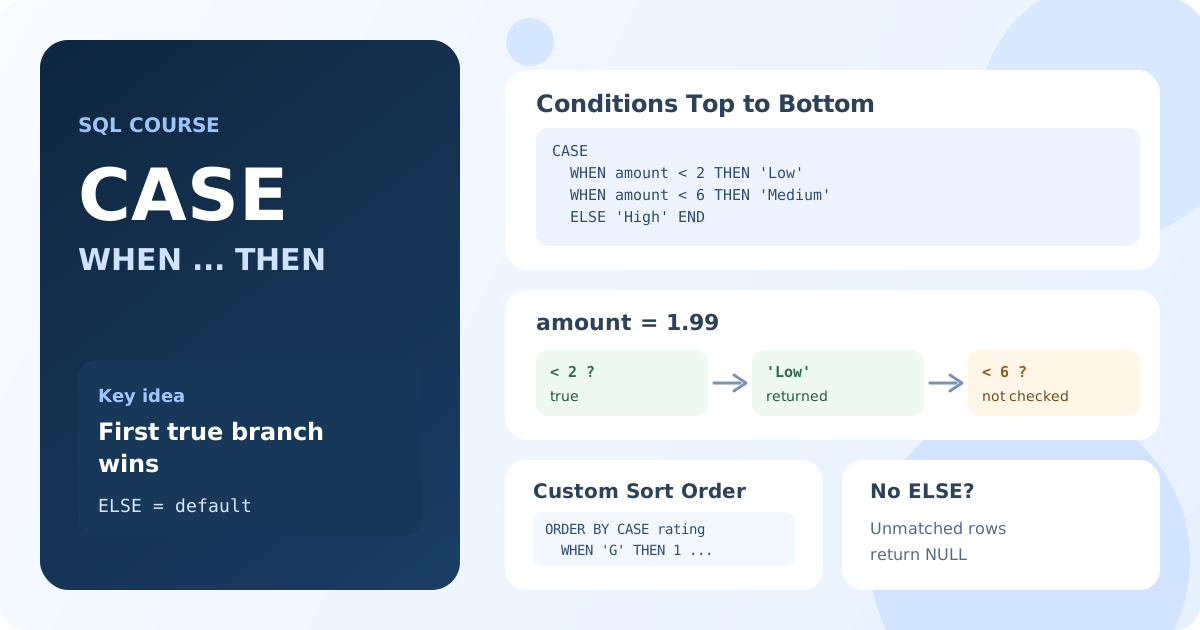
CASE Syntax
CASE has two forms.
Searched CASE
Each WHEN contains its own condition. This is the more flexible and more common form:
CASE
    WHEN condition1 THEN result1
    WHEN condition2 THEN result2
    ELSE default_result
END
Simple CASE
One expression is compared with a list of values:
CASE expression
    WHEN value1 THEN result1
    WHEN value2 THEN result2
    ELSE default_result
END
How CASE Is Evaluated
- Conditions are checked from top to bottom.
- The result of the first true condition is returned; the rest are not checked.
- If no condition is true, the
ELSEvalue is returned. - If there is no
ELSE, the result isNULL.
CASE is an expression, not a separate statement: it returns one value and can be used anywhere a value is allowed, in SELECT, WHERE or ORDER BY.
CASE in SELECT: Categories and Labels
Payment Levels
SELECT payment_id,
       amount,
       CASE
           WHEN amount < 2 THEN 'Low'
           WHEN amount < 6 THEN 'Medium'
           ELSE 'High'
       END AS payment_level
FROM payment
LIMIT 10;
Result: ten payments, each with a level: under $2 "Low", from $2 to under $6 "Medium", $6 and more "High".
The order of conditions matters. A payment of $1 also satisfies amount < 6, but it gets "Low" because the first matching branch wins. Thanks to this, the second condition doesn't need a lower bound.
Readable Status
SELECT rental_id,
       rental_date,
       CASE
           WHEN return_date IS NULL THEN 'Not returned'
           ELSE 'Returned'
       END AS rental_status
FROM rental
ORDER BY rental_date DESC
LIMIT 10;
Result: the latest rentals with a text status instead of an empty or filled return date.
Simple CASE for Codes
The simple form is convenient when a column holds codes:
SELECT title,
       rating,
       CASE rating
           WHEN 'G' THEN 'General audiences'
           WHEN 'PG' THEN 'Parental guidance'
           WHEN 'PG-13' THEN 'Parents strongly cautioned'
           WHEN 'R' THEN 'Restricted'
           ELSE 'Adults only'
       END AS rating_description
FROM film
LIMIT 10;
Result: films with a readable description of their rating.
CASE in ORDER BY: Custom Sort Order
Alphabetical order of the rating codes (G, NC-17, PG, PG-13, R) doesn't match their meaning. CASE turns each code into a priority number:
SELECT title, rating
FROM film
ORDER BY CASE rating
             WHEN 'G' THEN 1
             WHEN 'PG' THEN 2
             WHEN 'PG-13' THEN 3
             WHEN 'R' THEN 4
             ELSE 5
         END,
         title;
Result: films from the mildest to the strictest rating; within a rating, by title.
The same technique puts important rows on top:
SELECT rental_id, rental_date, return_date
FROM rental
ORDER BY CASE WHEN return_date IS NULL THEN 0 ELSE 1 END,
         rental_date DESC
LIMIT 20;
Result: unreturned rentals first, then the rest, newest first in each group.
CASE in WHERE
CASE can return a value for a condition, for example a threshold that depends on another column:
SELECT payment_id, staff_id, amount
FROM payment
WHERE amount >= CASE
                    WHEN staff_id = 1 THEN 5
                    ELSE 3
                END
LIMIT 10;
Result: payments of at least $5 for staff member 1 and of at least $3 for the others.
Most such filters can also be written with AND and OR: WHERE (staff_id = 1 AND amount >= 5) OR (staff_id <> 1 AND amount >= 3). Choose the version that is easier to read; for two branches it is often OR, for many branches CASE.
Practical Tips
- Always write
ELSE. Without it, unexpected values becomeNULL, and such rows are easy to miss. - Return one data type. Mixing text and numbers in different branches leads to implicit conversions and surprises.
- Order conditions from specific to general. The first true branch wins.
- In Lesson 4.4 you'll use
CASEinside aggregate functions to count rows by categories in one query.
Key Takeaways:
CASEreturns the result of the first trueWHENcondition, orELSEif none is true.- Searched
CASEchecks any conditions; simpleCASEcompares one expression with values. - Without
ELSE, the result isNULL. - In
SELECT,CASEcreates categories and readable labels. - In
ORDER BY, it sets a custom sort order; inWHERE, it can make a filter depend on other columns.
Frequently Asked Questions
What is the difference between simple CASE and searched CASE?
Simple CASE compares one expression with a list of values: CASE rating WHEN 'G' THEN .... Searched CASE checks a separate condition in each branch: CASE WHEN amount < 2 THEN .... Searched CASE can do everything the simple form can, plus ranges, NULL checks and conditions on several columns.
What does CASE return if no condition is true and there is no ELSE?
NULL. To avoid surprises, always add an ELSE branch with an explicit default value.
Is there an IF function in SQL?
CASE is the standard way. MySQL and MariaDB also have IF(condition, value_if_true, value_if_false), and SQL Server has IIF(), but they are not portable.