SQL Transactions: COMMIT, ROLLBACK and Isolation Levels
Lesson 8.4 · Reading time: ~10 min · Practice tasks ↓
A SQL transaction is a group of statements that the database executes as one unit: either all of them take effect, or none do. In this lesson you'll learn START TRANSACTION, COMMIT and ROLLBACK, how SAVEPOINT undoes part of a transaction, what happens on an error, and which problems the isolation levels prevent when several users change the same data.
In the previous lessons you changed data with INSERT, UPDATE and DELETE, one statement at a time. Real operations usually take several statements: renting a film in Sakila means adding a row to rental and a row to payment. If the second statement fails, the first must not stay on its own.
The sample databases on SQLtest are read-only, so these statements return a permission error there. The examples use the Sakila schema; they were checked on MySQL 8.0 and PostgreSQL 17.
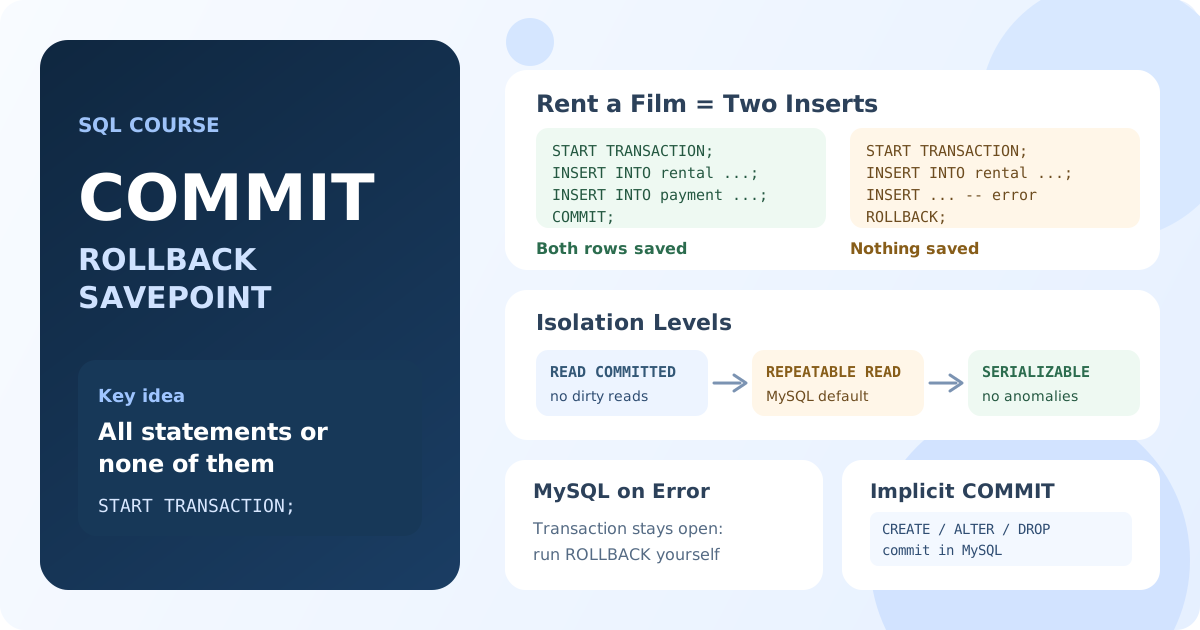
What Is a Transaction?
A transaction turns several changes into one operation. The database guarantees the four ACID properties, which you met in Lesson 1.3:
- Atomicity: all statements of the transaction take effect, or none do.
- Consistency: after the transaction, all constraints still hold.
- Isolation: concurrent transactions don't see each other's unfinished changes.
- Durability: once committed, the changes survive a crash or a power loss.
The classic example is a money transfer: subtract from one account and add to the other. Without a transaction, a failure between the two steps makes money disappear.
START TRANSACTION, COMMIT and ROLLBACK
START TRANSACTION;

-- statements that change data

COMMIT;    -- save all changes
-- or
ROLLBACK;  -- undo all changes
START TRANSACTION(orBEGIN) opens a transaction.COMMITmakes all its changes permanent and visible to other users.ROLLBACKcancels all changes made since the transaction started.
The keyword differs a little between databases:
| Database | Start | Save | Undo |
|---|---|---|---|
| MySQL, MariaDB | START TRANSACTION or BEGIN | COMMIT | ROLLBACK |
| PostgreSQL | BEGIN or START TRANSACTION | COMMIT | ROLLBACK |
| SQL Server | BEGIN TRANSACTION | COMMIT | ROLLBACK |
| Oracle | starts with the first change | COMMIT | ROLLBACK |
Example: rent a film and take the payment
START TRANSACTION;

INSERT INTO rental (rental_date, inventory_id, customer_id, staff_id)
VALUES ('2005-08-24 10:00:00', 1, 1, 1);

INSERT INTO payment (customer_id, staff_id, rental_id, amount, payment_date)
VALUES (1, 1, LAST_INSERT_ID(), 0.99, '2005-08-24 10:00:00');

COMMIT;
Result: both rows are saved together. LAST_INSERT_ID() returns the rental_id just generated in MySQL; PostgreSQL uses INSERT ... RETURNING rental_id for the same purpose.
Example: undo a mistake
START TRANSACTION;

UPDATE film
SET rental_rate = rental_rate * 2;

SELECT SUM(rental_rate) FROM film;  -- the new prices, visible inside the transaction

ROLLBACK;
Result: after ROLLBACK, all prices are back as they were. Until COMMIT, other users don't see the doubled prices (except at the READ UNCOMMITTED level described below).
Autocommit: Every Statement Is a Transaction
If you don't open a transaction, the database still uses one: each statement runs in its own transaction and is committed automatically. This mode is called autocommit, and it is on by default in MySQL, PostgreSQL and SQL Server.
SELECT @@autocommit; -- MySQL: 1 means autocommit is on
So a single UPDATE without START TRANSACTION can't be undone with ROLLBACK: it was committed the moment it finished. START TRANSACTION suspends autocommit until COMMIT or ROLLBACK.
SAVEPOINT: Undo Part of a Transaction
A savepoint marks a point inside a transaction. ROLLBACK TO SAVEPOINT undoes only the changes made after it; the transaction stays open.
START TRANSACTION;

UPDATE film SET rental_rate = 1.99 WHERE film_id = 1;

SAVEPOINT before_second;

UPDATE film SET rental_rate = 9.99 WHERE film_id = 2;

ROLLBACK TO SAVEPOINT before_second;

COMMIT;
Result: film 1 gets the new price 1.99; the change to film 2 is undone, and film 2 keeps its old price.
Savepoints are useful in long operations where one step may fail and you want to retry it without losing the earlier work.
What Happens When a Statement Fails
This is where databases behave differently, and it is a common source of bugs.
MySQL and MariaDB undo only the failed statement. The transaction stays open, and COMMIT saves everything that succeeded:
START TRANSACTION;

INSERT INTO payment (customer_id, staff_id, amount, payment_date)
VALUES (1, 1, 2.99, '2005-08-24 10:00:00');   -- succeeds

INSERT INTO payment (customer_id, staff_id, amount, payment_date)
VALUES (999, 1, 4.99, '2005-08-24 10:00:00'); -- fails: customer 999 does not exist

COMMIT;
Result in MySQL: the second insert fails with a foreign key error, but COMMIT still saves the first payment. To get all-or-nothing, the application must check for errors and run ROLLBACK itself.
PostgreSQL marks the whole transaction as failed after an error. Every following statement is rejected with "current transaction is aborted", and COMMIT actually performs a rollback: nothing is saved.
Statements That Commit Implicitly
In MySQL, MariaDB and Oracle, DDL statements such as CREATE TABLE, ALTER TABLE and DROP TABLE commit the current transaction before they run. A later ROLLBACK can't undo the changes made before them:
START TRANSACTION;

UPDATE film SET rental_rate = 5.99 WHERE film_id = 1;

CREATE TABLE film_backup (film_id INT);  -- implicit COMMIT here

ROLLBACK;  -- too late: the UPDATE is already saved
Result in MySQL: the new price 5.99 stays. PostgreSQL and SQL Server run DDL inside the transaction, so there ROLLBACK undoes both the UPDATE and the CREATE TABLE.
Concurrency Problems: Dirty, Non-Repeatable and Phantom Reads
When several transactions work with the same rows at the same time, a transaction may see data in states it shouldn't. The SQL standard names three such read anomalies:
| Anomaly | What happens |
|---|---|
| Dirty read | Transaction A reads a change that transaction B has not committed yet. B rolls back, and A has used data that never existed. |
| Non-repeatable read | A reads a row, B updates it and commits, A reads the same row again and gets a different value. |
| Phantom read | A selects rows by a condition, B inserts a new matching row and commits, A repeats the query and gets an extra row. |
A dirty read step by step:
| Time | Transaction A | Transaction B |
|---|---|---|
| 1 | UPDATE film SET rental_rate = 9.99 WHERE film_id = 1; | |
| 2 | SELECT rental_rate FROM film WHERE film_id = 1; reads 9.99 | |
| 3 | ROLLBACK; | |
| 4 | A shows a price of 9.99 that was never saved |
Transaction Isolation Levels
The isolation level decides which of these anomalies a transaction is protected from. Stronger isolation means fewer surprises but more waiting between transactions.
| Isolation level | Dirty read | Non-repeatable read | Phantom read |
|---|---|---|---|
READ UNCOMMITTED | possible | possible | possible |
READ COMMITTED | prevented | possible | possible |
REPEATABLE READ | prevented | prevented | possible by the standard |
SERIALIZABLE | prevented | prevented | prevented |
The default level depends on the database:
- MySQL and MariaDB (InnoDB):
REPEATABLE READ. A plainSELECTreads a snapshot taken at the first read of the transaction, so in practice it doesn't see phantoms either. - PostgreSQL, SQL Server, Oracle:
READ COMMITTED. PostgreSQL treatsREAD UNCOMMITTEDasREAD COMMITTED, so dirty reads never happen there; Oracle supports onlyREAD COMMITTEDandSERIALIZABLE.
To change the level:
-- for the next transaction only
SET TRANSACTION ISOLATION LEVEL SERIALIZABLE;

-- for all following transactions of this connection (MySQL)
SET SESSION TRANSACTION ISOLATION LEVEL READ COMMITTED;
In PostgreSQL, SET TRANSACTION ISOLATION LEVEL ... is written right after BEGIN. At SERIALIZABLE, the database may cancel one of two conflicting transactions with a serialization error; the application should then retry it.
Practical Rules
- Keep transactions short: while a transaction is open, it holds locks that other users wait for. Never wait for user input inside a transaction.
- Check the result of every statement and run
ROLLBACKon an error, especially in MySQL, which doesn't do it for you. - Don't mix DDL into data transactions in MySQL: it commits implicitly.
- Two transactions that lock the same rows in opposite order can block each other: this is a deadlock. The database cancels one of them, and the application should retry it.
Key Takeaways:
- A transaction groups statements into one unit:
COMMITsaves all of them,ROLLBACKundoes all of them. - Without an explicit transaction, every statement is committed immediately (autocommit).
SAVEPOINTandROLLBACK TO SAVEPOINTundo only part of a transaction.- After an error, MySQL keeps the transaction open, while PostgreSQL aborts it; in MySQL, run
ROLLBACKyourself. - In MySQL, DDL statements commit the current transaction implicitly.
- Isolation levels protect against dirty, non-repeatable and phantom reads; the default is
REPEATABLE READin MySQL andREAD COMMITTEDin PostgreSQL, SQL Server and Oracle.
Frequently Asked Questions
What is a transaction in SQL?
A transaction is a group of SQL statements that the database executes as a single unit: either all changes are saved with COMMIT, or all are undone with ROLLBACK. Transactions keep data consistent when an operation needs several statements or when several users change data at the same time.
What is the difference between COMMIT and ROLLBACK?
COMMIT ends the transaction and makes its changes permanent and visible to other users. ROLLBACK ends the transaction and undoes every change it made, returning the data to the state before START TRANSACTION.
Can I roll back after COMMIT?
No. After COMMIT, the changes are permanent; to reverse them you need a new statement that changes the data back, or a backup. The same applies to statements run in autocommit mode.
What is the default transaction isolation level?
REPEATABLE READ in MySQL and MariaDB with InnoDB; READ COMMITTED in PostgreSQL, SQL Server and Oracle.
Interview Questions
What does ACID mean for a transaction?
Atomicity: all or nothing. Consistency: constraints hold before and after. Isolation: concurrent transactions don't see each other's uncommitted changes. Durability: committed data survives failures.
What is a dirty read, and which isolation level prevents it?
A dirty read is reading another transaction's uncommitted change, which may later be rolled back. READ COMMITTED and every stronger level prevent it.
What is the difference between a non-repeatable read and a phantom read?
A non-repeatable read is a changed value in a row you already read; a phantom read is a new row that appears in the result of a repeated query with the same condition.
What happens in MySQL if a statement inside a transaction fails?
Only that statement is undone; the transaction stays open, and COMMIT saves the statements that succeeded. To make the whole operation atomic, the application must catch the error and run ROLLBACK.