Lesson 10.6 · Reading time: ~10 min
A full-text index is an index of the words in text columns: for every word it stores the rows that contain it. It lets a database find rows by words and rank them by relevance, which LIKE '%word%' can't do without reading the whole table. In this lesson you'll create a full-text index in MySQL, search with MATCH … AGAINST in natural language and boolean mode, learn the rules that make some words unsearchable, and see how the same task is solved in PostgreSQL.
Full-Text Indexes in SQL
In the previous lessons you learned how B-tree indexes speed up searches by a value or by the beginning of a value. A search for a word in the middle of a text is different: WHERE description LIKE '%astronaut%' can't use a B-tree index, because the word can start anywhere in the string.
Full-text indexes are built for exactly this. The MySQL examples run on the Sakila table film_text, which already has a full-text index; the PostgreSQL part was checked on PostgreSQL 17.
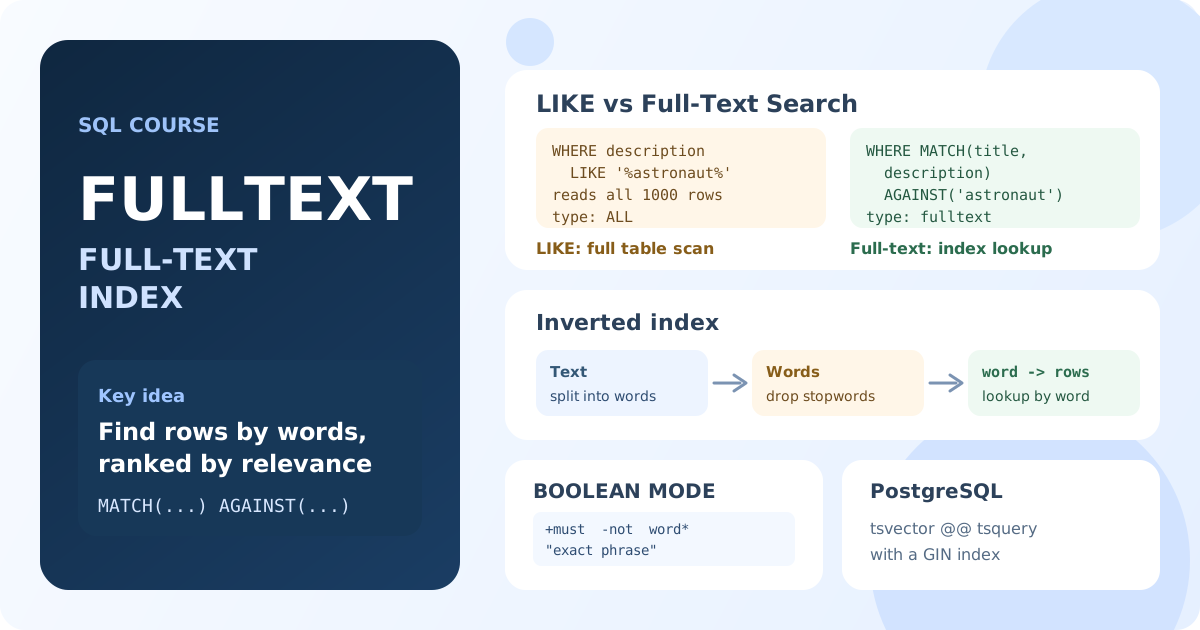
What Is a Full-Text Index?
When you create a full-text index, the database splits the text into words (tokens), drops very short words and common words such as "the" or "and" (stopwords), and builds an inverted index: a list of words, each with the rows that contain it.
| B-tree index | Full-text index | |
|---|---|---|
| Indexes | whole column values | individual words |
| Fast searches | =, ranges, LIKE 'abc%' | words and phrases anywhere in the text |
LIKE '%word%' | not used | not used either |
| Result order | by value | by relevance |
| MySQL syntax | WHERE col = … | WHERE MATCH(col) AGAINST(…) |
A full-text index works only with its own search syntax: MATCH … AGAINST in MySQL, @@ in PostgreSQL. A regular LIKE never uses it.
Creating a Full-Text Index in MySQL
A full-text index is added to CHAR, VARCHAR or TEXT columns:
CREATE FULLTEXT INDEX ft_film_description ON film (title, description);
The same with ALTER TABLE film ADD FULLTEXT INDEX ft_film_description (title, description); or inside CREATE TABLE. The sample databases on SQLtest are read-only, so run these statements in your own database.
Sakila already has such an index on film_text:
SHOW INDEX FROM film_text;
Result: PRIMARY (type BTREE) on film_id, and idx_title_description (type FULLTEXT) on the columns title and description.
Searching with MATCH … AGAINST
MATCH lists the indexed columns, AGAINST the words to find:
SELECT film_id, title,
    ROUND(MATCH(title, description) AGAINST ('astronaut crocodile'), 3) AS score
FROM film_text
WHERE MATCH(title, description) AGAINST ('astronaut crocodile')
ORDER BY score DESC
LIMIT 5;
Result: PHANTOM GLORY (4.239), STONE FIRE (4.196), ROAD ROXANNE, NEIGHBORS CHARADE (4.153) and LOVELY JINGLE (3.146). Films with both words come first.
This is the natural language mode, the default. A row matches if it contains any of the words: here 173 films contain "astronaut" or "crocodile". The same MATCH … AGAINST in SELECT returns the relevance score, and the result can be sorted by it.
The column list in MATCH must be exactly the column list of a full-text index. MATCH(description) AGAINST ('astronaut') fails with "Can't find FULLTEXT index matching the column list", because the index covers title and description together.
Boolean Mode
IN BOOLEAN MODE adds operators for precise searches:
| Operator | Meaning | Example | Films in film_text |
|---|---|---|---|
+ | the word is required | '+astronaut +crocodile' | 4 |
- | the word must be absent | '+astronaut -crocodile' | 74 |
* | prefix | 'dino*' | 3 |
" " | exact phrase | '"mad scientist"' | 97 |
SELECT film_id, title
FROM film_text
WHERE MATCH(title, description) AGAINST ('+astronaut +crocodile' IN BOOLEAN MODE);
Result: 4 films whose title or description contains both words.
Without operators, boolean mode also finds rows with any of the words, but doesn't sort them by relevance.
Full-Text Search vs LIKE
Compare the plans of the two searches:
EXPLAIN SELECT film_id FROM film_text WHERE MATCH(title, description) AGAINST ('astronaut');

EXPLAIN SELECT film_id FROM film_text WHERE description LIKE '%astronaut%';
Result: the first query uses the index idx_title_description (access type fulltext); the second reads all 1000 rows (type ALL).
The two searches also find different things:
LIKE '%cat%'matches any substring: "cat", but also "category" and "Catherine". A full-text index finds whole words.LIKEchecks one pattern in one column; full-text search looks for several words in several columns and ranks the result.- On a table with millions of rows,
LIKE '%word%'reads every row, while a full-text index reads only the list for the word.
Rules That Surprise Beginners
Some words can't be found at all, and that is not a bug:
- Minimum word length. Shorter words are not indexed: 3 characters in InnoDB (
innodb_ft_min_token_size), 4 in MyISAM (ft_min_word_len).film_textis a MyISAM table, soAGAINST ('cat')returns nothing there, while an InnoDB table finds "cat". - Stopwords. Common words like "the", "a", "and" are skipped:
AGAINST ('the')returns 0 rows. - No word forms in MySQL. The index stores words as they are: "running" doesn't find "run". Use a prefix in boolean mode,
'run*', for different endings. - The 50% rule. In MyISAM's natural language mode, a word that occurs in more than half of the rows is treated as too common and ignored.
Changing the minimum length or the stopword list is a server setting and requires rebuilding the index.
Full-Text Search in PostgreSQL
PostgreSQL has no FULLTEXT keyword. Text is converted to a tsvector (a list of normalized words), the query to a tsquery, and @@ checks whether they match:
SELECT to_tsvector('english', 'Runners should run slowly at first');
Result: 'first':6 'run':3 'runner':1 'slowli':4. The words are reduced to their stems and "should" and "at" are dropped as stopwords.
Because of the stems, a search for "run" also finds "running", and "cats" finds "cat", which MySQL doesn't do. For speed, store the tsvector in a generated column and index it with GIN, the PostgreSQL index type for full-text search:
ALTER TABLE film
ADD COLUMN search tsvector
    GENERATED ALWAYS AS (to_tsvector('english', title || ' ' || description)) STORED;

CREATE INDEX film_search_idx ON film USING GIN (search);

SELECT title, ts_rank(search, query) AS rank
FROM film, websearch_to_tsquery('english', 'astronaut -crocodile') AS query
WHERE search @@ query
ORDER BY rank DESC
LIMIT 5;
Note: websearch_to_tsquery understands search-engine syntax: quotes for phrases, or, and - to exclude a word. ts_rank plays the role of the MySQL relevance score.
Other databases have their own tools: SQL Server uses a full-text catalog with CONTAINS and FREETEXT, SQLite the FTS5 extension. For search across millions of documents with typos and synonyms, projects use dedicated engines such as Elasticsearch.
When to Use a Full-Text Index
Good fits:
- search by words in descriptions, articles, comments, product names;
- "search box" features where results should be ranked by relevance;
- large tables where
LIKE '%word%'has become slow.
Poor fits:
- searches by exact value or by the beginning of a value: a B-tree index does it better;
- short codes and values shorter than the minimum word length;
- searches for arbitrary substrings inside words, such as part of an article number.
Key Takeaways:
- A full-text index maps each word to the rows that contain it;
LIKE '%word%'uses neither a B-tree nor a full-text index. - In MySQL, create it with
FULLTEXT INDEXand search withMATCH(columns) AGAINST('words'); the columns must match the index exactly. - Natural language mode returns rows with any of the words, ranked by relevance; boolean mode adds
+,-,*and phrases. - Short words and stopwords are not indexed, and MySQL doesn't match word forms: "running" doesn't find "run".
- PostgreSQL uses
tsvector,tsquery, the@@operator and a GIN index, and it does match word forms.
Frequently Asked Questions
What is a full-text index in SQL?
It is an index of the words in text columns: for each word, the database stores the rows that contain it. It makes searches by words fast and lets you rank the results by relevance.
Why doesn't LIKE '%word%' use an index?
A B-tree index is sorted by the beginning of the value, and a pattern that starts with % can match anywhere in the string, so the database has to read every row. Full-text search with MATCH … AGAINST or @@ uses a full-text index instead.
Why does my full-text search find nothing for a short word?
Words shorter than the minimum length (3 characters in InnoDB, 4 in MyISAM) and stopwords such as "the" are not indexed. Use a longer word, a different search method, or change the server settings and rebuild the index.
What is the difference between natural language mode and boolean mode?
Natural language mode finds rows with any of the words and sorts them by relevance. Boolean mode understands operators: + for a required word, - to exclude a word, * for a prefix and quotes for a phrase.
Interview Questions
How is a full-text index different from a B-tree index?
A B-tree index stores whole column values in sorted order and serves equality, range and prefix searches. A full-text index stores individual words with the rows that contain them and serves word and phrase searches anywhere in the text, with relevance ranking.
How would you speed up a search with LIKE '%keyword%' on a large table?
Add a full-text index on the searched columns and rewrite the query with MATCH … AGAINST in MySQL, or with a tsvector column, a GIN index and @@ in PostgreSQL. Check that the words you search for are not shorter than the minimum length and are not stopwords.
Why might a full-text search return fewer rows than LIKE?
Full-text search matches whole words, while LIKE matches substrings, so "cat" with LIKE also finds "category". Short words, stopwords and, in MySQL, other word forms are not matched by the full-text index at all.