SQL TOP, FETCH FIRST and WITH TIES
Lesson 2.9 · Reading time: ~9 min · Practice tasks ↓
SQL TOP and FETCH FIRST n ROWS ONLY are the alternatives to LIMIT: TOP is used by SQL Server, and FETCH FIRST is the SQL standard supported by PostgreSQL, Oracle, MariaDB and others. In this lesson you'll learn the standard syntax, paging with OFFSET ... FETCH, the WITH TIES option that keeps rows with equal values, PERCENT, and the older ways of Oracle and Firebird.
In Lesson 2.7 you limited results with LIMIT and OFFSET. That syntax works in MySQL, MariaDB, PostgreSQL and SQLite, but SQL Server and Oracle don't accept it. When you move between databases, read someone else's queries or prepare for an interview, you'll meet several other ways to write the same idea.
Why Row Limiting Has Several Syntaxes
Limiting rows was not part of the SQL standard for a long time, so each database invented its own syntax:
- MySQL and PostgreSQL added
LIMIT, and SQLite copied it. - SQL Server added
TOP. - Oracle had the pseudo-column
ROWNUM. - Firebird added
FIRSTandSKIP.
The standard FETCH FIRST clause appeared only in SQL:2008, when these habits were already established. Today most databases support the standard form in addition to their own one, but MySQL and SQLite still don't.
FETCH FIRST n ROWS ONLY: the Standard Syntax
FETCH FIRST goes after ORDER BY, where LIMIT would be:
SELECT title, length
FROM film
ORDER BY length
FETCH FIRST 3 ROWS ONLY;
Result: three of the shortest films, 46 minutes long. The query runs in MariaDB 10.6+, PostgreSQL and Oracle; MySQL reports a syntax error.
The words FIRST and NEXT, ROW and ROWS are interchangeable: FETCH NEXT 1 ROW ONLY means the same as FETCH FIRST 1 ROWS ONLY. Choose whatever reads better. If you leave out the number, FETCH FIRST ROW ONLY returns one row.
Paging with OFFSET ... FETCH NEXT
The standard form of OFFSET is written with the word ROWS and comes before FETCH:
SELECT title, length
FROM film
ORDER BY length, title
OFFSET 10 ROWS
FETCH NEXT 5 ROWS ONLY;
Result: films 11 to 15 by length, the same as LIMIT 5 OFFSET 10.
This is the only way to page through results in SQL Server, and there it requires ORDER BY: OFFSET without a sort is a syntax error.
WITH TIES: Keep Rows That Share the Last Value
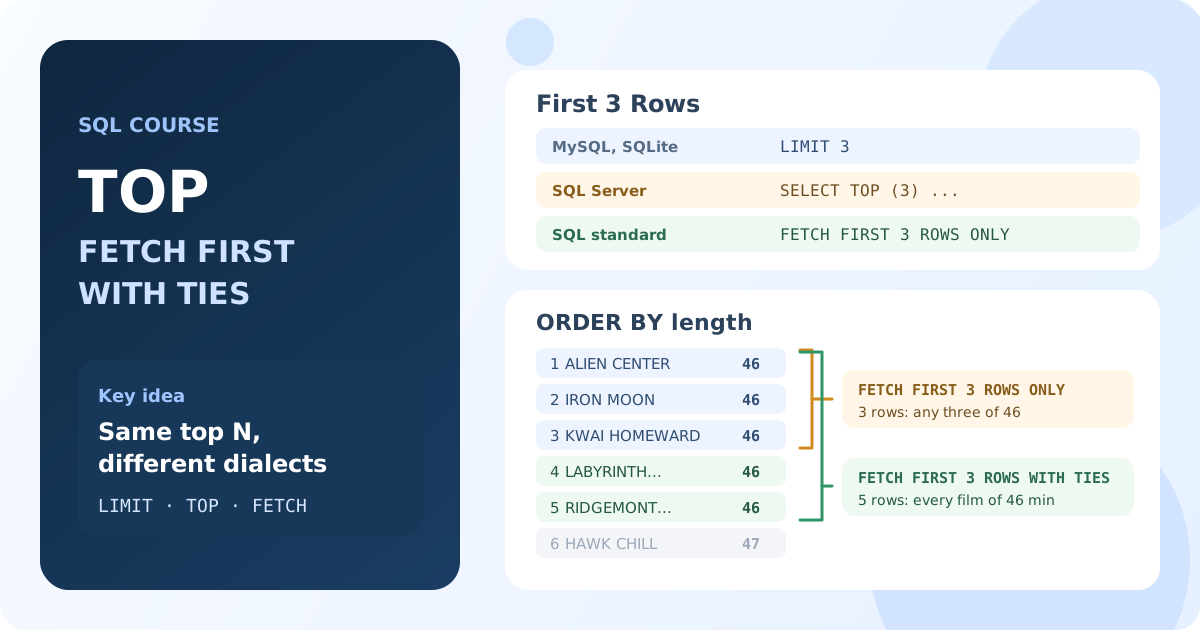
Look at the shortest films again. Five films are 46 minutes long, but FETCH FIRST 3 ROWS ONLY returns only three of them, and which three is up to the database.
WITH TIES solves this: it returns the first N rows plus all the following rows that have the same sort values as row N.
SELECT title, length
FROM film
ORDER BY length
FETCH FIRST 3 ROWS WITH TIES;
Result: 5 rows. All five 46-minute films are returned, because the third film shares its length with two more.
| Option | Rows | What you get |
|---|---|---|
FETCH FIRST 3 ROWS ONLY | 3 | any three of the five 46-minute films |
FETCH FIRST 3 ROWS WITH TIES | 5 | all five 46-minute films |
WITH TIES answers questions like "the three shortest films" honestly: no film is dropped just because it shares a value with the last one.
Rules of WITH TIES
- It requires
ORDER BY: ties are defined by the sort columns. Without a sort, PostgreSQL and MariaDB report an error. - A tie-breaker removes ties. With
ORDER BY length, titleno two rows are equal, andWITH TIESreturns exactly 3 rows. - The result can be much larger than N. The longest Sakila films are 185 minutes, and
ORDER BY length DESC FETCH FIRST 3 ROWS WITH TIESreturns 10 films.
The same query in PostgreSQL on the Bookings database finds the longest routes:
SELECT flight_no, departure_city, arrival_city, duration
FROM routes
ORDER BY duration DESC
FETCH FIRST 3 ROWS WITH TIES;
Result: 4 routes of 8 hours 50 minutes: flights between Moscow and Yuzhno-Sakhalinsk or Petropavlovsk.
WITH TIES in FETCH is supported by PostgreSQL 13+, MariaDB 10.6+ and Oracle 12c+.
SQL Server: TOP
SQL Server puts TOP right after SELECT:
SELECT TOP (3) Name, ListPrice
FROM Product
ORDER BY ListPrice DESC;
Result: three of the most expensive products in AdventureWorks.
The parentheses are optional for a number (TOP 3 works too), but recommended: with them TOP also accepts a variable or an expression, such as TOP (@n).
TOP has its own WITH TIES, and there it works with TOP only: OFFSET ... FETCH in SQL Server doesn't support WITH TIES.
SELECT TOP (3) WITH TIES Name, ListPrice
FROM Product
ORDER BY ListPrice DESC;
Result: 5 products. Five sizes of the Road-150 Red bike all cost 3578.27.
Pitfalls of TOP
TOPwithoutORDER BYis allowed, but it returns arbitrary rows, just likeLIMITwithout a sort.TOP ... WITH TIESwithoutORDER BYis an error.- SQL Server doesn't accept
FETCH FIRSTon its own:FETCHis allowed only afterOFFSET. For the first rows writeOFFSET 0 ROWS FETCH NEXT 3 ROWS ONLYor useTOP.
Returning a Percentage of Rows
Sometimes you need not 10 rows but 10% of them. SQL Server and Oracle can do this directly:
SELECT TOP (1) PERCENT Name, ListPrice
FROM Product
ORDER BY ListPrice DESC;
Result: 3 rows. 1% of 295 products is 2.95, and SQL Server rounds up.
In Oracle the standard form is used:
SELECT first_name, last_name, salary
FROM hr.employees
ORDER BY salary DESC
FETCH FIRST 5 PERCENT ROWS ONLY;
Result: 6 employees with the highest salaries: 5% of 107 is 5.35, rounded up.
DuckDB writes the percentage in LIMIT: LIMIT 10%. PostgreSQL, MariaDB and MySQL don't support percentages: there you count the rows first and calculate the number yourself.
Oracle: ROWNUM and FETCH FIRST
Before version 12c Oracle had no FETCH FIRST, and old code limits rows with the ROWNUM pseudo-column. It numbers rows as they are read, before ORDER BY is applied. That is why this query is wrong:
SELECT first_name, last_name, salary
FROM hr.employees
WHERE ROWNUM <= 3
ORDER BY salary;
Result: not the three lowest salaries, but the first three rows the database read (17000, 17000 and 24000), sorted afterwards.
To sort first, old code wraps the sorted query in a subquery and applies ROWNUM to its result:
SELECT first_name, last_name, salary
FROM (
    SELECT first_name, last_name, salary
    FROM hr.employees
    ORDER BY salary
)
WHERE ROWNUM <= 3;
Result: the three lowest salaries: 2100, 2200 and 2200.
Another trap: WHERE ROWNUM > 1 returns no rows at all. The first row gets number 1, fails the condition and is discarded; the next row becomes number 1 again, and so on.
In Oracle 12c and later simply use FETCH FIRST, including WITH TIES:
SELECT first_name, last_name, salary
FROM hr.employees
ORDER BY salary DESC
FETCH FIRST 7 ROWS WITH TIES;
Result: 8 employees: the 7th and 8th both earn 12008.
Oracle still doesn't accept LIMIT, even in version 26ai.
Firebird: FIRST, SKIP and ROWS
Firebird has two syntaxes of its own. FIRST and SKIP go right after SELECT, like TOP:
SELECT FIRST 3 SKIP 2 first_name, last_name, salary
FROM employee
ORDER BY salary DESC;
Result: employees 3 to 5 by salary: two rows are skipped and three are returned.
ROWS m TO n goes at the end of the query and takes row numbers instead of a count:
SELECT first_name, last_name, salary
FROM employee
ORDER BY salary DESC
ROWS 3 TO 5;
Result: the same employees 3 to 5. ROWS 3 alone means the first three rows.
Since Firebird 3.0 the standard OFFSET ... FETCH works too. WITH TIES is not supported, even in Firebird 5.
WITH TIES in MySQL and SQLite
MySQL and SQLite have neither FETCH nor WITH TIES, but the same result can be built from tools you'll learn later in the course. Here is a preview.
A subquery finds the value of the third row, and the outer query takes every film that is not longer:
SELECT title, length
FROM film
WHERE length <= (
    SELECT length
    FROM film
    ORDER BY length
    LIMIT 1 OFFSET 2
)
ORDER BY length, title;
Result: the same 5 films of 46 minutes as FETCH FIRST 3 ROWS WITH TIES. Subqueries are covered in Lesson 6.2.
The RANK() window function gives equal values the same rank, so rnk <= 3 keeps all ties:
SELECT title, length
FROM (
    SELECT title, length, RANK() OVER (ORDER BY length) AS rnk
    FROM film
) AS ranked
WHERE rnk <= 3
ORDER BY length, title;
Result: the same 5 films. RANK() is covered in Lesson 7.2.
Row Limiting Syntax by Database
| Database | First N rows | Skip rows | WITH TIES | Percent |
|---|---|---|---|---|
| MySQL | LIMIT n | LIMIT n OFFSET m | no | no |
| MariaDB 10.6+ | LIMIT n, FETCH FIRST n ROWS ONLY | LIMIT n OFFSET m, OFFSET m ROWS FETCH NEXT n ROWS ONLY | FETCH ... WITH TIES | no |
| PostgreSQL 13+ | LIMIT n, FETCH FIRST n ROWS ONLY | LIMIT n OFFSET m, OFFSET m ROWS FETCH NEXT n ROWS ONLY | FETCH ... WITH TIES | no |
| SQL Server | TOP (n) | OFFSET m ROWS FETCH NEXT n ROWS ONLY | TOP (n) WITH TIES | TOP (n) PERCENT |
| Oracle 12c+ | FETCH FIRST n ROWS ONLY (ROWNUM before 12c) | OFFSET m ROWS FETCH NEXT n ROWS ONLY | FETCH ... WITH TIES | FETCH FIRST n PERCENT ROWS ONLY |
| Firebird | FIRST n, ROWS n, FETCH FIRST (3.0+) | SKIP m, ROWS m TO n, OFFSET ... FETCH (3.0+) | no | no |
| SQLite | LIMIT n | LIMIT n OFFSET m | no | no |
| DuckDB | LIMIT n, FETCH FIRST n ROWS ONLY | LIMIT n OFFSET m, OFFSET ... FETCH | no | LIMIT n% |
If a query must run in several databases, the standard OFFSET ... FETCH with ORDER BY covers the most of them: everything except MySQL and SQLite. With this lesson you've finished the basics of retrieving rows; the next module shows how to transform values with SQL functions.
Key Takeaways:
FETCH FIRST n ROWS ONLYis the standard SQL alternative toLIMIT; MySQL and SQLite don't support it.OFFSET m ROWS FETCH NEXT n ROWS ONLYpages through results; in SQL Server it requiresORDER BY.WITH TIESadds the rows that share the sort values of the last row, so the result can be larger than N.- SQL Server uses
TOP (n),TOP (n) WITH TIESandTOP (n) PERCENT. - Oracle's
ROWNUMis assigned beforeORDER BY: sort in a subquery first, or useFETCH FIRSTin 12c+. - In MySQL and SQLite, build
WITH TIESwith a subquery orRANK().
Frequently Asked Questions
What is the SQL Server equivalent of LIMIT?
For the first rows use SELECT TOP (n) ...; for paging use ORDER BY ... OFFSET m ROWS FETCH NEXT n ROWS ONLY. SQL Server doesn't accept LIMIT and doesn't allow FETCH without OFFSET.
What does WITH TIES do in SQL?
It returns the first N rows plus every following row with the same values in the ORDER BY columns as row N. FETCH FIRST 3 ROWS WITH TIES can return 3, 5 or 10 rows, depending on how many rows share the third value.
Does MySQL support FETCH FIRST or WITH TIES?
No. MySQL 8 and 9 support only LIMIT. MariaDB supports FETCH FIRST ... WITH TIES since version 10.6. In MySQL, get the same result with a subquery or with RANK().
How do I limit rows in Oracle?
In Oracle 12c and later use FETCH FIRST n ROWS ONLY after ORDER BY. In older versions sort in a subquery and filter its result with WHERE ROWNUM <= n. Oracle doesn't support LIMIT.
What is the difference between FETCH FIRST and FETCH NEXT?
There is none: FIRST and NEXT are synonyms, as are ROW and ROWS. By convention FETCH FIRST is used without OFFSET and FETCH NEXT after it.