SQL Case Sensitivity in Different Databases
Lesson 1.9 · Reading time: ~9 min
SQL case sensitivity has three levels: keywords, object names and data. Keywords such as SELECT are case-insensitive in every database, but whether Customer and customer are the same table depends on the database, on quotes and sometimes even on the operating system. In this lesson you'll learn the rules of each popular database, the classic pitfall with quoted names, how string comparisons treat case, and a naming style that avoids all of these problems.
In Lesson 1.8 you saw that databases follow the SQL standard with their own dialects. Case is one of the most visible differences: a query that works in SQL Server can fail in PostgreSQL with relation "Customer" does not exist, and a query from a Windows laptop can fail on a Linux server.
Knowing the rules before you write your first queries saves hours of looking for a table that "is definitely there".
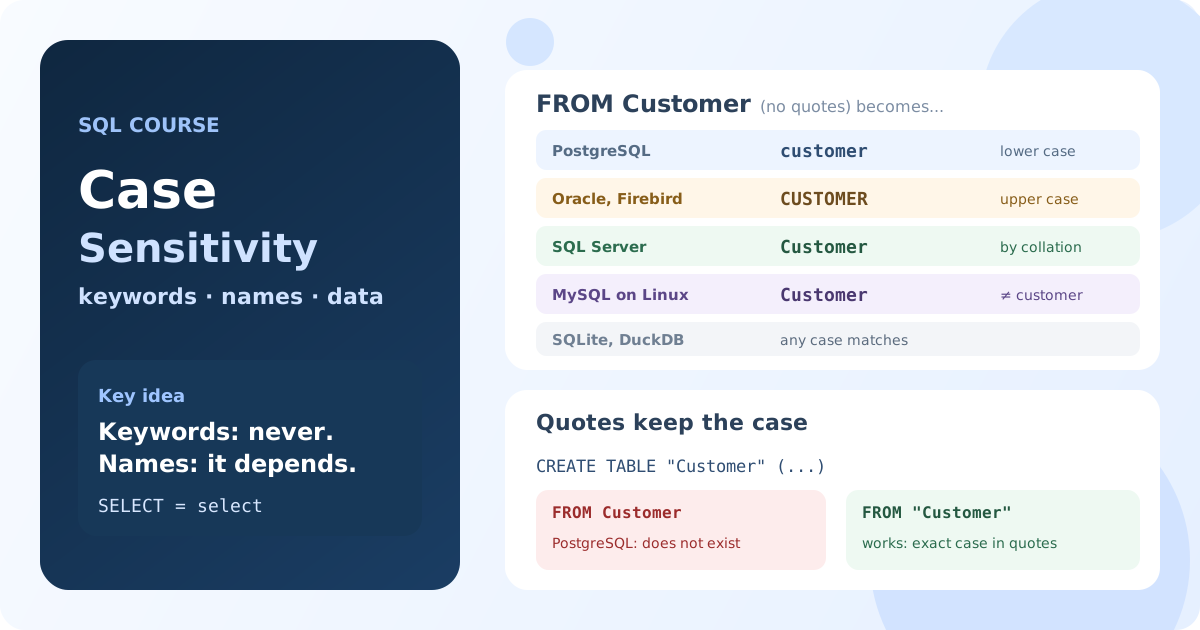
Three Levels of Case in SQL
When people ask "is SQL case sensitive?", they mean one of three different things:
- Keywords and function names:
SELECT,select,COUNT,count. - Identifiers: the names of databases, tables, columns and aliases, which you met in Lesson 1.7.
- Data: whether the string
'abc'equals'ABC'in aWHEREcondition.
Each level has its own rules, so let's take them one by one.
SQL Keywords Are Case-Insensitive
Keywords and built-in function names can be written in any case in every database:
sElEcT title
FrOm film
WhErE film_id = 1;
Result: ACADEMY DINOSAUR. MySQL, PostgreSQL, SQL Server, Oracle, Firebird and SQLite run the query in any mix of cases.
Writing keywords in UPPER CASE is only a convention: it separates the language from your table and column names and makes long queries easier to read. This course writes keywords in upper case and names in lower case, and most style guides recommend the same.
Unquoted Identifiers: Each Database Folds Names Differently
The SQL standard says that an unquoted name is converted to upper case, so customer, Customer and CUSTOMER are the same name. Databases implement this idea in different ways.
PostgreSQL: Names Become Lowercase
PostgreSQL converts every unquoted name to lower case, the opposite of the standard:
SELECT Model, AIRCRAFT_CODE
FROM Aircrafts
WHERE aircraft_code = '773';
Result: Boeing 777-300. The table is stored as aircrafts, and the column headers come back as model and aircraft_code.
Aliases are converted too: SELECT model AS TotalModel returns a column named totalmodel. The case you typed disappears as soon as the query is parsed.
Oracle and Firebird: Names Become Uppercase
Oracle and Firebird follow the standard and convert unquoted names to upper case:
select first_name, Last_Name
from Employee
where emp_no = 2;
Result in Firebird: Robert Nelson, with the headers FIRST_NAME and LAST_NAME. The same happens in Oracle with hr.Employees.
That's why tools show Oracle and Firebird table names in capitals: EMPLOYEES, EMPLOYEE.
SQL Server: the Collation Decides
SQL Server doesn't convert names at all. It keeps the case you used in CREATE TABLE and compares names using the collation of the database: the set of rules for comparing text.
The default collation, such as SQL_Latin1_General_CP1_CI_AS, is case-insensitive (CI), so these names are the same:
select name, listprice
from PRODUCT
where productid = 680;
Result: HL Road Frame - Black, 58. In AdventureWorks the headers come back as you typed them: name and listprice.
A database created with a case-sensitive collation (_CS_) treats Product and PRODUCT as different names. Such databases are rare, but they exist, so check DATABASEPROPERTYEX(DB_NAME(), 'Collation') before you assume anything.
MySQL and MariaDB: Table Names Follow the Operating System
In MySQL and MariaDB a database is a folder and a table is a file, so the case rules for databases and tables come from the file system. The lower_case_table_names setting controls them:
| Value | Default on | Table names |
|---|---|---|
0 | Linux | stored as written, compared case-sensitively |
1 | Windows | stored in lower case, compared case-insensitively |
2 | macOS | stored as written, compared case-insensitively |
The sandbox of this course runs on Linux, so the wrong case of a table name is an error:
SELECT title
FROM FILM
WHERE film_id = 1;
Result: Table 'sakila.FILM' doesn't exist. With FROM film the query works.
On Linux, Customer and customer can even be two different tables in the same database. Table aliases follow the same rule: FROM film F with WHERE f.film_id = 1 fails with Unknown column 'f.title'.
Column names, on the other hand, are case-insensitive in MySQL and MariaDB on every system: SELECT TITLE, Film_ID FROM film works.
SQLite and DuckDB: Always Case-Insensitive
SQLite and DuckDB compare names case-insensitively, even when they are quoted, and remember the case you used when you created the object:
CREATE TEMP TABLE "Customer" ("FullName" text);
INSERT INTO "Customer" VALUES ('Orlando Gee');

SELECT fullname
FROM CUSTOMER;
Result in SQLite and DuckDB: Orlando Gee under the header FullName. A second table named customer can't be created: the name is taken.
Quoted Identifiers Keep Their Case
Quotes turn a name into a quoted (delimited) identifier: the database uses it exactly as written, with its case, spaces and reserved words. The standard uses double quotes; MySQL uses backticks, and SQL Server also accepts square brackets:
| Database | Quoted name |
|---|---|
| PostgreSQL, Oracle, Firebird, SQLite, DuckDB | "Customer" |
| MySQL, MariaDB | `Customer` |
| SQL Server | [Customer] or "Customer" |
In PostgreSQL, Oracle and Firebird a quoted name is case-sensitive. That's the source of the most common case error.
The "Customer" Pitfall in PostgreSQL
Many tools, ORMs and migration scripts create tables with quoted names. Here is what happens next:
CREATE TEMP TABLE "Customer" ("CustomerID" int, "FullName" text);
INSERT INTO "Customer" VALUES (1, 'Orlando Gee');

SELECT *
FROM Customer;
Result: relation "customer" does not exist. The unquoted Customer became customer, but the table is called Customer.
Once a name was created with quotes and capital letters, every query must quote it too, with exactly the same case:
SELECT "FullName"
FROM "Customer";
Result: Orlando Gee. Without quotes, SELECT FullName fails with column "fullname" does not exist.
PostgreSQL even hints at it: Perhaps you meant to reference the column "Customer.FullName". Oracle and Firebird have the mirror problem: hr."employees" fails, because the table is stored as EMPLOYEES.
Double Quotes in MySQL Are a String
In MySQL and MariaDB double quotes are not a name at all: by default they mark a string, like single quotes:
SELECT "title"
FROM film
WHERE film_id = 1;
Result: the word title, not the film title. MySQL returns the text constant 'title' for every row.
The query doesn't fail, so the mistake is easy to miss. Use backticks for names in MySQL, or switch on the ANSI_QUOTES mode to make double quotes standard.
Case in Data: Comparing Strings
The third level is the data itself. Whether 'abc' = 'ABC' is true depends on the database and on the collation of the column:
| Database | 'abc' = 'ABC' by default | LIKE | Case-insensitive search |
|---|---|---|---|
| MySQL, MariaDB | true | case-insensitive | already by default; BINARY or a _bin collation for exact |
| SQL Server | true (CI collation) | case-insensitive | already by default; COLLATE ..._CS_AS for exact |
| PostgreSQL | false | case-sensitive | ILIKE, LOWER() |
| Oracle | false | case-sensitive | UPPER(), LOWER() |
| Firebird | false | case-sensitive | CONTAINING, UPPER() |
| SQLite | false | case-insensitive (Latin letters) | COLLATE NOCASE, LOWER() |
| DuckDB | false | case-sensitive | ILIKE, COLLATE NOCASE |
The same condition gives different results. In PostgreSQL the Bookings database has no city 'moscow':
SELECT COUNT(*)
FROM airports
WHERE city = 'moscow';
Result: 0. With WHERE lower(city) = 'moscow' or WHERE city ILIKE 'moscow' the query finds 3 Moscow airports.
In MySQL the similar query against Sakila finds the actors at once:
SELECT COUNT(*)
FROM actor
WHERE last_name = 'davis';
Result: 3, although the names are stored as DAVIS. With WHERE BINARY last_name = 'davis' the result is 0.
That's why a query moved from MySQL or SQL Server to PostgreSQL can quietly return fewer rows. When the case of the data doesn't matter, say so in the query: compare LOWER(column) with a lower-case value. Collations do much more than case: they also define sorting and accents, and they get a lesson of their own later in the course.
Case Sensitivity by Database
| Database | Unquoted names | Quoted names | 'abc' = 'ABC' |
|---|---|---|---|
| PostgreSQL | lower case | case-sensitive | false |
| Oracle | upper case | case-sensitive | false |
| Firebird | upper case | case-sensitive | false |
| SQL Server | as written, compared by collation (usually case-insensitive) | the same as unquoted | true with a CI collation |
| MySQL, MariaDB | tables and databases: depend on lower_case_table_names (case-sensitive on Linux); columns: case-insensitive | the same as unquoted | true |
| SQLite | case-insensitive | case-insensitive | false |
| DuckDB | case-insensitive | case-insensitive | false |
Keywords and function names are case-insensitive in all of them.
Naming Rules That Avoid Case Problems
You don't need to remember the whole table if you follow a few rules:
- Name tables and columns in lower case with underscores:
customer_order,total_amount. Such names mean the same in every database and never need quotes. - Don't create quoted names with capitals or spaces. If a tool created them, quote them everywhere with the exact case.
- Write each name in the same case everywhere, even where the database forgives it: a query written on Windows or SQL Server will then also work on Linux and in PostgreSQL.
- Write keywords in upper case for readability; the database doesn't care.
- For text conditions, decide whether case matters and write it down explicitly with
LOWER(),UPPER()orILIKE, instead of relying on the default collation.
More naming advice is collected in Lesson 10.1. With these rules in mind you're ready for the next module, where you start retrieving data with SELECT.
Key Takeaways:
- SQL keywords and function names are case-insensitive in every database; upper case is a style convention.
- Unquoted names are converted to lower case in PostgreSQL and to upper case in Oracle and Firebird; SQL Server compares them by the database collation.
- In MySQL and MariaDB table names are case-sensitive on Linux (
lower_case_table_names = 0), while column names are not. - A quoted name keeps its case: a table created as
"Customer"in PostgreSQL must always be written as"Customer". 'abc' = 'ABC'is true in MySQL and SQL Server by default and false in PostgreSQL, Oracle, Firebird, SQLite and DuckDB.- Lowercase
snake_casenames without quotes work the same everywhere.
Frequently Asked Questions
Is SQL case sensitive?
SQL keywords are not: SELECT and select are the same everywhere. Table and column names depend on the database: PostgreSQL, Oracle and Firebird convert unquoted names to one case, SQL Server uses the collation, and MySQL table names follow the operating system. String comparisons depend on the collation of the data.
Are table names case sensitive in MySQL?
On Linux, yes: with the default lower_case_table_names = 0, FILM and film are different tables. On Windows and macOS they are the same. Column names are case-insensitive on every system, so name tables in lower case to be safe.
Why does PostgreSQL say a relation does not exist when the table is there?
The table was most likely created with a quoted name containing capitals, such as "Customer". PostgreSQL converts the unquoted Customer in your query to customer, which is a different name. Write the name in double quotes with the exact case: FROM "Customer".
How do I make a case-insensitive search in PostgreSQL?
Use ILIKE instead of LIKE (WHERE city ILIKE 'moscow'), or compare lower-case values: WHERE lower(city) = 'moscow'. For frequent searches, an index on lower(city) makes the second variant fast.
Should SQL keywords be written in uppercase?
The database doesn't care, so it's a matter of style. Upper-case keywords and lower-case names are the most common convention, because they make the structure of a query easy to see. The important thing is to be consistent within a project.